Best Practices for Storing Call Data Safely

Protect call recordings, transcripts, and metadata using AES-256, TLS 1.3, secure key management, Zero Trust access, audit logs, retention rules, and backups.

Best Practices for Storing Call Data Safely

Protecting call data is non-negotiable. Sensitive information like call recordings, transcripts, and metadata often includes PII, PHI, or payment details, making it a prime target for breaches. Non-compliance with regulations like GDPR, HIPAA, and PCI DSS can lead to severe penalties - Meta’s €1.2 billion GDPR fine in 2023 is a stark example. Beyond fines, breaches diminish trust and cost millions in recovery.

Here’s how you can safeguard call data effectively:

  • Encrypt Data: Use AES-256 for storage and TLS 1.3 for transfer. Manage encryption keys securely with automated rotation and hardware security modules (HSMs).
  • Control Access: Implement Zero Trust policies, enforce multi-factor authentication (MFA), and apply role-based access control (RBAC) to limit permissions.
  • Monitor and Audit: Use real-time monitoring tools and maintain detailed logs to detect suspicious activity and meet compliance requirements.
  • Set Retention Policies: Follow regulations like HIPAA (6 years) and PCI DSS (1 year for logs). Use cryptographic erasure to securely delete outdated data.
  • Backup and Recovery: Adopt the 3-2-1 backup rule with regular testing to ensure data availability during disasters or attacks.
  • Choose Secure Storage: Cloud storage offers built-in encryption and compliance tools, while on-premise setups provide complete control but require more management.

Key takeaway: Combining encryption, access control, monitoring, and compliance ensures data security while maintaining customer trust. Tools like AWS and Answering Agent simplify these processes with built-in security features tailored for call centers.

What is VoIP Security + Ways to Encrypt and Secure Your Business Phone Systems

Encrypt Data at Rest and in Transit

Encryption transforms call data into unreadable code, ensuring that even if data is intercepted, it remains inaccessible. It serves as a critical line of defense against breaches.

"Data encryption at rest is a mandatory step toward data privacy, compliance, and data sovereignty." – Microsoft Azure

To safeguard call data, protection is necessary in two key states: at rest (stored on disks or servers) and in transit (while moving between systems or across networks). Unencrypted data in transit is especially vulnerable to interception, making encryption in both states essential. Equally important is managing encryption keys effectively to ensure these protocols work as intended.

Use AES-256 and TLS 1.3 Encryption

For securing data at rest, AES-256 (Advanced Encryption Standard with 256-bit keys) is the global standard. Major cloud providers like AWS, Azure, and Google Cloud rely on AES-256 to encrypt storage media.

For data in transit, TLS 1.3 (Transport Layer Security) is the recommended protocol. It protects call recordings, transcripts, and metadata as they move between phone systems, storage servers, and applications. AWS, for example, has deprecated TLS versions earlier than 1.2 as of February 2024, emphasizing the need for modern security protocols. To enhance security further, configure your servers and load balancers to require TLS 1.3 and enable HTTP Strict Transport Security (HSTS), which prevents connections from downgrading to insecure HTTP.

"Encryption helps maintain data confidentiality even when the data transits untrusted networks." – AWS Well-Architected Framework

Avoid creating custom encryption systems. Custom cryptography often lacks the necessary randomness (entropy) and may introduce vulnerabilities. Instead, use encryption tools provided by your cloud platform. These tools are developed by experts, rigorously tested, and updated regularly to counter new threats.

Effective encryption also requires robust key management practices.

Manage Encryption Keys Properly

Proper key management is crucial because if encryption keys fall into the wrong hands, all encrypted data becomes accessible. To mitigate this risk, store keys separately from encrypted data and use Hardware Security Modules (HSMs) for maximum protection. HSMs are physical devices, validated at FIPS 140-2 Level 3, designed to generate, store, and manage keys securely within a hardened environment.

Automating key rotation is another essential step. Regularly rotating keys limits the potential damage from a breach, as an old key would only expose a limited amount of data. Most cloud key management services offer automated rotation schedules, so there’s no reason to skip this step.

Separate responsibilities between those managing keys and those using them. For instance, IT administrators who create and delete keys should not have the ability to decrypt data. This segregation minimizes insider threats and ensures no single individual has complete control over the encryption process.

"Administrator roles that create and delete keys should not have the ability to use the key." – AWS Prescriptive Guidance

Lastly, enable detailed audit logging for all key operations. Every time a key is generated, used, or modified, the action should be recorded. Set up real-time alerts for suspicious activities, such as unusual decryption requests or unauthorized attempts to disable keys. These logs provide visibility, helping you detect and respond to threats before they escalate into major breaches.

Control Access with Zero Trust Policies

Encryption shields call data from outside threats, but internal risks arise when access isn’t properly managed. This is where Zero Trust Architecture steps in, operating on the principle of "never trust, always verify."

"Zero trust assumes there is no implicit trust granted to assets or user accounts based solely on their physical or network location." – NIST SP 800-207

With the average cost of a single data breach surpassing $3 million, controlling access to call recordings, transcripts, and customer metadata is a top priority. Zero Trust enforces ongoing verification by assessing a user’s identity, device health, location, and behavior before granting access. Even if an attacker compromises one account, micro-segmentation prevents them from freely moving across the network.

To implement Zero Trust effectively, focus on three key practices: limiting permissions with role-based access control, requiring multi-factor authentication, and continuously verifying every access attempt.

Apply Role-Based Access Control and Least Privilege

Adding to the concept of continuous verification, Role-Based Access Control (RBAC) strengthens internal security by assigning permissions based on job roles rather than individuals. For instance, a customer support agent might need access to recent call recordings for quality checks but should not have access to billing information or admin settings.

The Principle of Least Privilege (PoLP) takes this a step further, ensuring each role gets only the permissions necessary for specific tasks. A "default-deny" approach and regular permission reviews are essential to minimizing the risk of unauthorized access.

Require Multi-Factor Authentication

Relying on passwords alone isn’t enough to secure call data systems. Multi-Factor Authentication (MFA) adds a critical layer of protection by requiring users to verify their identity through at least two independent factors - like a password (something they know), a security key or phone (something they have), or biometric data (something they are).

Call centers are frequent targets for attacks due to their access to sensitive personal information. MFA makes it harder for attackers to exploit compromised credentials. For stronger security, consider phishing-resistant options like FIDO2 hardware security keys or biometric authenticators. Hardware keys, in particular, create a physical barrier that remote attackers can’t easily bypass.

Use Zero Trust Architecture

Zero Trust Architecture takes internal controls a step further by dynamically verifying every access request, whether it comes from inside or outside the network.

Feature Traditional Zero Trust
Trust Model Implicit trust for anyone inside the network No implicit trust; every request is verified
Access Control Broad access once authenticated Granular, per-session access to specific resources
Lateral Movement Unrestricted movement Blocked by micro-segmentation
Verification One-time static authentication Continuous context-aware verification

Zero Trust systems evaluate device posture, ensuring devices are secure and up to date. Access decisions also consider context, such as a user’s location, time of access, and behavior. For example, if a support agent typically logs in from New York during business hours, an unusual attempt from overseas at night could trigger additional verification or be denied outright.

To further reduce risks, implement Just-In-Time (JIT) access for administrative privileges. This approach grants temporary elevated permissions only when needed and automatically revokes them after use. Start by mapping out all users, devices, and applications interacting with call data. Monitoring internal "east–west" traffic can help identify unauthorized lateral movement, while replacing traditional VPNs with Zero Trust Network Access (ZTNA) allows for more precise, application-level control.

These Zero Trust strategies are essential for protecting call data and maintaining customer confidence.

Monitor Activity and Maintain Audit Logs

After implementing strict access controls and encryption, the next step in safeguarding call data is robust monitoring. Combining real-time monitoring with detailed audit logs ensures you can spot security threats as they happen and investigate incidents thoroughly afterward.

"Log management... facilitates log usage and analysis for many purposes, including identifying and investigating cybersecurity incidents, finding operational issues, and ensuring that records are stored for the required period of time." – NIST SP 800-92 Rev. 1

If a data breach occurs, audit logs act like a detailed map, showing who accessed the data, when it was accessed, and what changes were made. These logs are critical for recovery efforts and fulfilling compliance obligations like HIPAA, GDPR, and PCI DSS.

Detect Threats in Real Time

Real-time monitoring is your first line of defense against unauthorized access and suspicious activity. For instance, if someone tries to download thousands of call recordings at 3:00 AM from an unusual location, automated alerts should flag this behavior immediately.

Security Information and Event Management (SIEM) systems play a key role in identifying these threats. They centralize logs from call recording systems, network devices, and cloud services into a single dashboard, making it easier to spot complex attack patterns. Popular tools like Splunk, FireEye Helix, Google Cloud Logging, and Amazon CloudWatch help provide this unified visibility.

To make monitoring more effective, configure log-based alerting policies that distinguish between critical threats and routine events. High-priority alerts, such as multiple failed login attempts or large-scale data exports, should trigger immediate investigations. Lower-priority events can be reviewed during regular security audits. Many modern systems also use AI-driven analytics to identify anomalies and potential fraud, leveraging behavioral patterns and voice biometrics. In cloud environments, enabling services like Amazon GuardDuty or AWS Security Hub can further enhance real-time threat detection.

These monitoring efforts directly support the creation and maintenance of comprehensive audit logs.

Keep Detailed Audit Logs

Audit logs are essential for tracking call data interactions, supporting compliance, and investigating breaches. Whether regulators require proof of your data handling practices or you need to reconstruct a security incident, these logs provide valuable insights.

Focus on tracking these four types of logs:

  • Admin Activity logs: Record configuration changes and administrative actions.
  • Data Access logs: Document who viewed or modified call recordings.
  • System Event logs: Capture automated infrastructure actions.
  • Policy Denied logs: Highlight blocked access attempts that may indicate probing or brute-force attacks.

Keep in mind that many cloud platforms disable Data Access logs by default to save costs, so you may need to enable them manually.

To protect sensitive log data, apply Role-Based Access Control (RBAC), ensuring only authorized security personnel and auditors can access it. For call centers handling payment data, use automated redaction to mask credit card numbers and other sensitive details in log entries. Field-level access controls can further safeguard personally identifiable information while keeping logs useful for investigations.

Establish clear retention policies based on compliance requirements. While logs may need to be searchable for 90 days to a year for active investigations, some regulations require retention for up to seven years. For example, AWS CloudTrail offers a default 90-day retention period for management events, while Google Cloud Logging allows custom retention periods between 1 day and 3,650 days. Older logs can be moved to cost-effective archival storage solutions like Amazon S3.

Finally, ensure log integrity by using Customer-Managed Encryption Keys (CMEK) and digital signatures to prevent tampering. When incidents arise, tools like Amazon Athena, CloudWatch Logs Insights, or Google Logs Explorer can help you quickly search through large datasets.

With the global average cost of a data breach projected to reach $4.88 million in 2024, investing in strong monitoring and logging systems is not just a best practice - it’s a necessity for safeguarding customer trust and avoiding costly penalties.

Set Data Retention and Disposal Policies

Managing call data effectively means securing it, monitoring its use, and ensuring its lifecycle - storage through deletion - is handled responsibly. Keeping data longer than necessary increases the risk of breaches, while deleting it too early can lead to regulatory violations. Striking the right balance with clear retention and disposal policies ensures compliance while maintaining efficiency.

"Information disposition and sanitization decisions occur throughout the information system life cycle." – NIST Special Publication 800-88 Revision 1

Why eliminating outdated data matters: Removing unnecessary recordings reduces liability, lowers storage costs, and improves system performance. However, deleting data prematurely could result in regulatory penalties. To avoid these risks, classify call data by its sensitivity and apply retention schedules accordingly. Then, use secure methods to dispose of data in line with compliance requirements.

Use Cryptographic Erasure and Retention Schedules

Simply pressing "delete" isn’t enough to securely dispose of call data. Cryptographic erasure (CE) is a more secure option, especially for cloud-stored recordings where physical access to storage hardware isn’t possible. This method works by destroying the encryption keys that protect the data, rendering it permanently inaccessible without needing to overwrite every byte.

NIST SP 800-88 Revision 2, finalized on September 26, 2025, defines media sanitization as a process that makes accessing data on storage media infeasible, even with significant effort. The guidelines describe four main methods based on the sensitivity of the data:

  • Clear: Protects against basic recovery attempts.
  • Purge: Defends against advanced recovery techniques, such as those used in labs.
  • Destroy: Physically renders storage media unusable.
  • Cryptographic Erase: Deletes encryption keys, making the data inaccessible.

For large-scale cloud environments, cryptographic erasure is particularly effective. Instead of overwriting terabytes of data spread across multiple servers, deleting the encryption keys achieves the same result more quickly and reliably - especially when the hardware remains in use by the service provider.

Follow Retention Policy Requirements

Regulations often dictate how long call data must be retained. For instance, HIPAA requires healthcare-related call recordings to be kept for at least six years from their creation or last effective date. PCI DSS mandates that audit logs be maintained for at least one year, with three months immediately accessible for investigation. Similarly, financial firms subject to SOX must retain auditing and review documents for seven years.

Regulation Retention Period Scope
HIPAA 6 years Patient records, claims, billing
PCI DSS 1 year for logs; delete card data after processing Credit card and transaction data
SOX 7 years Financial records and audit workpapers
GDPR As long as "necessary" Personal data of EU citizens

To handle these varied requirements, involve teams from Legal, IT, and Finance when creating retention schedules. Automating deletion processes can help avoid human error - once a retention period expires, the system should archive or purge the data automatically. This automation is a key part of a checklist for implementing 24/7 AI phone answering to ensure security and efficiency. For recordings that need to be stored long-term, consider tiered storage solutions. These can move older, less frequently accessed data to more economical storage options, while keeping recent recordings on high-performance systems. Additionally, establish legal hold procedures to pause automated deletions if litigation arises.

Choose the Right Storage Architecture
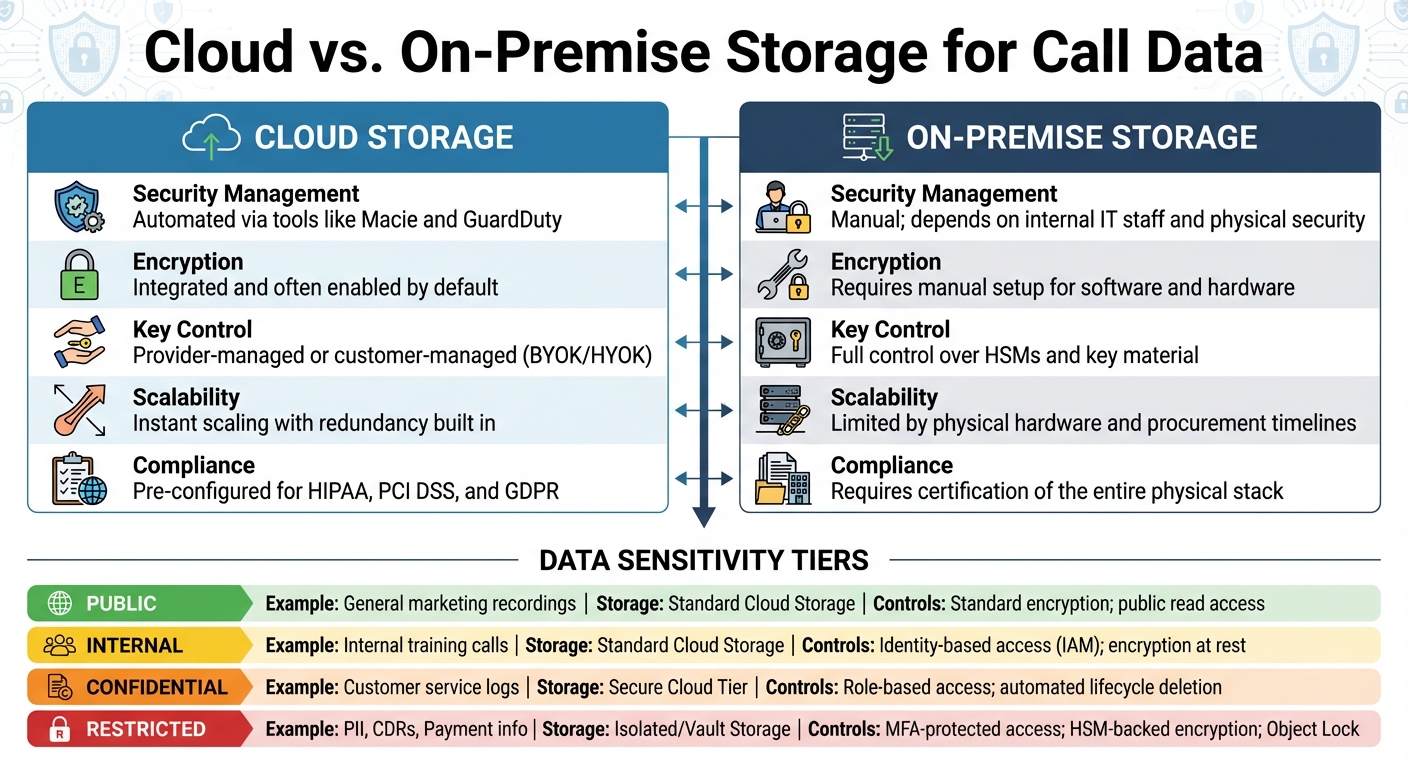
Cloud vs On-Premise Call Data Storage: Security Features and Compliance Comparison

Cloud vs On-Premise Call Data Storage: Security Features and Compliance Comparison

Your choice of storage - cloud, on-premise, or hybrid - has a direct impact on security, cost, and compliance. Start by categorizing your call data based on sensitivity. This will help you apply the most stringent security measures where they’re needed most. Afterward, weigh the strengths and weaknesses of cloud and on-premise storage options.

Cloud vs. On-Premise Storage

Cloud storage brings built-in security features that are hard to replicate in an on-premise environment. For instance, cloud platforms can automatically identify sensitive data and monitor compliance requirements. They also offer native encryption for data at rest and in transit, often using AES-256 and TLS 1.2/1.3, which many services enable by default. On the other hand, on-premise storage typically requires custom implementations, which can be more challenging to manage.

Cloud providers also make encryption key management easier with managed Key Management Services (KMS) that include automated key rotation. In contrast, on-premise setups rely on manual management of Hardware Security Modules (HSMs). Hybrid solutions, like External Key Stores (XKS), can offer a middle ground by combining local control with the efficiency of the cloud. Additionally, cloud platforms use advanced features like "Confidential Computing" (e.g., AWS Nitro System or Azure Confidential VMs) to encrypt data while it’s being processed in memory - something on-premise solutions typically lack.

The decision often boils down to control versus convenience. Cloud providers handle infrastructure security (data centers, hardware), leaving you to secure the data. On-premise storage, however, gives you full control over the entire stack but also places all security responsibilities - physical and digital - on your team. For organizations handling HIPAA-regulated call data, it’s essential to sign a Business Associate Agreement (BAA) with cloud providers, even if they only store encrypted data without access to decryption keys.

"Lacking an encryption key does not exempt a CSP from business associate status and obligations under the HIPAA Rules" – U.S. Department of Health and Human Services

Feature Cloud Storage On-Premise Storage
Security Management Automated via tools like Macie and GuardDuty Manual; depends on internal IT staff and physical security
Encryption Integrated and often enabled by default Requires manual setup for software and hardware
Key Control Provider-managed or customer-managed (BYOK/HYOK) Full control over HSMs and key material
Scalability Instant scaling with redundancy built in Limited by physical hardware and procurement timelines
Compliance Pre-configured for HIPAA, PCI DSS, and GDPR Requires certification of the entire physical stack

Once you’ve chosen your storage architecture, enhance security by aligning it with a tiered data classification system.

Use Tiered Storage Based on Sensitivity

Classify call data into tiers based on sensitivity - such as Public, Internal, Confidential, or Restricted - and align storage solutions and security measures accordingly. For instance, Call Detail Records (CDRs) and Personally Identifiable Information (PII) should be treated as highly sensitive.

For sensitive and active data, use high-security storage tiers. For older records, opt for cost-effective encrypted archives like Amazon S3 Glacier. Automate data transitions between storage tiers using tools like Amazon S3 Lifecycle or DynamoDB TTL, which can also handle secure deletion when retention policies are met. For critical call records, features like S3 Object Lock or Glacier Vault Lock can prevent accidental deletion or overwriting, ensuring compliance with retention requirements.

To simplify security management, use resource tagging. Metadata tags can classify data by sensitivity, enabling automated access controls. Machine learning tools can further enhance this process by identifying and tagging sensitive data - such as PII or payment information - within call logs. This reduces the risk of human error and ensures sensitive data stays isolated in secure environments, like separate cloud accounts or virtual private clouds.

Data Sensitivity Level Example Call Data Type Recommended Storage Tier Key Security Controls
Public General marketing recordings Standard Cloud Storage Standard encryption; public read access (if needed)
Internal Internal training calls Standard Cloud Storage Identity-based access (IAM); encryption at rest
Confidential Customer service logs Secure Cloud Tier Role-based access; automated lifecycle deletion
Restricted PII, CDRs, Payment info Isolated/Vault Storage MFA-protected access; HSM-backed encryption; Object Lock

How Answering Agent Secures Call Data

Answering Agent

Handling a high volume of calls requires tight security measures. Answering Agent ensures that every call, recording, and piece of customer data is protected from the moment of connection to long-term storage. These measures are specifically designed with service businesses in mind.

Built-In Encryption and Access Controls

Answering Agent employs industry-standard encryption and access control methods to safeguard call data. Communications during calls are encrypted using Transport Layer Security (TLS) and Secure Real-Time Transport Protocol (SRTP) to protect data in transit. Once a call concludes, recordings and logs are stored securely in Amazon S3 with AWS Key Management Service (KMS), which applies AES-256 encryption to data at rest. This setup not only ensures security but also provides a durability rate of 99.99999999999% (11 nines) for stored data.

To control access, the platform enforces Role-Based Access Control (RBAC). Each team member is assigned predefined security profiles, limiting access to only what their role requires. Additionally, Multi-Factor Authentication (MFA) is mandatory for accessing sensitive data. Call data is logically separated by account and instance IDs, and every action - such as playing back recordings - is logged using AWS CloudTrail, creating a thorough audit trail.

Support for HIPAA and PCI DSS Compliance

Answering Agent goes beyond encryption and access controls to meet stringent regulatory standards like HIPAA and PCI DSS. For payment processing, the platform supports encrypted Dual-Tone Multi-Frequency (DTMF) signaling, ensuring that sensitive credit card details are never included in call recordings. It also allows for sensitive PCI data to be removed from recordings and hidden in logs and transcriptions to maintain compliance.

For organizations regulated by HIPAA, Answering Agent encrypts sensitive customer input and provides tools for detailed compliance audits. The platform also supports S3 Object Lock, enabling Write-Once-Read-Many (WORM) storage to prevent accidental or malicious deletion of call recordings during retention periods. The infrastructure undergoes regular assessments to meet standards like SOC, PCI, HIPAA, and HITRUST CSF.

Security Feature HIPAA Support PCI DSS Support
Encryption (Rest) KMS encryption for S3 objects KMS encryption for S3 objects
Encryption (Transit) TLS and SRTP TLS and SRTP
Sensitive Input Encrypted customer input blocks Encrypted DTMF
Access Control MFA and RBAC MFA and RBAC
Data Integrity S3 Object Lock (WORM) Recording scrubbing/obfuscation
Audit Logs AWS CloudTrail AWS CloudTrail

Back Up Data and Test Recovery Systems

Alongside encryption and strict access controls, having a reliable backup and recovery plan is essential for protecting data. Even the most secure storage systems can fail due to hardware issues, ransomware attacks, or natural disasters. Regularly backing up data and testing recovery systems ensures that call data remains accessible when needed.

Use the 3-2-1 Backup Strategy

The 3-2-1 backup rule is a simple yet effective way to safeguard call data against multiple types of failures. Here’s how it works:

  • Keep three copies of your data: the original file and two backups.
  • Store these backups on two different types of media - for example, cloud storage and an external hard drive.
  • Ensure at least one copy is kept off-site, protecting it from local disasters like fire or flooding.

This approach ensures that even if one backup is lost to hardware failure and another to a ransomware attack, the off-site copy will still be available. For added protection, the updated 3-2-1-1-0 rule includes one immutable (unchangeable) backup and emphasizes the importance of zero errors through regular testing.

"The added '1-0' emphasizes what 3-2-1 alone doesn't guarantee: that you have a ransomware-resistant copy and that your backups are validated and recoverable when you actually need them." - Adam Preeo, Vice President of Product Management for Data Protection, ConnectWise

To make your backup strategy even more effective, define your Recovery Point Objective (RPO) and Recovery Time Objective (RTO). RPO measures how much data loss is acceptable in terms of time (e.g., one hour or one day), while RTO defines how quickly systems must be restored after a failure. For critical call data, you may need hourly or near-real-time backups, while less important information might only require daily backups.

Once backups are in place, the next step is to ensure they work when you need them most.

Test Backups and Document Everything

Setting up backups is just the beginning - regular testing and thorough documentation are crucial for ensuring a smooth recovery process. Schedule quarterly recovery drills to practice restoring data, and use automated monitoring tools to keep an eye on backup integrity and performance. These tools can detect file changes, trigger new backups, and send alerts if something goes wrong, like a failed backup or insufficient storage space. The "zero errors" aspect of the 3-2-1-1-0 rule relies on continuous validation through integrity checks and automated testing.

Clear documentation is also critical. Maintain detailed records of your backup configurations, recovery procedures, success rates, and any trends you observe. This not only helps your team respond effectively during a crisis but also ensures compliance with regulations like HIPAA and PCI DSS. Well-documented procedures mean that any team member can step in and handle recovery operations if needed.

To further protect your backups, encrypt them using AES-256 encryption for both storage and transit. Implement multi-factor authentication (MFA) and role-based access control (RBAC) for sensitive backup tasks, such as deleting or modifying retention policies. These measures are especially important given that 89% of ransomware attacks now involve data theft and "double extortion" tactics. By layering these security measures, you’ll strengthen the integrity of your backup systems and better protect your data.

Conclusion

Safeguarding call data requires a multi-layered approach: encryption, controlled access, continuous monitoring, and adherence to regulations. Use AES-256 encryption for data at rest and TLS 1.3 for data in transit to ensure intercepted recordings remain unreadable. Strengthen security with Role-Based Access Control (RBAC), Multi-Factor Authentication (MFA), and Zero Trust Architecture, limiting access strictly to authorized individuals and reducing risks from insider threats or social engineering.

To complement these core measures, real-time monitoring and comprehensive audit logs play a critical role in detecting and addressing suspicious activity before it leads to a breach. Establish clear data retention policies with automated lifecycle management to stay compliant while keeping storage costs in check. Regular backups following the 3-2-1 strategy and frequent recovery drills ensure your operations can withstand cyberattacks or system failures.

"Failure to safeguard customer data can lead to regulatory fines, reputational damage, and financial losses." - Compliance for Call Centers

For businesses managing large volumes of customer calls, Answering Agent offers centralized authentication, end-to-end encryption, and machine-readable audit logs. These features not only reduce human error but also simplify compliance checks during audits. With 90% of financial industry respondents reporting a rise in fraud targeting call centers since 2022, investing in a strong security framework is no longer optional - it’s essential for protecting sensitive data and preserving customer trust.

FAQs

What is Zero Trust Architecture, and how does it protect call data?

Zero Trust Architecture (ZTA) is a security framework designed to keep call data secure by continuously verifying every user, device, and access request - no matter their location. At its core is the principle of "never trust, always verify", meaning access is granted only after thorough validation.

ZTA bolsters security using measures like multi-factor authentication (MFA), role-based access control (RBAC), and encryption to protect data both at rest and in transit. It also employs real-time monitoring to identify and address suspicious activity, ensuring sensitive call data stays safe and private. This vigilant approach significantly reduces risks and strengthens data protection for service-based industries.

What are the main advantages of using cloud storage for call data instead of on-premise solutions?

Using cloud storage for call data comes with several important benefits. For starters, it ensures strong security measures, such as encryption and access controls, to keep sensitive information safe from unauthorized access.

Another advantage is its flexibility to grow with your needs. As your data storage demands increase, cloud solutions let you expand effortlessly, without investing in expensive hardware upgrades.

On top of that, cloud storage makes data management and regulatory compliance much simpler. Many providers already follow strict industry standards, helping businesses stay on top of legal and security requirements while keeping their operations running smoothly.

What is cryptographic erasure, and why is it essential for secure data disposal?

Cryptographic erasure is a secure way to dispose of data by encrypting it and then deleting the encryption keys. Once the keys are gone, the encrypted data becomes completely unreadable, effectively protecting sensitive information.

This method plays a crucial role in preserving confidentiality, particularly when dealing with sensitive records like customer call data. It offers a dependable solution for protecting information while adhering to strict security and compliance requirements.

Related Blog Posts

Answering Agent