How To Measure Lead Conversion From Calls
Phone calls are one of the highest-converting lead sources, yet many businesses fail to track them effectively. Without proper tracking, you risk losing valuable insights and revenue. Here's what you need to know:
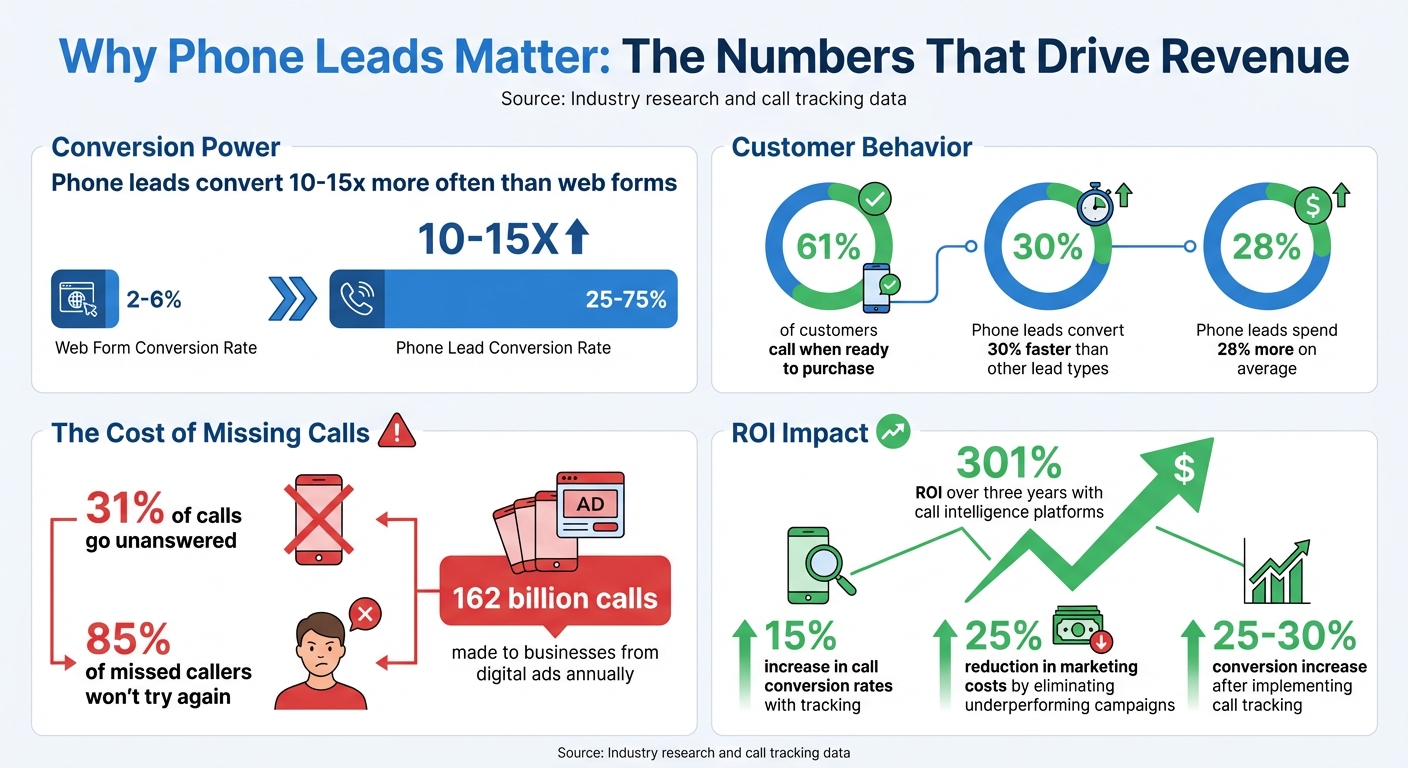
- Phone leads convert 10–15x more often than web forms.
- 31% of calls go unanswered, and 85% of missed callers won’t try again.
- Using call tracking tools like Answering Agent can increase conversion rates by 15% and reduce marketing costs by 25%.
To measure call conversions, follow these steps:
- Track total calls and define what counts as a conversion (e.g., sales, bookings).
- Use tools to separate qualified leads from irrelevant calls.
- Monitor post-call actions like appointments or purchases.
- Calculate your conversion rate:
(Converted Leads ÷ Total Qualified Leads) × 100
Call tracking not only identifies high-performing campaigns but also helps fix operational issues like missed calls or long hold times. Businesses leveraging this data have seen a 301% ROI over three years. By implementing AI tools and optimizing call scripts, you can ensure every call counts toward your bottom line.
Phone Lead Conversion Statistics and ROI Impact
Google Ads Phone Call Conversion Tracking 2023 - Track Phone Calls From Your Website

Why You Need to Measure Call Conversion Rates
Measuring call conversion rates is crucial for spotting revenue leaks. It helps you figure out whether the problem lies with underperforming marketing campaigns or operational issues like missed calls or poor handling. Every missed call represents a lost opportunity to generate revenue.
The numbers don’t lie - inefficient call-handling practices cost businesses billions annually. On the flip side, companies using call intelligence platforms have seen a 301% return on investment over three years. For U.S. businesses, tracking call conversions is essential. Without it, it’s nearly impossible to separate high-value leads from low-intent inquiries. This process not only uncovers revenue gaps but also lays the groundwork for improving your call management systems.
"The absolute, non-negotiable foundation of turning calls into revenue is call tracking. Without it, you are flying blind." - Concoctions.AI
Tracking these metrics allows you to identify which campaigns attract high-intent callers. With this insight, you can reallocate marketing budgets for better results. Businesses that adopt call tracking often see a 15% boost in call conversion rates and cut marketing costs by 25% by eliminating underperforming campaigns. Plus, it helps pinpoint operational issues - like long hold times or undertrained staff - that could be hurting your conversions .
How to Calculate Call Conversion Rates
Calculating your call conversion rate is simple:
(Converted calls ÷ Total calls) × 100.
For example, if you received 200 calls last month and 50 of them resulted in bookings or sales, your conversion rate would be:
(50 ÷ 200) × 100 = 25%.
The tricky part is defining what qualifies as a "converted call." For most businesses, this includes completed sales, booked appointments, or signed contracts. To filter out irrelevant calls - like spam or quick inquiries - set a minimum call duration, typically between 60 to 90 seconds . For instance, a 30-second call where someone asks for your business hours wouldn’t count as a lead, but a three-minute conversation about pricing and availability would.
Break down your tracking into three key metrics:
- Total inbound calls
- Qualified leads (calls that meet your duration threshold)
- Actual conversions (qualified leads that turn into customers)
This breakdown helps identify exactly where potential customers drop off in your sales funnel.
Why Phone Leads Convert Better
Phone calls often signal high-intent prospects who are ready to buy. While web form leads typically convert at a rate of 2–6%, phone leads boast a much higher conversion rate of 25–75%.
"Phone call leads turn into sales 10x more often than form-fill or chat leads." - Mac Mischke, Content Marketing Manager, WhatConverts
Moreover, 61% of customers pick up the phone when they’re ready to make a purchase. These callers convert 30% faster than other types of leads and tend to spend 28% more. For service-based industries - like contractors, medical offices, or professional services - phone calls allow businesses to qualify leads, handle objections, and build relationships instantly. That’s something a web form or chatbot just can’t replicate.
Here’s a real-world example: A Texas resort running Google Ads for golf-related keywords initially saw few hotel bookings through web forms. By analyzing phone call conversions, they discovered that customers were calling to book tee times first and then reserving rooms over the phone. This insight proved the campaign’s effectiveness and prevented the resort from scrapping a profitable ad strategy.
How to Set Up Call Tracking with Answering Agent
Now that you know why precise call tracking is a game-changer, let’s dive into how you can get started with Answering Agent. The setup is quick - under five minutes - and doesn’t require any technical skills. Answering Agent integrates directly with your current phone system, capturing all the data you need to track lead conversions effectively. Plus, it works smoothly with your existing tools, making the process hassle-free.
Connecting Answering Agent to Your Phone System
Start by creating a local or toll-free tracking number in the Answering Agent dashboard. This tracking number will forward calls to your existing business line (your destination number). To ensure calls are routed correctly, format the destination number with the country code and no spaces.
If you want to track online marketing efforts, install the Dynamic Number Insertion (DNI) JavaScript snippet on your website. This snippet automatically updates the displayed phone number based on where the visitor came from - Google Ads, organic search, social media, etc. - giving you up to 98% attribution accuracy.
Need to keep your current business number? No problem. You can port it over by submitting provider details and a Letter of Authorization (LOA) for a smooth transition. Answering Agent also syncs directly with CRMs like Salesforce and HubSpot, so your call data and conversion metrics will update automatically.
Want to give your team an edge? Enable call whispering. This feature plays a quick, private message (up to 100 characters) to your team before they answer, providing context about the lead’s source. To keep your data clean, you can also activate the Press-1 filter, which blocks spam and robocalls.
Creating Scripts for Lead Qualification
Once your system is connected, it’s time to create scripts that qualify leads effectively. Use the VoiceAI Agent feature to introduce an AI assistant that can answer, qualify, and route calls 24/7. To ensure the AI aligns with your brand, train it by uploading your company’s materials, product guides, and knowledge base.
Design conversation flows that include friendly greetings, interactive menus, and tailored qualification questions. For instance, if you’re a contractor, your script might ask about project timelines, budgets, or property addresses. You can also program the AI to take specific actions based on responses, like scheduling appointments, updating CRM records, or directing high-value leads to your top sales rep.
Want to improve transcription accuracy? Add phrase hints for industry-specific terms, brand names, or technical jargon. Additionally, set up a post-call IVR (Interactive Voice Response) so your team can quickly tag the outcome of a call by pressing a button (e.g., 1 for a sale, 2 for a potential lead). This manual tagging works hand-in-hand with the AI’s automated lead scoring, giving you full control over your conversion data.
Jon Ostenson, CEO of 10Xfive, leveraged similar call tracking and qualification tools to manage around 170,000 outbound and 70,000 inbound calls annually for a major client. The result? A conversion rate of nearly 85%, far exceeding the industry average of 50%.
sbb-itb-abfc69c
How to Measure Lead Conversion from Calls
Once your call tracking system is up and running, it's time to measure how effectively those calls are turning into actual leads. The goal here is to sift through the raw call data and focus on real opportunities. Or, as Michael Cooney, Co-founder of WhatConverts, explains:
"Clients may not always understand how conversions fuel revenue, but they can understand how quotable leads drive sales".
Step 1: Define Your Timeframe and Conversion Goals
Start by picking a consistent timeframe for measurement - monthly or quarterly often works best for spotting trends. Next, clearly define what counts as a conversion for your business. For example, is it a booked appointment, a request for a quote, or an actual sale? The definition will vary depending on your industry.
For instance:
- A home services contractor might count any call leading to a scheduled on-site estimate as a conversion.
- A medical practice might focus on calls that result in scheduled consultations.
To avoid wasting time on non-serious inquiries, consider setting a minimum call duration, such as three minutes or more. Shorter calls rarely lead to meaningful business outcomes.
Once your goals are clear, you can start analyzing your call data.
Step 2: Separate Total Calls from Qualified Leads
Your Answering Agent dashboard will show the total number of inbound calls, but not all of them will be worth pursuing. Raw call numbers often include spam, wrong numbers, or solicitors. This is where AI Analysis comes in handy - it can quickly evaluate calls based on intent, keywords, sentiment, and whether they are "sales-related" or "quotable".
Matt Tomkin from Tao Digital highlights the value of this feature:
"By a long shot, our favorite feature is the AI Analysis. It provides a lead/call summary within seconds. Plus, it pulls out keywords, sentiment analysis, whether a call is sales-related, negative, quotable, etc."
This automated process saves hours of manual work and ensures you're focusing only on genuine opportunities.
Step 3: Monitor Post-Call Actions
The next step is tracking what happens after the call. Did the lead schedule an appointment, request a quote, or make a purchase? Using Answering Agent's CRM integrations with tools like Salesforce or HubSpot, you can follow a lead's journey from the initial call to the final transaction.
AI-generated call transcripts and summaries can also provide valuable insights. For example:
- Are certain objections or questions coming up frequently?
- Do high-value leads tend to mention specific challenges or needs?
These patterns can reveal what drives conversions and where potential customers might be dropping off .
Step 4: Calculate Your Conversion Rate
Finally, calculate your conversion rate using this formula: (Converted Leads ÷ Total Qualified Leads) × 100. Tracking this metric over time can help you identify trends. For example:
- Are certain marketing channels delivering higher conversion rates?
- Does tweaking your call scripts lead to better results?
A simple comparison table in your reporting dashboard can make it easy to spot these trends. Considering that 162 billion calls are made to businesses from digital ads each year, even small improvements in your conversion rate can have a big impact on your bottom line.
How to Analyze and Improve Your Conversion Rates
Once you've established your conversion rates, it's time to dig deeper into your call data to find opportunities for improvement. By breaking your data into segments, you can uncover patterns and trends that highlight both strengths and areas needing attention. Here's how to approach it.
Breaking Down Data by Segment
Segmenting your call data allows you to identify which channels are performing well and which need adjustment. Start by looking at conversion rates by channel. This analysis can guide you in reallocating your marketing budget to focus on the channels driving the best results. As John Thornton from Black Propeller puts it:
"Once we integrate call tracking into our client's marketing campaigns, they can generally expect to see conversions increase by 25 to 30 percent."
Time-based segmentation is another valuable tool. By identifying when your highest-quality calls come in, you can optimize staffing or adjust your ad spend to align with peak times. For instance, if you're running ads during hours when no one is available to answer, you could be missing out on valuable leads. Similarly, geographic segmentation can help you route calls to the nearest location or identify regions where your messaging is most effective.
Call duration patterns also offer insights. While short calls are often filtered out, comparing the length of converted versus non-converted calls can reveal whether your team is spending too much time on low-value leads or rushing through high-potential ones. Aaron Gahn from AgencyAnalytics notes:
"Call duration is an excellent metric to gauge customer engagement based on the length of phone conversations."
With these segmented insights, you can refine your processes and scripts to convert more leads.
Improving Your AI Scripts
Leverage call data insights to refine your Answering Agent scripts. Start with AI-powered keyword analysis to identify recurring phrases in successful conversions - such as "pricing", "appointment", or "cancel." Incorporate these topics into your scripts proactively instead of waiting for callers to bring them up.
Sentiment analysis is another powerful tool. If your data shows that callers often get frustrated at a particular point in the conversation, that section needs reworking. Experiment with alternative tones, using collaborative language like "we" and "our" to build trust and foster engagement.
A/B testing can also help fine-tune your scripts. For example, try two different opening lines for appointment scheduling calls and track which one leads to more bookings. Small tweaks - like asking discovery questions earlier or improving how objections are handled - can make a measurable difference in your conversion rates.
Conclusion
Tracking lead conversion from calls can be broken down into four straightforward steps: set your timeframe and define conversion criteria, count the total calls and identify qualified leads, monitor which leads convert, and calculate your conversion rate. Once you’ve got that baseline, dive deeper by segmenting your data by channel, time, and geography. This helps you pinpoint what’s working and what needs improvement. Use these findings to fine-tune your scripts and processes for better results.
One of the biggest hurdles businesses face is losing leads due to missed calls. On average, small and medium-sized enterprises fail to answer 31% of their inbound calls, and 85% of those potential customers won’t try calling again. That’s lost revenue before you even have the chance to make your pitch.
To tackle this issue, Answering Agent ensures you never miss a call. Operating 24/7, it uses your custom scripts to qualify leads, syncs conversion data directly to your CRM, and handles unlimited calls at once. It also books appointments instantly and provides AI-generated transcripts and sentiment analysis, eliminating the need for manual input and reducing errors. Setup takes less than 15 minutes, and with pricing starting at around $300 per month, it’s an affordable way to ensure every lead gets the attention it deserves.
FAQs
How can call tracking tools help boost my lead conversion rates?
Call tracking tools are a game-changer when it comes to improving lead conversion rates. They provide detailed insights into which marketing campaigns, ads, or keywords are driving customer calls. This means you can pinpoint the channels that work best and allocate your marketing budget more effectively.
Many of these tools come packed with features like call transcription, sentiment analysis, and lead scoring. These features give you a clearer picture of customer intent, helping you focus on high-quality leads. When you integrate this data into your sales and marketing strategies, you can streamline follow-ups, cut down on wasted ad spend, and turn more phone calls into actual sales.
In short, call tracking tools take raw call data and turn it into actionable insights. This allows you to make smarter decisions and get a better return on your investment.
What metrics should I track to measure lead conversions from phone calls?
To gauge how effectively phone calls are converting into leads, it’s essential to monitor a few key metrics. Start with the conversion rate - this tells you what percentage of calls turn into successful leads or sales. Another important metric is call duration; longer conversations often suggest deeper engagement with potential customers. Keep an eye on the call source as well, so you can pinpoint which marketing channels are generating the most valuable calls. Don’t forget to track call outcomes, such as scheduled appointments or finalized sales, and measure revenue per call to see the direct financial impact of these interactions. By diving into these metrics, you’ll be better equipped to refine your approach and get the most out of every customer call.
How can AI improve lead qualification from phone calls?
AI transforms how businesses handle lead qualification during phone calls by automating repetitive tasks like capturing data, transcribing conversations, and analyzing interactions. It can assess conversations in real-time, gauge customer sentiment, and rank leads based on their level of engagement and intent. This makes it easier for businesses to pinpoint high-value leads and respond promptly.
It also improves call attribution by connecting phone calls to specific marketing campaigns, offering clear insights into which channels generate the most promising leads. Features like automated call summaries, seamless CRM updates, and efficient workflow routing cut down on manual work, reduce the risk of missed opportunities, and support smarter decision-making. By enhancing accuracy and streamlining processes, AI helps boost lead conversion rates while making better use of resources.
Related Blog Posts
Related Articles
Best Practices for Storing Call Data Safely
Protect call recordings, transcripts, and metadata using AES-256, TLS 1.3, secure key management, Zero Trust access, audit logs, retention rules, and backups.
Common CRM Sync Issues and Fixes
Learn how to tackle common CRM sync issues, improve data quality, and enhance customer satisfaction with effective strategies and tools.
ROI of CRM Integration for Field Service Scheduling
How integrating CRM with field service scheduling cuts travel and overtime, raises first-time fixes and revenue, and boosts efficiency with AI phone answering.