
AI call routing is transforming how medical practices handle patient communication. By integrating with medical CRMs, these systems manage high call volumes, automate routine tasks, and ensure patient data is updated in real-time - all while maintaining HIPAA compliance. This reduces missed calls, improves patient satisfaction, and saves practices significant time and revenue.
Key Points:
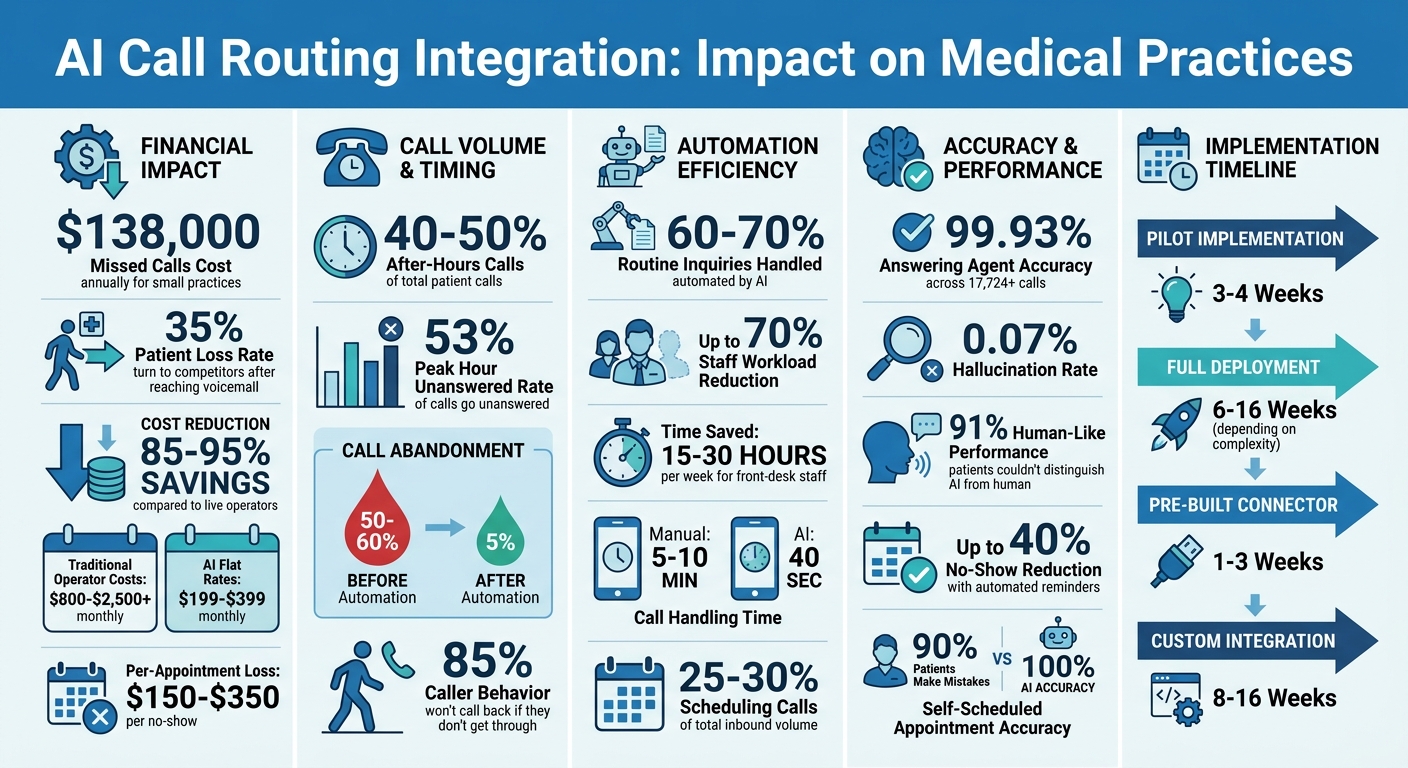
- Missed Calls Cost: Small practices lose an average of $138,000 annually due to unanswered calls, with 35% of patients turning to competitors.
- After-Hours Calls: 40–50% of patient calls occur outside office hours.
- Automation Benefits: AI handles 60–70% of routine inquiries, reducing staff workload by up to 70%.
- CRM Integration: AI systems sync with CRMs to pull patient records, schedule appointments, and log call details in seconds.
- Real-Time Updates: Bidirectional data flow ensures instant updates to patient charts, eliminating manual data entry errors.
With 24/7 availability, AI systems like Answering Agent provide accurate, human-like call handling, cutting costs by 85–95% compared to live operators. Practices regain revenue, improve efficiency, and deliver faster, personalized care to patients.
AI Call Routing ROI: Cost Savings and Revenue Recovery for Medical Practices
Route Inbound Calls to 50+ Locations with One AI Voice Agent - Synthflow Phone Book Tutorial
sbb-itb-abfc69c
Selecting a Medical CRM for AI Integration
Not all medical CRMs are designed to handle the complexities of AI call routing. Choosing the right platform can mean the difference between a seamless workflow and a chaotic mess. A suitable CRM should support real-time data exchange, adhere to HIPAA regulations, and grow alongside your practice.
"Medical practices are the hardest voice AI buyers to serve because the stakes are specific: a mishandled symptom call is a safety issue, a broken EHR integration is a workflow catastrophe, and a non-compliant recording is a federal penalty".
When selecting a CRM, look for platforms offering native API integrations with latency under 500ms. Middleware tools like Zapier may introduce delays, which can disrupt your operations. Below are examples of CRMs that integrate effectively with AI call routing systems.
Common Medical CRMs That Support Integration
For larger practices or multi-location groups, platforms like Salesforce Health Cloud, Epic Systems, Cerner, and Athenahealth are top choices. These CRMs provide strong API support, handle intricate patient data, and manage real-time scheduling and insurance verification. Epic and Cerner particularly excel in clinical data access and integrating patient portals.
Smaller and mid-sized practices can benefit from user-friendly systems like HubSpot, DrChrono, Kareo, and AdvancedMD. These platforms allow AI systems to perform tasks such as creating contacts, logging calls, and booking appointments instantly - avoiding the 5–30 second delays often experienced with middleware solutions. Specialty-specific CRMs like SimplePractice (for mental health) and Dentrix (for dental) are tailored to unique workflows, making them ideal for niche practices.
While compatibility is crucial, the CRM must also meet specific technical and compliance requirements.
Required Features in a Medical CRM
A strong CRM starts with robust API and integration capabilities. Look for platforms that enable seamless two-way data flow, allowing your AI to function as an integrated team member. For example, AI should be able to access provider schedules and log call summaries directly into patient records.
HIPAA compliance is non-negotiable. Ensure the CRM provider can sign a Business Associate Agreement (BAA) that covers API use, call recordings, and data storage. Ask for a detailed architecture diagram to confirm how Protected Health Information (PHI) flows through the system and that encryption standards like TLS 1.3 or higher are in place.
Additionally, prioritize no-code customization features. These allow your staff to adjust protocols, appointment types, and escalation rules without needing technical support. Advanced reporting tools are equally important - dashboards that track metrics like call volume, appointment conversions, and no-show rates can provide actionable insights. These analytics are essential for determining whether your AI integration is solving key challenges, such as the $138,000 annual revenue loss small practices face due to missed calls38,000 annual revenue loss small practices face due to missed calls.
How to Integrate AI Call Routing with Medical CRMs
Integrating AI call routing with your medical CRM can be straightforward when broken into clear steps. The process doesn’t need to disrupt your practice if you plan carefully and test thoroughly. Pilot implementations usually take 3 to 4 weeks, while full-scale deployments can range from 6 to 16 weeks, depending on complexity.
Step 1: Review Your Current Systems and Needs
Start by auditing your current phone system. Look for inefficiencies in IVR (Interactive Voice Response) menus and identify peak call times. Review hourly call volumes and pinpoint where callers tend to drop off. For example, one practice uncovered a staggering 50–60% abandonment rate before introducing automation. Use your CRM reports to understand common call purposes - such as appointment scheduling or prescription refills - and prioritize testing those workflows.
Check if your phone system supports SIP (Session Initiation Protocol), as this is often required for AI integration. Document your existing call-handling processes, focusing on how urgent calls are routed versus routine inquiries. This baseline will help you measure improvements later.
Step 2: Choose and Set Up Your AI Call Routing Platform
Select an AI platform that aligns with your technical and compliance needs. Answering Agent, for example, offers 99.93% accuracy across thousands of scored calls and can handle unlimited simultaneous calls, making it ideal for peak-hour bottlenecks. It operates 24/7 with a natural, human-like voice and integrates directly with most medical CRMs.
Before processing patient data, make sure the vendor signs a Business Associate Agreement (BAA) and uses AES-256 encryption for stored data and TLS 1.2 or higher for data in transit to meet HIPAA standards. Confirm that the vendor’s agreements with LLM (Large Language Model) providers prevent indefinite storage or training on your conversation data.
Fine-tune the AI’s response time to under 800ms for a natural conversational flow - responses that are too slow or too fast can disrupt interactions. For accurate pronunciation, use phonetic spelling in scripts, especially for complex medical terms or your practice’s name.
Step 3: Connect and Sync CRM Data
Map the data fields between your AI platform and CRM. For instance, sync the AI’s "Caller Name" field with the CRM’s "Contact Name" field. Set up intent triggers so keywords like "cancel" or "emergency" prompt specific routing actions. Enable real-time access to provider schedules so the AI can book appointments directly, reducing staff workload.
The table below illustrates different integration levels and their impact on staff:
Integration Level What It Does Staff Impact No integration AI takes messages; staff enters data manually Adds work for staff Basic (one-way) AI sends appointment requests to a queue Staff reviews and confirms Standard (read + write) AI reads schedule and books directly Staff monitors, no manual entry Advanced (bidirectional) AI reads schedules, books, identifies patients, updates records Minimal staff involvement
For smarter call routing, configure the system to direct calls to the "Contact Owner" in your CRM (e.g., in platforms like HubSpot or Salesforce). Use triage logic so that if a caller mentions urgent terms like "chest pain", the system immediately routes the call to clinical staff or emergency services. While the AI doesn’t diagnose, it can recognize critical keywords and act accordingly.
Step 4: Test and Refine the Integration
Begin testing during off-peak hours, such as nights or weekends, to gauge performance without disrupting regular operations. Simulate a variety of patient scenarios - like calls from new patients or elderly individuals - to ensure the system handles diverse situations effectively. Test edge cases, such as noisy environments or incomplete information, to verify fallback mechanisms.
Set up backup routing and test failover scenarios to avoid dropped calls if the primary system fails. Use real-time dashboards to monitor metrics like missed call rates and AI-handled call percentages, helping you catch and resolve issues early. After launch, review at least five random calls each month to identify areas for improvement, such as unfamiliar terminology or misrouted calls.
"90% of self-scheduled patients make mistakes. But the EliseAI appointments? They're all perfect".
Always provide an option for callers to reach a live person during emergencies. Studies show that 85% of callers who don’t get through won’t call back. With proper testing, automation can significantly reduce abandonment rates - from 50–60% down to just 5%.
Features Enabled by AI Call Routing Integration
AI call routing integration takes patient communication to the next level by enabling a real-time exchange of information between calls and CRM systems. This seamless flow allows data from calls to be logged as tasks or notes in the CRM, while CRM records guide and personalize each interaction during the call. With bidirectional syncing, manual documentation gaps are eliminated as call data is automatically transferred into patient records.
Instant Access to Patient Data
The system identifies callers using details like their phone number or date of birth, instantly pulling up their full patient chart. This means both the AI system and staff can immediately access key details such as demographics, insurance information, appointment history, and clinical records as soon as the call starts. Patients no longer have to repeat their medical history or endure long hold times while staff search for their files.
This instant access significantly cuts down call handling times. For example, manual scheduling calls typically take 5–10 minutes, but AI-powered self-scheduling can wrap up in under 40 seconds. Patients receive tailored guidance based on their actual records. For instance, the AI can address a billing issue by referencing the patient’s specific insurance policy rather than relying on a generic script.
With this quick data retrieval in place, the next focus is on ensuring accurate documentation of every interaction.
Automatic Call Logging and Summaries
AI systems generate structured chart notes in just 30 seconds and automatically update patient records. These notes follow clinical formats like SOAP, capturing every detail without requiring manual input. This process ensures a seamless connection between the call, structured data, and the EHR task.
"A system that answers calls but doesn't write to your EHR is just a more expensive voicemail".
By automating documentation, nursing staff can shift their focus from answering phones to providing bedside care, a crucial operational improvement for practices managing heavy call volumes.
Smart Call Routing Based on Patient Information
Calls are categorized - such as for refills, urgent symptoms, or billing - and routed based on their urgency and specialty. For example, the AI can detect high-priority keywords like "chest pain" and immediately escalate the call to a provider or emergency services. This intelligent triage ensures that urgent medical needs are addressed quickly, while routine inquiries are handled efficiently.
Specialty practices can customize the AI to prioritize scheduling for specific needs, such as surgical cases or prescription refills for primary care and psychiatry. This tailored approach aligns with the unique call patterns of each practice, whether they’re appointment-heavy or focused on medication management.
Feature Impact on Patient Care Impact on Practice Efficiency Instant Chart Access Personalized interactions; no repeated history Reduces call handling time; improves accuracy Auto-Call Logging Ensures all clinical details are recorded Eliminates manual data entry; reduces errors Smart Routing Faster response for urgent medical needs Reduces call transfers and "phone tag" Self-Scheduling 24/7 appointment booking or changes Lowers no-shows and front-desk call volume
Beyond handling urgent needs, AI integration simplifies routine scheduling tasks as well.
Appointment Scheduling and Management
AI systems access real-time calendar availability to book, reschedule, or cancel appointments directly within the CRM - no human intervention required. Patients can self-schedule at any time, bypassing the need to log into a portal or wait for office hours. The system matches caller details to existing records and offers personalized scheduling options based on their provider and appointment history.
This automation tackles a major challenge: appointment scheduling and rescheduling account for 25–30% of inbound call volume at most medical practices. By automating these tasks, AI can reduce the front desk’s phone workload by up to 70%. Missed calls cost small practices an average of $138,000 annually, and 35% of patients who reach voicemail will immediately contact a competitor.
AI integration also helps reduce no-show rates by identifying patients at higher risk of missing appointments based on past behavior. Enhanced engagement strategies, such as automated reminders sent 7 and 1 day before appointments via voice, text, and email, can cut no-shows by up to 40%. Each missed appointment represents a financial loss of $150 to $350, directly affecting revenue. Some systems even verify insurance in real time during the call and process payments or set up payment plans automatically.
With a proven 99.93% accuracy rate across over 17,724 scored calls, systems like Answering Agent demonstrate how reliable AI-powered scheduling can be, ensuring tasks are completed correctly without staff involvement.
Answering Agent for Medical Practices
Answering Agent takes call-handling for medical practices to the next level by combining AI technology with seamless CRM integration. This system is designed to manage high call volumes without the need for extra staff. By linking directly with your CRM and EHR systems, it automates tasks like scheduling, patient intake, and call documentation - all while adhering to strict HIPAA standards.
Accuracy and Call Handling Capacity
Answering Agent boasts an impressive 99.93% accuracy rate across 17,724+ evaluated calls, with a minimal 0.07% hallucination rate. This ensures dependable management of sensitive patient interactions. The system can handle unlimited simultaneous calls, eliminating issues like busy signals or long hold times. Considering that 53% of calls during peak hours often go unanswered, this capability ensures that nearly every call is addressed promptly.
In addition to its accuracy, Answering Agent operates around the clock, providing consistent service day and night.
24/7 Availability with Human-Like Conversations
Designed to sound natural, Answering Agent is available 24/7, offering a conversational tone that mimics human interaction. In blind tests, 91% of patients couldn’t tell the difference between the AI and a human receptionist. This is a game-changer for practices, especially since 55% of patients expect access to scheduling at any time, and 34% of after-hours calls involve symptoms that may require clinical attention.
The system doesn’t just answer calls - it books appointments directly into your CRM calendar, verifies insurance on the spot, and routes urgent calls based on detected symptoms. All of this happens without requiring human involvement, ensuring smooth and efficient operations.
Lower Operating Costs
By using AI, practices can cut call-handling costs by 85%–95% compared to live operators. While traditional operators charge $0.75 to $1.50 per minute - leading to monthly expenses of $800 to $2,500+ for busy practices - AI solutions often come with flat rates starting at just $199 to $399 per month for solo practitioners. This cost-effective model provides immediate savings, especially for small practices losing an average of $138,000 annually due to missed calls.
On top of the financial benefits, Answering Agent saves front-desk staff 15 to 30 hours of phone time per week. This frees up valuable time for other tasks, further streamlining workflows and improving overall efficiency through AI-powered call routing.
Common Integration Challenges and How to Solve Them
Integrating AI call routing with medical CRMs can present a few hurdles, but these challenges often have practical solutions. Tackling these issues effectively can greatly improve the performance and reliability of your AI call routing system within a healthcare context.
Maintaining HIPAA Compliance
Assuming a vendor is HIPAA-compliant just because they offer healthcare-specific features is a major risk. To ensure compliance, you’ll need a signed Business Associate Agreement (BAA) from your vendor and follow a HIPAA checklist for clinic AI. As Dr. Elena Mercer, Senior Medical Content Editor, points out:
"The biggest misconception is that a vendor offering healthcare features is automatically safe for protected health information. It is not."
When integrating with medical CRMs, robust security measures are non-negotiable. Ensure encryption for all call recordings and transcripts - both in transit (TLS 1.2 or higher) and at rest (AES-256). Implement role-based access controls so only authorized staff can view sensitive information, and enable detailed audit logs to monitor access. AI-generated transcripts are particularly risky since they’re searchable and can expose sensitive details like diagnoses or medications. To mitigate this, store transcripts securely and avoid using them for AI training purposes.
Another common issue is "shadow AI", where staff use unauthorized tools like browser extensions to summarize calls. These tools can unintentionally create compliance violations. To address this, establish clear policies banning unapproved AI tools and set data retention rules aligned with your practice’s policies.
Once compliance is under control, the next step is to simplify the integration process itself.
Simplifying Complex Integrations
Platforms with pre-built connectors for popular medical CRMs like athenahealth, eClinicalWorks, or DrChrono can significantly reduce integration time. These solutions often deploy in just 1–3 weeks, compared to the 8–16 weeks typically required for custom-built systems. The CallSphere team emphasizes this point:
"EHR integration is the single biggest implementation risk. Budget for professional services on this line."
Start with a phased rollout by testing the system in low-risk scenarios, such as after-hours coverage, before expanding to regular business hours. During this trial phase, have staff review every call transcript and data entry over a two-week period to identify and fix any synchronization errors early.
If your CRM lacks native support, consider using secure API webhooks to transfer structured data. However, keep in mind that middleware tools like Zapier may introduce delays of 1–15 minutes, which could affect efficiency.
Once the integration is set up, focus on ensuring real-time data synchronization to avoid operational hiccups.
Preventing Data Synchronization Delays
Real-time synchronization is essential to prevent issues like double bookings or inaccurate data. Look for bidirectional integrations that allow the AI system to both read provider schedules and write appointment data directly into your CRM. Without this capability, the AI might offer unavailable time slots or inadvertently create duplicate patient records.
To avoid duplicate entries, configure your CRM to check for existing contacts by phone number during synchronization. Native API integrations typically provide the fastest and most reliable real-time sync, while middleware solutions may lag by several minutes. Delays in transcription or routing can harm patient trust, so it’s vital to test how the system handles connectivity issues and ensure failover mechanisms are in place.
Conclusion
Integrating AI call routing with your medical CRM completely transforms how practices manage patient communication. It ensures every call becomes part of a smooth workflow, automatically updating patient records and initiating follow-up actions - no manual input required from your staff.
Missed calls can have a serious financial impact, costing small practices around $138,000 annually, as 35% of patients may turn to competitors instead. After-hours calls, which often make up 40–50% of total call volume, are a major opportunity. By automating 60–70% of routine requests, practices can recover lost revenue and cut the front desk's phone workload by as much as 70%.
To achieve these results, you need a reliable system. Answering Agent offers 24/7 call handling with an impressive 99.93% accuracy rate across 17,724+ scored calls and a minimal 0.07% hallucination rate. Its human-like voice was indistinguishable from a live receptionist in 91% of blind tests. Unlike AI call routing vs. traditional systems, which often charge $800–$2,500 monthly with unpredictable fees, Answering Agent provides clear pricing and integrates directly with your CRM, logging data straight into patient charts.
As Dr. Shahinaz Soliman aptly puts it:
"A system that answers calls but doesn't write to your EHR is just a more expensive voicemail".
Starting with off-peak hours is a smart way to introduce this system. Testing after-hours usage first allows for a smoother transition before expanding AI call routing to cover business hours, ensuring a proactive approach to patient communication.
FAQs
Will AI call routing work with my EHR or CRM?
Absolutely! AI call routing can connect with systems like Electronic Health Records (EHR) or Customer Relationship Management (CRM) platforms to simplify workflows, save time, and improve the overall patient experience. For example, tools like Answering Agent allow for smooth integration and real-time data sharing. This ensures communication stays accurate and efficient, which is a game-changer for medical practices aiming to provide better care.
How do I keep AI call routing HIPAA-compliant?
To meet HIPAA requirements, an AI system must prioritize the security of Protected Health Information (PHI). This includes using AES-256 encryption for data storage, TLS 1.3 for secure data transfer, and implementing multi-factor authentication (MFA) to enhance access control. Additionally, maintaining detailed audit logs ensures transparency and accountability.
The system should also support integration with major Electronic Health Record (EHR) platforms like Epic or Cerner, while strictly following HIPAA guidelines. Regular staff training sessions on HIPAA policies and conducting routine audits are key steps to ensure compliance remains intact over time.
What happens if the AI can’t handle a call?
If the AI can't manage a call, it will either pass the call to a human team member or record a message for later follow-up. This approach helps ensure patients' concerns are handled quickly and efficiently.
Related Blog Posts
Book a walkthrough
See it handle your calls.
Book 20 minutes, or hear a sample call first.
Ready to see it handle your calls?
Book a walkthrough, or hear a short sample call first.
Related Articles
AI Answering and CRM Sync: Setup Tips
Turn missed calls into tracked leads by integrating AI answering with your CRM—audit data, map fields, test, and monitor sync.
Missed Calls to Leads: AI CRM Solutions
AI CRM answers missed calls, qualifies leads instantly, and syncs data to recover lost revenue and reduce abandoned callers.
How To Measure Lead Conversion From Calls
Measure phone call lead conversions: define conversion criteria, track qualified calls, analyze post-call outcomes, and calculate conversion rate.