
Getting a technician to the right door on time depends on a chain of steps: someone answers the call, collects the right details, finds a slot that fits the job and the route, and gets the customer to be home. AI tools can handle most of that chain, including at 2:00 AM.
This guide covers what the tools do, how to set them up against your current process, and which numbers tell you whether they're working.
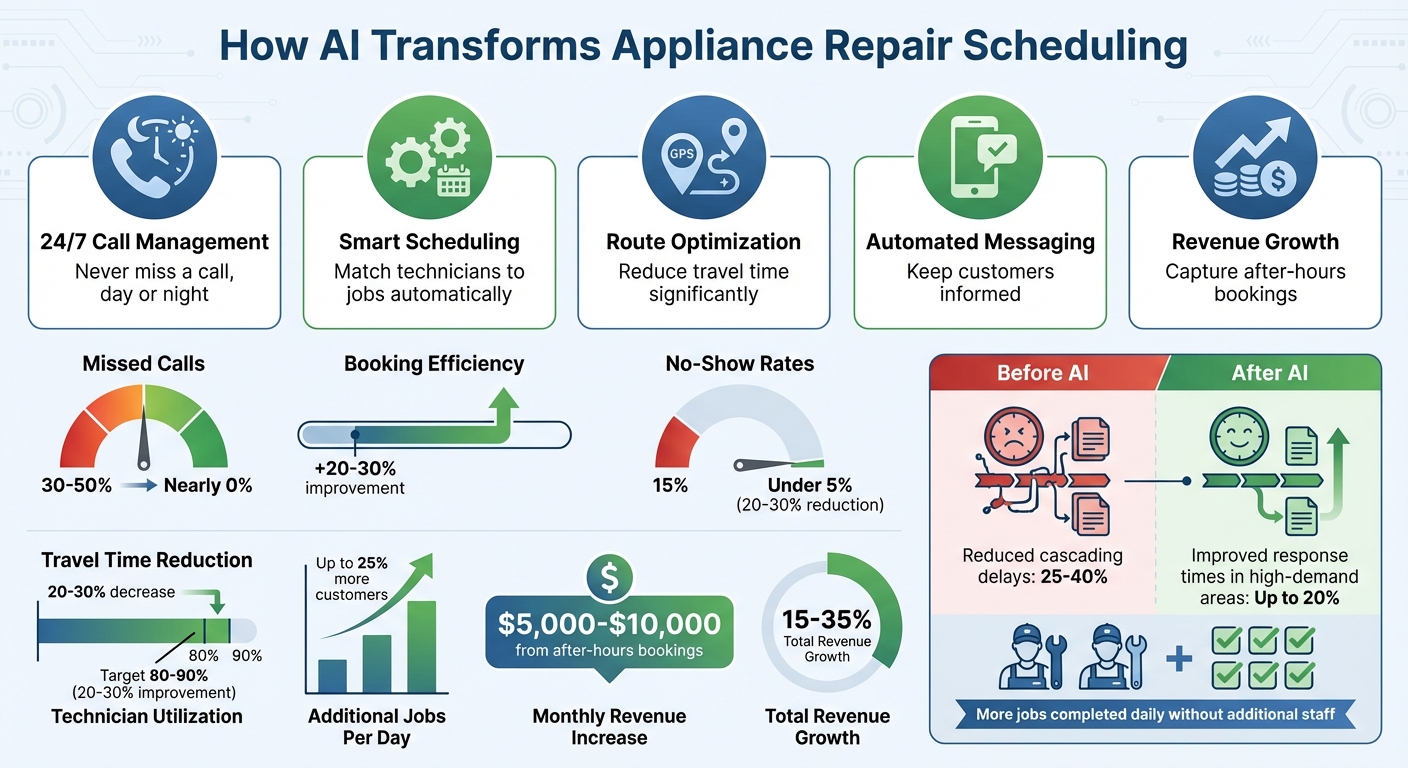
AI Scheduling Impact on Appliance Repair Business Metrics
What AI Scheduling Tools Actually Do
AI scheduling assigns and adjusts appointments using technician skills, location, job duration, and customer preference. Phone tag and paper calendars can't do that. A small shop can now run phone intake, calendar sync, dispatch, and customer messaging as one system.
- Calendar syncing. A two-way sync with Google Calendar or Outlook prevents double bookings and blocks travel time from the previous job.
- Job assignment. The system matches certifications, brand experience, and proximity to the job. Your senior tech gets the compressor replacement. A newer tech gets the dryer belt. Better matches mean fewer second visits.
- Route planning. Traffic, appointment windows, and expected job length shape each tech's day. Duration estimates come from your own history. If compressor swaps run three hours, the system books three hours.
- Customer messaging. The system sends confirmations, reminders, and arrival updates. When a job runs long, it reschedules the affected customers and tells them.
How AI Phone Answering Fits In
An AI phone service like Answering Agent answers the call and collects the customer's name, address, appliance, brand, symptom, and preferred window. It then checks your live calendar for a slot that fits the job type. It can take several calls at once, so nobody waits on hold.
After the customer picks a time, the booking goes onto the calendar. The customer gets a confirmation with the window and any prep notes, such as "have the model number ready." The lead is tagged by urgency and synced to your CRM or field-service software, where the tech can see it on their phone.
How to Add AI Scheduling to Your Workflow
Review Your Current Scheduling Process
Start by mapping every step from first contact to arrival. Note who answers, what details they collect, and how long calls take.
Pull 30 to 90 days of data covering call volume, voicemail rate, callback time, bookings, no-shows, and cancellations. Note how emergencies are handled differently from routine repairs. Also note where things break, such as late-night calendar juggling or double-bookings at peak hours. This data becomes your baseline.
Standardize your job types and give each one a realistic duration. The AI's booking rules are only as good as these templates.
Connect AI Tools to Your Calendar
Pick a tool that works with the calendar or field-service platform you already use, whether that's Google Calendar, Microsoft 365, or something else. Home-service features that matter include 24/7 booking, flexible windows, duration templates, and route-aware slots.
- Enter each tech's hours, days off, and service area, defined by ZIP code or radius.
- Set booking rules. Examples include no same-day bookings after 3:00 PM, a cap on jobs per tech per day, and automatic reassignment for routing.
- Pad durations from your history. If a refrigerator repair usually takes two hours, book 2.5.
- Add 15–30 minutes between jobs for paperwork and cleanup. Add more in heavy-traffic areas.
If you get many after-hours calls, connect a phone answering service to the same calendar so those callers can book open slots directly.
Set Up Automated Customer Messages
- Confirmation: Include the date, window, fee estimate, and prep instructions.
- Reminders: Send them 24 hours and 2–3 hours before the appointment. Each reminder should include options to confirm, reschedule, or cancel.
- En route: Text about 30 minutes before arrival to avoid wasted trips.
- Follow-up: Ask for a review, send maintenance reminders after bigger repairs, or give updates on back-ordered parts.
Match the tone of the scripts and messages to how your office already talks to customers.
Tracking Results from AI Scheduling
Metrics to Monitor
Compare each of these numbers against the baseline you pulled before setup:
| Metric | What it tells you |
|---|---|
| Missed call rate | Whether calls are being answered, especially after hours |
| Booking rate | How many answered calls become appointments |
| No-show rate | Whether reminders and windows are working |
| Technician utilization | Billable hours ÷ available hours (many shops aim for 80–90%) |
| After-hours bookings and revenue | What you were losing to voicemail |
Using Data to Improve Your AI Setup
Review the dashboard weekly. When actual job times keep drifting from the booked times, update the templates. For example, if washers average 90 minutes and dryers 120, book them that way to stop delays from cascading through the day.
Read call transcripts too. They show questions about areas you don't serve, estimates that are off, and confusion in your script. If no-shows climb, look at reminder timing and window width first.
Call data by location shows where demand clusters, which helps decide where to add coverage. Answering Agent provides call summaries and reports you can use for this review.
AI Scheduling For Appliance Repair Businesses: What’s Working in 2025?
Conclusion
Most of the gains come from two things. More calls get answered and booked, and techs spend their day on jobs that fit their skills and route. Standardize your job types, connect the phone and calendar, set up reminders, and check the numbers weekly. Answering Agent handles the phone side, syncs with your calendar, and sends call summaries so you can tune the rest.
FAQs
How can AI scheduling boost efficiency for appliance repair technicians?
It matches jobs to the right tech and books realistic durations and routes. It also pushes schedule changes to techs in real time. Techs drive less, wait less, and spend more of the day on repairs.
How does AI help reduce missed repair appointments?
It sends automatic reminders before the visit and an en-route text before arrival. Customers can confirm, reschedule, or cancel from the message. Cancelled slots are reopened quickly so they can be filled.
How do AI-powered phone answering services help appliance repair businesses?
They answer every call, including after hours, and collect the job details. They then book directly into your calendar. Calls that used to go to voicemail become scheduled jobs.
Related Blog Posts
Book a walkthrough
See it handle your calls.
Book 20 minutes, or hear a sample call first.


