
Manual routing sends calls by fixed rules: a menu option, a time-of-day switch, or a receptionist doing the transfer. AI routing listens to what the caller says, checks who they are, and sends them to the right person or answer. The practical differences show up in speed, hours, cost per call, and whether the agent already knows the caller's history when they pick up.
Manual routing can still work for a small team with low, predictable volume. Once calls pile up at peak hours or after close, AI routing usually wins. The safest path is to test it on one slice of your calls first.
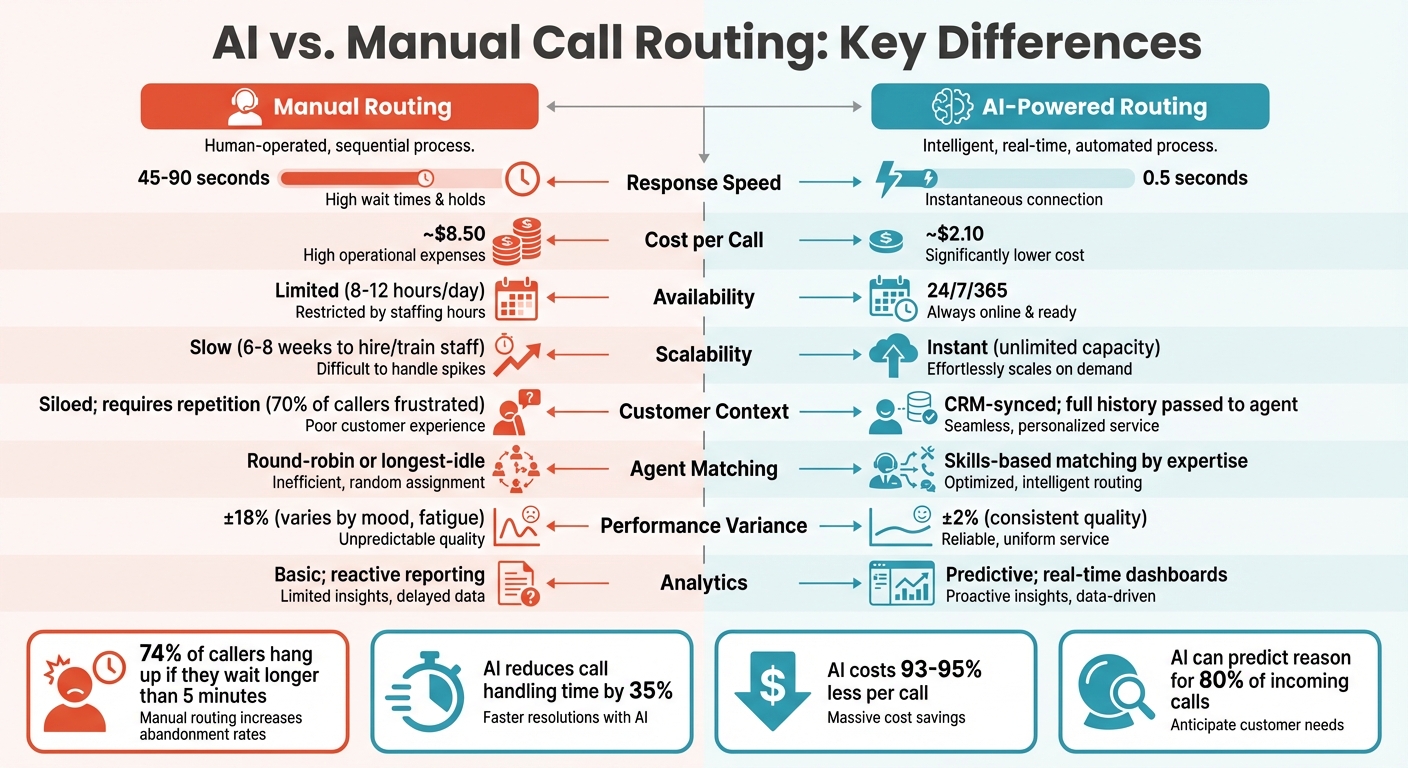
Key Differences Between Manual and AI Call Routing
| Feature | Manual Routing | AI-Powered Routing |
|---|---|---|
| Availability | Business hours (typically 8–12 hours/day) | 24/7/365 |
| Scalability | Slow (6–8 weeks to hire and train staff) | Handles simultaneous calls without new hires |
| Response Speed | 45–90 seconds | About 0.5 seconds |
| Logic | Static IF-THEN rules | Real-time intent analysis |
| Customer Context | Siloed, so callers repeat themselves | CRM-synced, with history passed to the agent |
| Agent Matching | Round-robin or longest-idle | Skills-based matching |
| Cost per Call | ~$8.50 | ~$2.10 |
| Analytics | Basic, after-the-fact reports | Real-time dashboards and forecasting |
A manual rule looks like "after 5 PM, send to voicemail" or "press 2 for billing." It treats every caller the same. AI routing for service businesses weighs intent, urgency, caller history, and agent skills before it picks a destination.
Availability and Scalability
Manual routing stops when the staff goes home. After-hours calls go to voicemail, and many of those callers never call back. During business hours, each person can take only one call at a time, so a busy hour turns into a hold queue. Only 26% of callers will hold longer than five minutes.
AI routing answers every call, at any hour, and takes many calls at once. A late-night question or a weekend booking gets handled instead of landing in voicemail. Answering Agent covers this after-hours and overflow gap for local service businesses.
Efficiency and Customer Experience
Rigid IVR menus add 30–60 seconds before a caller reaches anyone, and deep menu trees drive many callers to hang up. Misroutes make it worse: the caller explains the problem, gets transferred, and explains it again. Over 70% of callers say repeating themselves frustrates them.
AI routing replaces the menu with a sentence. The caller says what they need, and natural language understanding sends them to the right place. It also catches urgency. A caller who says "emergency" or "ASAP" can skip the regular queue and go straight to someone who can act.
Skills-based matching shortens calls because the first person the caller reaches can solve the problem. Routine questions such as hours, directions, and booking changes can be answered without a transfer, which leaves staff free for the calls that need judgment or empathy.
Cost Comparison: AI vs. Manual Call Routing
Labor makes up most of the cost of manual routing. Every new agent means recruiting and training. With annual turnover often at 30–45%, that cycle never ends. Add desks, phone systems, and management, and you pay for idle time during slow hours too. Round-the-clock coverage raises the bill again, because night and holiday shifts pay more.
AI routing drops most of that. It runs in the cloud, so there is no extra office space or equipment. Higher volume doesn't require recruitment and turnover planning. By automating call handling, you pay closer to ~$2.10 per call instead of ~$8.50. That gap matters most for businesses whose volume swings with season or weather.
Integration and Analytics
Manual systems track call volume, duration, and missed calls. They can't tell you why people called. They also don't connect to your CRM or helpdesk, so the agent answers blind and updates records by hand afterward. Your data ends up incomplete, and staffing decisions become guesswork.
AI systems integrate with CRM platforms like Salesforce and HubSpot, helpdesks like Zendesk, and tools like Zapier. When a call connects, the agent sees past purchases, open tickets, and earlier conversations. Call summaries can log automatically, so records stay current without extra admin work. For a fuller breakdown, see AI routing vs. traditional systems.
The data also looks forward. Predictive analytics can forecast call volume, flag the issues that keep coming up, and show where calls get stuck in transfer loops. You can staff ahead of demand instead of reacting to last week.
Conclusion: Choosing the Right Call Routing System
Choose based on call volume, how fast your callers expect an answer, and what staffing costs you. If volume is low and steady, manual routing may be enough. If calls spike, arrive after hours, or repeat the same few questions, AI routing can manage many calls at once and route them by intent.
Let AI handle repetitive work such as appointment scheduling, order status, and FAQs. Keep people on complex or sensitive calls.
Roll it out in phases:
- Start with after-hours calls or a single department.
- Connect the system to your CRM so agents see caller history.
- Review the most common call reasons and misroutes, then adjust routing rules.
- Expand to more hours or departments once accuracy holds up.
FAQs
How do I know if AI routing is right for my call volume?
Look at your peak hours, after-hours calls, and hold times. If calls queue up, go to voicemail, or repeat the same questions, AI routing will likely pay off. It also helps businesses with multiple locations. If your volume is low and steady, manual routing may be enough.
What does it take to connect AI routing to my CRM?
You need either a built-in integration or an API or integration tool that syncs customer records, call history, and call summaries in real time. Many AI platforms include native CRM connections, which cuts setup time.
Can I roll out AI routing after-hours first?
Yes. After-hours is a low-risk place to start. The AI covers calls that would otherwise go to voicemail, and you can check its accuracy before you give it daytime traffic.
Related Blog Posts
Book a walkthrough
See it handle your calls.
Book 20 minutes, or hear a sample call first.


