
Personalizing a call means the AI already knows who is calling, why they probably called, and what it can do for them before it says hello. Success looks like this: the caller never repeats their account details, gets an answer or a booked slot in one call, and reaches a person only when a person is actually needed.
That takes three things working together: AI connected to your CRM so it can pull records live, language understanding that maps what the caller says to an intent, and a review loop that improves call handling week over week. Tools like Answering Agent run those pieces on every call at once.
What AI Personalization Means for Customer Calls
Defining AI Personalization
The system identifies the caller from their phone number or CRM match and loads their history. Someone calling back about last week's service appointment gets picked up mid-thread. They don't have to start over.
It also adjusts as the call changes. If a caller moves from a pricing question to "I need someone out today," the AI changes its tone and responses and follows your escalation rules. Frustration or urgency in the caller's voice can trigger a handoff to a human.
Core Technologies Behind AI-Powered Calls
- Natural Language Processing (NLP): Maps different phrasings to one intent. "Check my charges" and "invoice question" both route to billing. NLP also keeps track when a caller switches topics mid-sentence.
- Machine Learning (ML): Reviews transcripts to find which phrasings and fallbacks resolve calls faster, then applies them to later calls.
- Real-time data processing: Pulls from your CRM and calendar during the call and fills variables like {{full_name}} or {{appointment_date}}, so answers are specific to the caller.
sbb-itb-abfc69c
How to Implement AI-Powered Call Personalization
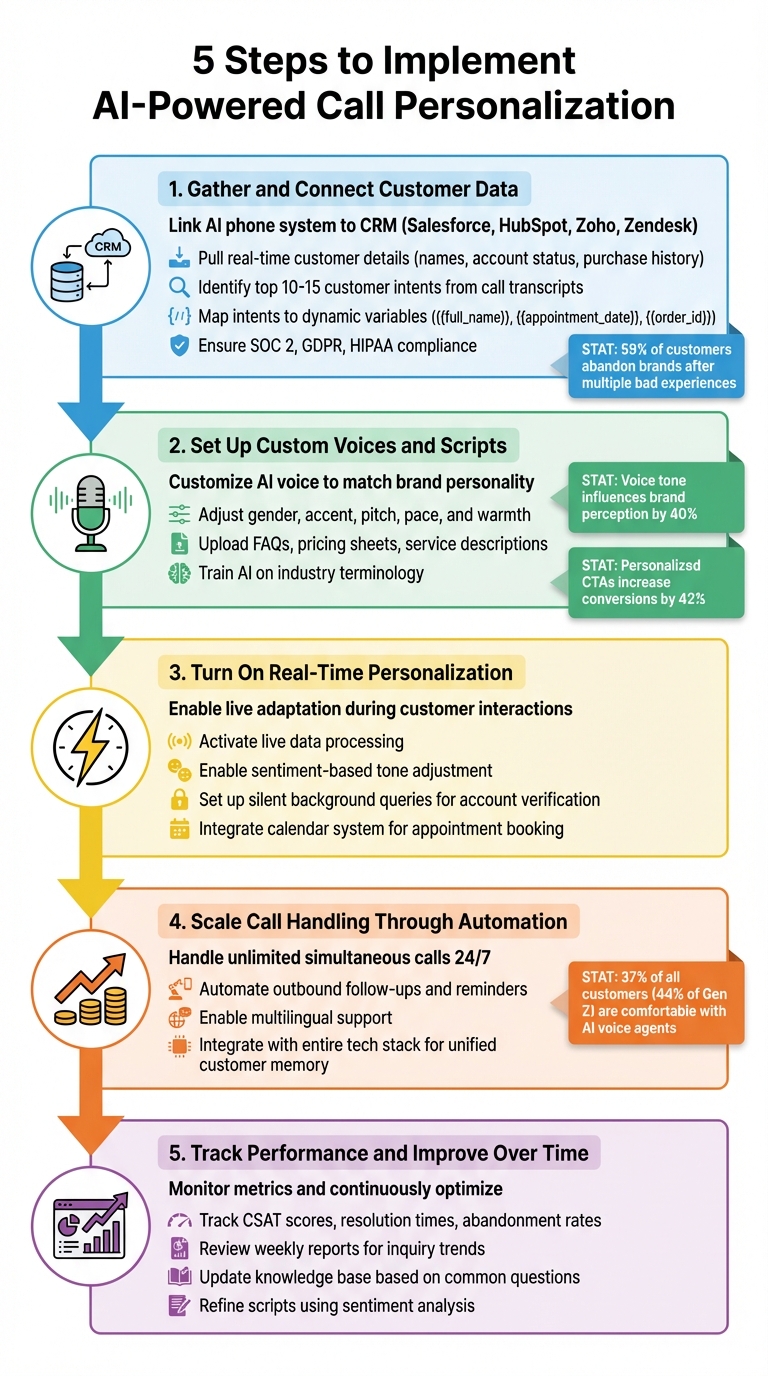
Step 1: Gather and Connect Customer Data
Connect the phone system to your CRM, whether that's Salesforce, HubSpot, Zoho, or Zendesk. Names, account status, purchase history, and open tickets should load the moment a call connects.
Then read recent transcripts and list your top 10–15 intents. For each one, write down the data the AI needs:
| Intent | Data to pull | What the AI does |
|---|---|---|
| Scheduling | {{full_name}}, calendar availability | Offers open slots and books one |
| Appointment follow-up | {{appointment_date}}, service notes | Confirms, reschedules, or escalates |
| Order or billing question | {{order_id}}, account status | Answers status questions and routes disputes |
Encrypt recordings and mask sensitive fields. Check which of SOC 2, GDPR, or HIPAA apply to your business before you go live.
With data flowing, work through a checklist for implementing AI phone answering before you move on to voice and scripts.
Step 2: Set Up Custom Voices and Scripts
Choose a voice that sounds like your business: gender, accent, pace, and warmth. A local contractor can sound friendly and regional. A professional firm may want something more formal. A good reference is how your best person on the phones sounds.
Upload your FAQs, pricing sheets, and service descriptions so the AI uses your terms and quotes your actual policies.
Step 3: Turn On Real-Time Personalization
Turn on live data lookups so the AI can check an account or order status without putting the caller on hold. Set sentiment rules so it can adjust its tone, pace, or escalate the call.
Connect your calendar so the AI can check availability, book the slot, and send a confirmation during the call.
Step 4: Scale Call Handling Through Automation
Set the system to answer simultaneous calls around the clock. Add outbound follow-ups, appointment reminders, and other languages as you need them.
Connect it to the rest of your stack so every channel logs to the same customer record. The next call, text, or email then picks up where the last one ended.
Step 5: Track Performance and Improve Over Time
Watch CSAT, resolution time, abandonment rate, first-call resolution, and escalation rate. A high escalation rate on one intent usually means a gap in the script or the knowledge base.
Read the weekly report for spikes. If questions about one policy jump, update the knowledge base that week. With modular prompts, you can change a business rule without rebuilding the whole flow.
Why Service Businesses Benefit from AI-Powered Calls
Service businesses get emergency calls at night, quote requests on weekends, and rushes whenever the weather turns. AI-powered call handling covers those hours without extra hires or a per-minute call center.
Better Efficiency and Growth Capacity
The AI captures leads, books jobs, separates routine questions from urgent ones, and routes complex calls to staff. With integrations like ServiceTitan, Salesforce, or HubSpot, each call is logged as it happens, so leads don't sit on a sticky note.
Improved Customer Experience
Callers can speak normally instead of pressing through a phone menu. Greeting a caller by name and referring to their last visit shows you know them. Multi-language support lets you serve Spanish-speaking callers you might otherwise lose.
Lower Costs and Higher Revenue
After-hours calls that used to go to voicemail can end with a booked job. Record updates, workflow triggers, and SMS confirmations run without staff, so your team can spend its time on the calls that need judgment.
Conclusion
AI-powered phone systems personalize calls at scale when they have your data, your language, and clear escalation rules. The setup has five steps: connect data, set voice and scripts, turn on live personalization, automate volume, and review weekly. Start with routine work like answering common questions and converting missed calls to appointments. Then add more as the metrics hold up.
FAQs
How does AI know who’s calling?
It matches the phone number to your CRM record and loads the caller's history, open tickets, and upcoming appointments before it starts talking.
When should a call be sent to a human?
Send it to a person for complex technical problems, upset callers, VIP accounts, pricing negotiations, and emergencies. Use a warm transfer so your staff member gets the AI's summary and doesn't have to ask the caller to start over.
What do I need to set up AI call personalization?
You need three things: a list of your top call intents taken from recent call data, scripts and a knowledge base for each intent, and a connection to your CRM and calendar so the AI can pull records and book during the call.
Related Blog Posts
Book a walkthrough
See it handle your calls.
Book 20 minutes, or hear a sample call first.


