Integrating AI Scheduling with Telehealth: Step-by-Step Guide
Healthcare providers face two major challenges: rising labor costs (hospital labor expenses grew by $42.5 billion between 2021 and 2023) and inefficient scheduling systems, with 48% of patients struggling to book appointments. AI scheduling tools integrated with telehealth platforms solve these issues by reducing wait times, cutting staff overtime by up to 40%, and lowering no-show rates (e.g., outpatient MRI no-shows dropped from 19.3% to 15.9% in six months).
This guide explains how to integrate AI scheduling with telehealth, covering technical requirements, compliance, and step-by-step integration. Key benefits include:
- Improved efficiency: Automates booking, saving staff 8 minutes per patient.
- 24/7 patient access: Enables self-scheduling anytime, enhancing convenience.
- Cost savings: Reduces operational expenses and optimizes resources.
- Market growth: The AI telemedicine market is projected to grow from $25.6 billion in 2025 to over $90 billion by 2030.
Here’s how to get started:
- Use API-enabled AI scheduling tools with real-time calendar sync.
- Ensure compatibility with telehealth platforms supporting FHIR and HL7 standards.
- Maintain HIPAA compliance with encryption, MFA, and audit trails.
- Follow a phased integration process, starting with one department, testing workflows, and training staff.
How to Simplify Appointment Scheduling for Healthcare Teams
Technical Requirements for Integration
Integrating AI scheduling into your telehealth platform relies on three key technical components: API-enabled scheduling tools, compatible telehealth software, and a HIPAA-compliant infrastructure. Together, these elements form the foundation for a smooth integration process.
AI Scheduling Platforms with API Access
Your AI scheduling tool needs strong API capabilities to ensure seamless communication with healthcare systems. Look for platforms that support RESTful APIs, allowing real-time updates and bi-directional calendar synchronization. This ensures that when appointments are booked, your telehealth schedule and EHR are automatically updated, eliminating double-bookings and reducing manual errors.
For example, Answering Agent offers AI-powered phone answering services with appointment booking features available 24/7. This makes it easier for patients to schedule telehealth visits at any time. When selecting an AI scheduling platform, confirm it supports OAuth 2.0 authentication for secure API access. Additionally, ensure it can standardize timestamps to UTC (e.g., 2025-10-02T18:30:00Z) to avoid scheduling conflicts across different time zones.
Telehealth Platform Compatibility Requirements
Your telehealth platform must support FHIR and HL7 standards to integrate seamlessly with EHR systems. With projections showing that 86.6% of physicians in small practices would use electronic health records by 2024, EHR integration is a vital consideration.
You’ll need to decide between bi-directional data exchange, which allows automatic two-way synchronization, or unidirectional exchange, which is simpler and more cost-effective. The platform should also include features like Single Sign-On (SSO) and automatic record updates to streamline staff workflows.
HIPAA Compliance Standards
Patient security is non-negotiable, so all integrated systems must adhere to HIPAA regulations. Start by securing a signed Business Associate Agreement (BAA) and ensuring the system uses end-to-end encryption for data both in transit and at rest. This is critical, especially considering that over 29 million healthcare records were breached in 2020, underscoring the importance of compliance.
"The telehealth platform you use should meet HIPAA requirements. You should also obtain informed consent from your patients prior to a telehealth appointment." - Health Resources and Services Administration (HRSA)
To further enhance security, implement Multi-Factor Authentication (MFA) and role-based access controls, ensuring staff only access the data necessary for their roles. Additionally, your system should maintain audit trails to track all data access and modifications. These trails create accountability and help identify potential security risks before they escalate into breaches. With these safeguards in place, you'll be ready to take the next steps in the integration process.
Step-by-Step Integration Process
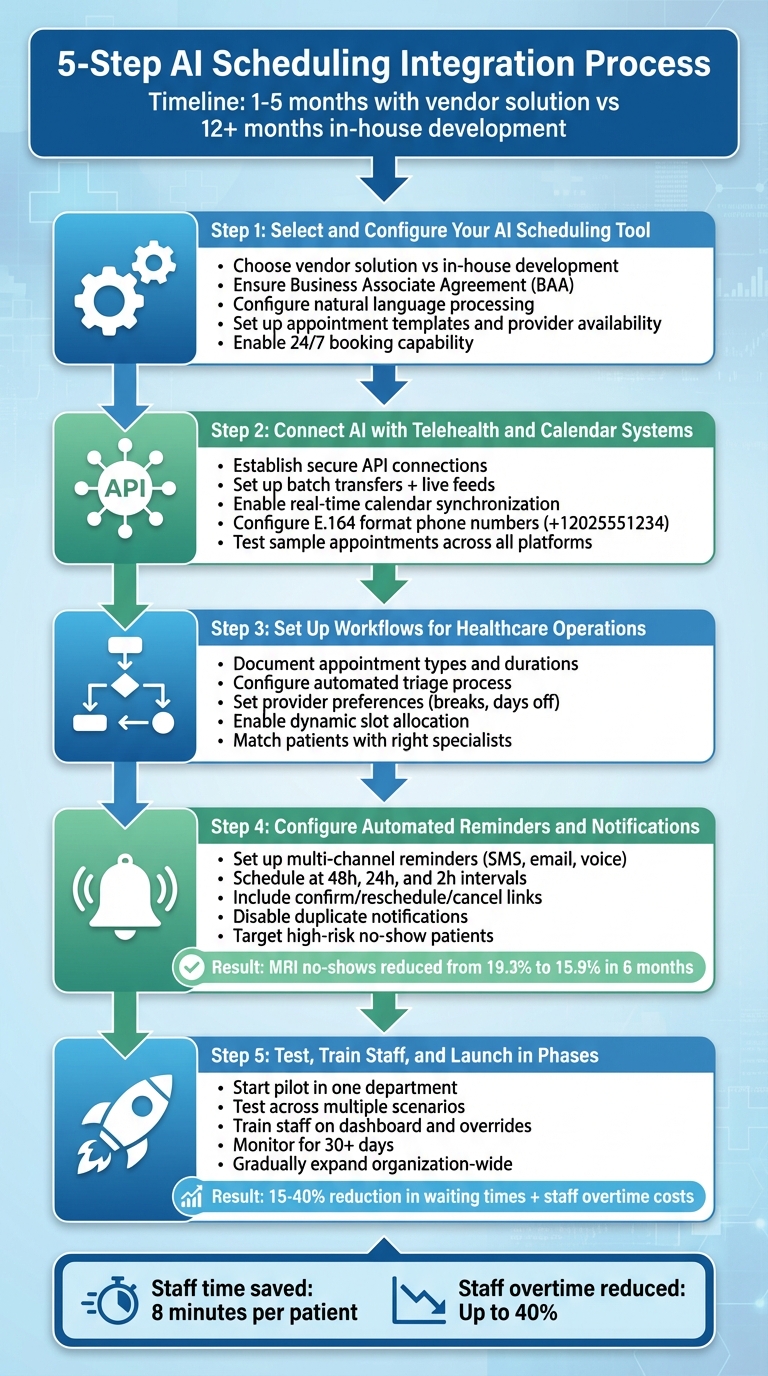
5-Step AI Scheduling Integration Process for Telehealth Platforms
After confirming your technical requirements and compliance standards, you're ready to integrate AI scheduling into your telehealth platform. For most, this process takes one to five months when using a vendor solution, compared to 12+ months for in-house development. Typically, the rollout begins with a single department before expanding across the organization.
Step 1: Select and Configure Your AI Scheduling Tool
First, decide whether to develop your own system or use a vendor solution. Many healthcare providers opt for vendor platforms due to their predictable subscription costs and minimal need for in-house machine learning expertise. Ensure the vendor signs a Business Associate Agreement (BAA) and supports open scheduling APIs.
For example, Answering Agent offers AI-powered phone answering services that handle appointment bookings 24/7. It can manage unlimited calls simultaneously, using customizable scripts tailored to your practice's needs. You can set up appointment types, provider availability, and communication channels while maintaining your brand's identity through white-labeled integration.
The AI should be configured to understand natural language requests like "sometime next week" and match them to available time slots . Appointment templates should account for varying durations based on consultation types. Additionally, automated triage features can ensure patients are matched with the right provider based on their symptoms and location preferences.
Step 2: Connect AI with Telehealth and Calendar Systems
Establish secure connections between the AI platform, your EHR/Practice Management System, and telehealth software. You'll need two types of data feeds: batch transfers for predictive modeling and live feeds for real-time responses . Ensure the system syncs calendars in real time across providers, rooms, and equipment to avoid double-bookings.
When a patient books an appointment, the AI system should automatically update your telehealth platform and EHR. Collect patient phone numbers in E.164 format (e.g., +12025551234) to ensure automated SMS reminders are delivered reliably. Test the setup by scheduling a sample appointment to confirm seamless updates across all platforms. Once the connection is verified, you can optimize operational workflows.
Step 3: Set Up Workflows for Healthcare Operations
Document and adjust workflows for virtual visits, defining appointment types, durations, and provider preferences like breaks or specific days off . Configure the AI to analyze both urgency and patient preferences, prioritizing emergencies and matching patients with the right specialists .
Set up an automated triage process to collect essential details - such as symptoms, preferred location, and insurance information - before booking. Enable dynamic slot allocation to adjust time blocks based on appointment complexity . This flexibility ensures patient needs are met while keeping providers efficient. Well-documented workflows also simplify staff training and testing in the next phase.
Step 4: Configure Automated Reminders and Notifications
Set up SMS, email, and voice-call reminders to reach patients through their preferred channels . Include direct links for confirming, rescheduling, or canceling appointments . Schedule reminders to go out at intervals like 48 hours, 24 hours, and 2 hours before the appointment.
If your telehealth platform already sends reminders, disable duplicate notifications in the AI system. Configure triggers to send intake forms or insurance verification based on appointment type . Use predictive analytics to identify patients with a history of no-shows and send them additional reminders. For instance, one initiative reduced MRI no-show rates from 19.3% to 15.9% in six months using this approach.
"Appointment reminders are permitted under HIPAA as part of treatment, but if you use automated calls/texts, follow the TCPA healthcare messaging rules." - OpenLoop Health
Once reminders are set up, conduct pilot testing to ensure the system is functioning properly before launching.
Step 5: Test, Train Staff, and Launch in Phases
With your tools and workflows ready, begin a pilot phase in one department or specialty. This allows you to identify potential issues and fine-tune the AI system before scaling organization-wide . Test the system across different scenarios - urgent care, follow-ups, specialist visits - to ensure it performs as expected. Verify calendar syncing, timely reminders, and secure data transfers.
Train your staff to use the AI system as a tool that complements their expertise, freeing them to focus on patient care . Provide hands-on training with the system's dashboard, including how to override AI decisions and track performance metrics. Once the pilot runs smoothly for at least 30 days, gradually expand to other departments while monitoring key metrics like no-show rates, patient satisfaction, and staff efficiency.
Consider enabling waitlist automation, where the AI notifies patients of cancellations to fill empty slots instantly. For example, a cancer center's infusion unit reduced combined patient waiting times and staff overtime costs by 15% to 40% using AI-based scheduling.
sbb-itb-abfc69c
Maintaining and Improving Your Integration
Monitor Performance with Data Analytics
Keep an eye on key metrics like no-show rates, provider productivity, revenue per visit, and specialist wait times to evaluate how well your AI scheduling system is functioning. With labor and compensation making up 56–60% of total hospital expenses, even minor improvements in efficiency can result in noticeable cost savings.
AI can help you analyze historical appointment data, spot seasonal patterns, and even factor in local events or weather trends to predict busy periods and adjust staffing levels accordingly. Real-time data feeds allow you to make quick adjustments, such as opening virtual slots or reallocating staff. Additionally, surveys from both clinicians and patients can provide insights into problem areas that raw data might miss.
Pay close attention to how much time providers spend on administrative tasks. Tools powered by Natural Language Processing (NLP) should lighten the load by reducing the need for manual note-taking. If staff are still working overtime on documentation, it could signal that your system needs further fine-tuning.
Once you’ve identified performance trends, shift your focus to ensuring your system is secure and compliant.
Review Compliance and Security Regularly
Regular security audits are essential to maintaining HIPAA compliance. The healthcare industry faces significant cybersecurity risks - 90% of hospitals and clinics have experienced at least one data breach, and 25% of cyberattacks target healthcare specifically. To protect patient information, implement end-to-end encryption for data during both transfer and storage. Also, make sure your staff receives ongoing privacy and security training, especially as your AI tools are updated.
"As long as your privacy and data aren't secure, it does not matter what other features a telemedicine platform offers."
– Srini Karunakaran, IT Services Delivery Specialist, KANINI
These steps will not only safeguard patient data but also ensure the smooth operation of your telehealth system.
Expand with Advanced Features
Once you’ve established a secure and well-monitored system, consider enhancing its capabilities to improve patient care further. After your basic scheduling system is running seamlessly, you can introduce advanced features like AI-powered triage, multilingual chatbot support, and virtual waiting rooms to increase efficiency.
You might also integrate wearable devices - such as heart rate monitors or glucose meters - that can trigger urgent appointments automatically when abnormal readings are detected.
For example, tools like Answering Agent can handle unlimited calls simultaneously, using customizable scripts and offering 24/7 availability. This ensures patients can book appointments in their preferred language at any time.
As your system evolves, these advanced features can help maintain high levels of patient satisfaction. Aiming for a satisfaction rate of 85% or higher is a common benchmark for successful virtual care integrations.
Conclusion
Incorporating AI-driven scheduling into telehealth platforms is reshaping how care is delivered. With AI tools reducing readmission rates by 30% and cutting review times by 40%, even small improvements in efficiency can lead to substantial cost savings.
The potential for growth in this space is massive. The telehealth AI market is expected to skyrocket from $25.6 billion in 2025 to over $90 billion by 2030. Why? Because AI takes over repetitive tasks like scheduling, documentation, and triage, allowing clinicians to focus on what they do best - caring for patients. With 66% of U.S. physicians already integrating AI into their workflows, those who embrace these technologies early are setting themselves up for long-term success in a competitive healthcare environment.
"AI has fundamentally changed telemedicine. It enhances patient care, streamlines healthcare processes, and reduces administrative burdens." – Folio3 Digital Health
Of course, implementing AI solutions requires thoughtful planning. You'll need to ensure technical compatibility, HIPAA compliance, and thorough staff training. But the payoff is undeniable. Features like predictive scheduling optimize appointment slots, while 24/7 AI-powered assistants improve patient engagement and accessibility. Tools such as Answering Agent even enable round-the-clock appointment booking.
To make the most of these advancements, consider starting small. Launch a pilot program in a single department, track key metrics, and expand as you see positive results. With a global healthcare worker shortage projected to hit 11 million by 2030, AI scheduling offers a practical way to improve care quality while managing costs more effectively.
FAQs
How can AI scheduling make patient appointment booking more efficient?
AI scheduling takes the hassle out of booking appointments by automating tasks that usually require manual effort. By syncing directly with a provider’s calendar, it can quickly check availability, avoid double-bookings, and recommend the best time slots based on the type of appointment and the provider’s preferences. This eliminates the back-and-forth of scheduling calls, cutting down delays and reducing administrative work.
Beyond real-time scheduling, AI tools let patients take control of their appointments. They can self-schedule, get instant confirmations, and reschedule with ease - all of which help minimize no-shows and keep calendars full. Tools like Answering Agent take it a step further by operating 24/7 to handle calls, book appointments, and manage schedules with natural, conversational interactions. This not only enhances the patient experience but also frees up valuable time for healthcare providers, allowing them to focus on delivering care.
What do I need to integrate AI scheduling with a telehealth platform?
To connect AI scheduling with a telehealth platform, you'll need a RESTful API capable of managing appointments, patient information, and provider availability. Security should be a top priority - use OAuth 2.0 or API keys for authentication, and ensure the system complies with HIPAA regulations by operating in a secure, encrypted environment.
For handling real-time updates, consider using webhooks. These can notify the telehealth platform of events like new appointments or cancellations, ensuring everything stays in sync. To make the scheduling process seamless for users, you can integrate the scheduling interface directly into the telehealth platform with tools like JavaScript widgets or iFrames. Before launching, thorough testing in a sandbox environment is crucial to iron out any issues.
Some best practices to keep in mind include building a scalable infrastructure to accommodate high booking traffic, implementing strong error-handling mechanisms, and providing clear documentation for workflows and data management. These steps will help you create a secure and efficient scheduling system that meets the needs of both patients and providers.
How can healthcare providers ensure their AI scheduling tools comply with HIPAA regulations?
To stay compliant with HIPAA when using AI scheduling tools, healthcare providers need to secure a Business Associate Agreement (BAA) with any vendor managing Protected Health Information (PHI). This agreement ensures the vendor adheres to strict protocols like data encryption, access controls, and audit logging. It's also crucial to choose a platform specifically built for HIPAA compliance, featuring secure cloud hosting and role-based permissions.
Providers should conduct a thorough risk assessment to understand how PHI flows through their systems, limit data collection to the minimum necessary, and adopt robust authentication methods such as multi-factor authentication. Regular staff training on privacy policies and open communication with patients about how their data is used are equally important. Additionally, enabling audit trails to monitor access and changes to scheduling data adds an extra layer of security.
For example, when considering a service like Answering Agent, ensure it provides HIPAA-compliant encryption, configurable consent options, and a signed BAA. These steps help protect patient information while taking advantage of AI-powered tools for scheduling and round-the-clock call management.
Related Blog Posts
Related Articles
Avoiding Errors in AI Patient Call Translations
Checklist to cut clinically significant errors in AI-translated patient calls: prepare scripts, verify terms, confirm details, and enable human interpreters.
Call Routing Analytics for Medical Practices
Cut wait times and no-shows with call routing analytics—prioritize urgent calls, boost first-call resolution, and use HIPAA-compliant AI for 24/7 handling.
AI Multilingual Support for HIPAA-Compliant Practices
Multilingual AI phone systems can process 40+ languages while enforcing HIPAA protections—encryption, BAAs, and audit logs—to improve patient communication and cut costs.