
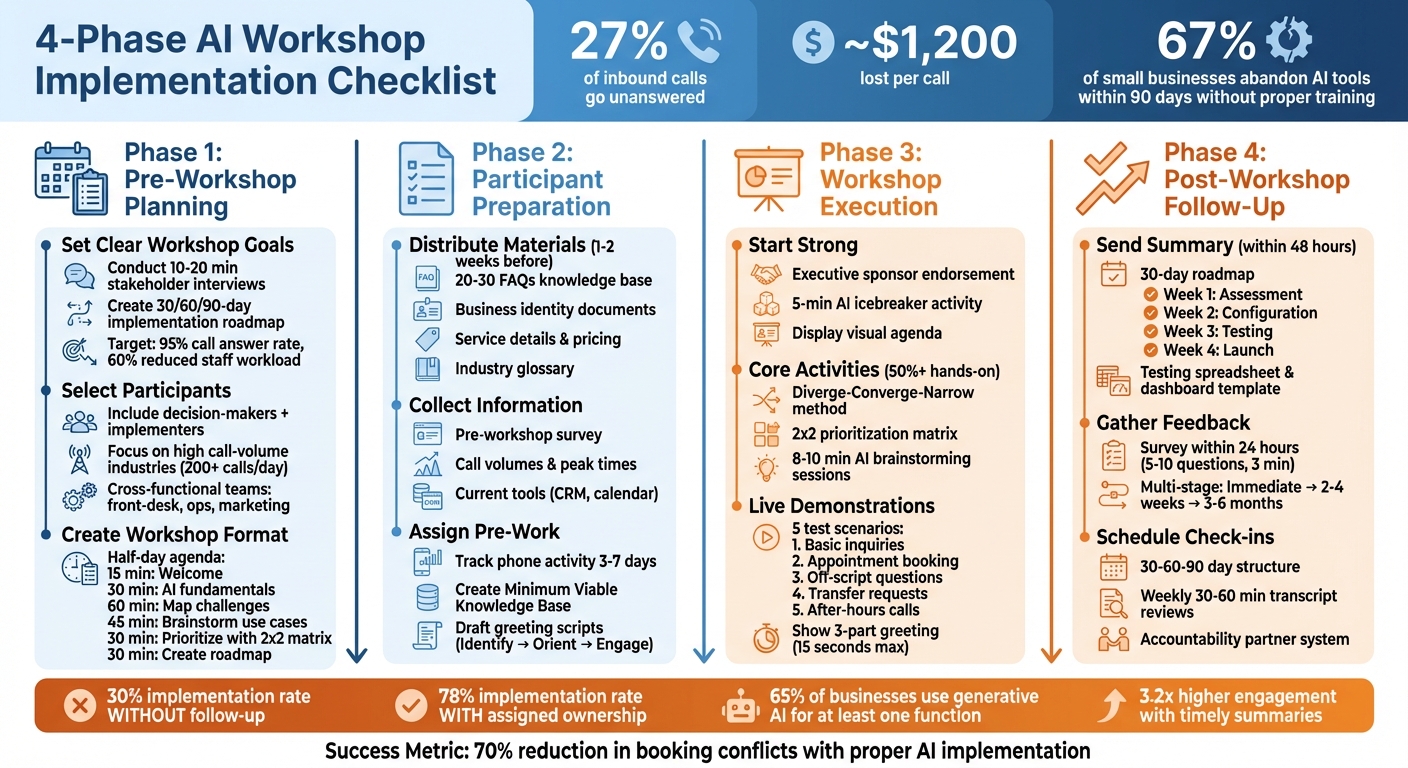
Missed calls cost U.S. service businesses thousands of dollars each month, with 27% of inbound calls going unanswered - roughly $1,200 lost per call. AI familiarization workshops can help businesses solve this by teaching teams how to use AI tools like Answering Agent to handle calls 24/7, automate tasks, and boost efficiency.
Here’s what you’ll get from this guide:
- Pre-workshop planning: Define goals, select participants, and create a detailed agenda.
- Participant preparation: Share materials, collect data, and assign pre-workshop tasks.
- Execution tips: Run interactive sessions, demo AI tools, and prioritize hands-on activities.
- Follow-up steps: Summarize insights, gather feedback, and schedule check-ins to ensure implementation.
Workshops aren’t just about learning AI - they’re about creating actionable plans to improve operations and reduce lost revenue. Use this checklist to ensure your workshop delivers measurable results.
4-Phase AI Workshop Implementation Checklist
Pre-Workshop Planning Checklist
Set Clear Workshop Goals
Before scheduling your workshop, define the specific outcomes you want to achieve. Workshops are most effective when they result in actionable deliverables. For example, aim to create a shortlist of 3–5 practical AI use cases or a 30/60/90-day implementation roadmap with clear ownership and measurable success metrics. Goals might include reducing staff phone workloads by 60%, reaching a 95% call answer rate, or offering 24/7 multilingual support for after-hours needs.
Kick things off with a pre-workshop discovery phase. Conduct short stakeholder interviews (10–20 minutes) and send out surveys to understand participants' concerns and objectives. This step will help you identify what to focus on, whether it's introducing basic AI concepts, pinpointing quick-win opportunities like lead capture or appointment booking, or calculating ROI for initiatives with high potential returns. With only 32% of leaders confident in implementing AI within their organizations, setting clear goals is critical for addressing internal hesitations and securing buy-in from leadership.
Once your objectives are clear, you can move on to selecting the right participants to achieve these outcomes.
Select and Invite Participants
Your participant list should align with the workshop's focus. For example, a technical session aimed at developers won't resonate with business teams, and a non-technical session might disengage engineers. Prioritize decision-makers in industries with high call volumes, such as medical practices handling 200+ calls daily, law firms managing urgent client inquiries, or home service contractors addressing emergencies. If you're working with white-label partners, focus on franchisees or multi-unit operators who can enforce technology adoption across multiple locations.
Don’t just invite executives looking for an overview - include the implementers who will manage AI tools after the workshop. Involve cross-functional roles like front-desk staff, operations managers, and marketing teams to ensure a well-rounded perspective. To keep the group focused, explicitly ask, "Who shouldn’t attend?" This approach ensures your resources are directed toward the most relevant participants. Also, require attendees to clear their schedules entirely; after all, small business owners spend an average of 14 hours researching phone automation solutions.
Once your attendee list is finalized, turn your attention to structuring the workshop.
Create Workshop Format and Schedule
Decide whether the workshop will be in-person, virtual, or hybrid based on participants' locations and technical preferences. Build an agenda that balances learning with hands-on activities - at least half the workshop should involve practical exercises. A half-day agenda might include:
- 15 minutes for a welcome and introduction
- 30 minutes on AI fundamentals
- 60 minutes mapping out current challenges to identify pain points
- 45 minutes brainstorming use cases
- 30 minutes prioritizing ideas with a 2x2 matrix
- 30 minutes crafting a detailed roadmap
To jumpstart engagement, include AI-based warm-ups, like generating a team name or testing simple AI phone scheduling scenarios. Provide participants with pre-loaded context documents - company descriptions, pricing sheets, and common FAQs - so the AI demos feel relevant to their businesses. For Answering Agent demonstrations, plan to showcase at least four scenarios: basic service inquiries, calendar-integrated appointment booking, handling off-script questions, and managing after-hours calls. Finally, standardize the tools used during the workshop to minimize distractions and simplify troubleshooting.
sbb-itb-abfc69c
Participant Preparation Checklist
Distribute Pre-Workshop Materials
Getting the right pre-workshop materials out early can make all the difference in how successful and engaging your sessions turn out. Aim to send these materials one to two weeks ahead of time to avoid last-minute issues and ensure participants are fully prepared and focused when the workshop begins. Here's what to include:
- Business identity documents: Company bio, service area zip codes, and operating hours.
- Service details: Menu descriptions, pricing ranges, and any diagnostic fees.
- Operational rules: Policies for cancellations, accepted payment methods, and escalation protocols.
- AI tools support: Live call simulations, call management dashboards, and proof of the platform's accuracy for Answering Agent demos.
It’s also helpful to provide a knowledge base of 20 to 30 FAQs. This size typically covers about 80% of common customer questions. To make the AI more effective, add an industry glossary with alternative terms and common synonyms (e.g., "breaker box" vs. "electrical panel"). For participants unsure about writing prompts, offer a starter kit using the CAREful framework - Context, Ask, Rules, Examples.
Before distributing materials, test all context files by uploading them to the AI to confirm compatibility. Stick to simple text files instead of complex formats like PDFs for smoother processing.
"Quality matters more than quantity. MIT Technology Review research shows that 30 well-documented FAQs outperform 100 poorly written ones." - NextPhone
Collect Participant Information
A pre-workshop survey is a must for tailoring the session to your audience. Use it to gather details about each attendee’s role, technical skills, and specific business challenges. This information enables you to fine-tune demonstrations and group exercises. Key data points to collect include:
- Roles and responsibilities
- Call volumes and peak times
- Tools currently in use, like CRMs or calendar systems
Interestingly, many small businesses find they’re missing 27% of calls during this type of audit.
To make the session more effective, segment participants based on their roles and experience. Developers and marketers, for instance, have very different needs. Likewise, focus on training the team members who will actually use the AI daily, rather than executives who may not be hands-on. This approach is critical because 67% of small businesses abandon AI tools within 90 days if they skip proper training.
Once you’ve gathered this information, you can shift the focus to hands-on assignments that ensure participants are ready to dive in.
Provide Pre-Workshop Assignments
Ask participants to track their phone system activity for three to seven days leading up to the workshop. This data will provide a baseline for measuring AI’s impact and make the demonstrations feel immediately relevant. Key metrics to track include:
- Total daily call volume
- Peak call times (commonly 9–11 AM and 2–4 PM)
- Frequently asked questions
- Missed calls
Additionally, have participants create a "Minimum Viable Knowledge Base" that covers essential details like service lists, pricing, operating hours, and the top 10 to 20 FAQs.
Encourage them to draft custom AI call scripts using a simple three-step formula: Identify (business name), Orient (what the AI can do), and Engage (open-ended question). They should also prepare test scenarios that include both routine and exceptional call situations for Answering Agent demonstrations.
Finally, ask participants to compile a list of all business tools tied to phone operations - along with login credentials - so they can test live integrations during the workshop. Provide sample prompts and recommend uploading context files in advance, using short, direct sentences and bullet points to ensure the AI processes the information correctly.
Venue and Technical Setup Checklist
Set Up Venue and Equipment
Whether your workshop is in-person or virtual, the setup should keep participants engaged while minimizing technical hiccups. For in-person events, position tablets or touchscreen monitors on sturdy stands at eye level (around 59 inches or 150 cm) to make hands-on demos comfortable. Use a large display screen (40–60 inches) to showcase AI outputs and live dashboards, ensuring everyone in the room has a clear view. If recording or videoconferencing, ensure the lighting is suitable to avoid distractions.
For virtual workshops, make sure all participants use the same large language model - like ChatGPT, Gemini, or Claude - to avoid confusion during exercises. Set up tools like digital whiteboards and shared document platforms to enable real-time collaboration. A stable internet connection is critical, so test your primary network ahead of time and have a 4G/5G mobile hotspot as a backup in case the venue’s WiFi falters. Additionally, bring power strips, extension cords, and gaffer tape to keep cables organized and out of the way.
Collect login credentials for all integration tools before the workshop begins. This includes CRM systems (e.g., HubSpot, Salesforce, or Clio), calendar platforms (like Google Workspace, Microsoft 365, or Calendly), and any industry-specific software such as ServiceTitan or Housecall Pro. Having these ready ensures participants can verify live connections during hands-on exercises without delays. This groundwork ensures the technical aspects run smoothly, setting the stage for the hands-on demos covered in the next section.
Test Answering Agent Demo Features
Once the venue is ready, focus on testing the Answering Agent demo features. Use a 10-point checklist to cover common call scenarios: simple greetings, appointment scheduling, pricing inquiries, emergencies, after-hours responses, FAQs, transfer requests, wrong numbers, extended silence, and multilingual support. Confirm that the AI handles routine interactions seamlessly and escalates more complex cases to human staff when needed. Careful testing can cut down on post-launch technical issues by up to 73%.
Ensure that calendar bookings generate events properly, CRM leads are created without errors, and notifications (via email or SMS) are delivered within five minutes. Test both blind transfers (direct connections) and warm handoffs (where AI provides context to the human recipient) to prevent dropped calls. Evaluate call quality across different devices, and temporarily modify business hours in the system to verify that after-hours greetings and routing rules adjust as expected.
Document all test scenarios in a spreadsheet, noting the expected outcomes, actual results, and any steps needed to address issues. For initial test calls, manually review AI-generated follow-up emails to confirm the tone and details are accurate before enabling auto-send. Skipping this phase can lead to post-launch problems - 91% of businesses experience issues when testing is overlooked.
Prepare Backup Equipment
Always have spare laptops with the necessary software pre-installed and a secondary internet source ready to go. If your primary WiFi connection fails, a 4G/5G hotspot can keep the workshop running without interruption. Prepare offline materials, such as screen recordings of successful AI calls or alternative non-digital exercises, to maintain continuity if live AI tools encounter issues.
"The difference between a good AI photo booth activation and a great one is not the technology - it is the preparation."
Technical Issue Backup Action Primary Internet Drops Switch to a 4G/5G backup hotspot AI Tool/Kiosk Unresponsive Restart the application and check connectivity QR Code Not Scanning Increase screen brightness to maximum AI Hallucinations/Errors Use pre-prepared offline demo content Integration Failure Revert to manual data entry or use CSV files
For high-volume demonstrations, stress test the system with at least 10 simultaneous calls to ensure it can handle surges without slowing down. Establish clear escalation protocols so human staff can step in if the AI struggles with a request twice or encounters a particularly complex case. Combining human oversight with AI can reduce booking conflicts by up to 70% and boost attendee satisfaction (NPS) by 15–25%. These backup measures ensure the workshop runs smoothly, even in the face of unexpected challenges.
Workshop Execution Checklist
Start with Introductions and Goals
Kick off the session by having a senior leader or executive sponsor explain why AI is important to your business. They should share a relatable example of how they personally use AI - like drafting emails, analyzing customer feedback, or automating routine tasks. This kind of endorsement helps participants see AI tools, such as Answering Agent, as valuable teammates rather than something to fear.
Begin with a quick assessment to understand participants' familiarity and confidence with AI. This can be done using a baseline tool. Make sure everyone launches the designated AI tools early on to address any technical hiccups. Display a visual agenda on a digital whiteboard that lays out the session's timeline, key deliverables (like a list of 3–5 prioritized AI use cases), and how each activity contributes to the overall goals. To break the ice, spend five minutes on an AI-based activity - like asking the AI to create a team name or write a short story using emojis. This helps participants get comfortable with the AI environment.
Lead Core Workshop Activities
Guide participants through identifying AI opportunities using the "diverge–converge–narrow" method. Start by dividing them into small teams (2–4 people) to brainstorm 15–20 AI use cases relevant to their roles. For example, marketing teams might focus on content creation, while operations teams could explore automation for scheduling. Then, use AI to group these ideas into themes and summarize discussions, turning digital sticky notes into visual diagrams.
Next, apply a prioritization framework like a 2×2 matrix to evaluate the AI-generated ideas based on Business Impact and Feasibility. Define clear evaluation criteria:
- Feasibility: Can this be implemented with current resources?
- Desirability: Does it address a genuine customer need?
- Viability: Will it save costs or generate revenue?
Allocate about 8–10 minutes for AI-assisted brainstorming so participants can refine their prompts and ideas.
"AI success is rarely about the model - it's about stakeholder alignment, data readiness, and organizational momentum."
- InitializeAI
Ensure hands-on activities take up at least half the session. Techniques like round-robin sharing or silent "brainwriting" (where individuals jot down ideas before group discussions) can help quieter participants contribute without being overshadowed. Use AI to summarize key decisions and outline next steps at the end of each activity, keeping the session on track. Once opportunities are identified and priorities are set, move into live demonstrations to deepen understanding.
Conduct Hands-On AI Demonstrations
Building on the brainstorming phase, live demonstrations show how AI solutions work in real-world scenarios. Use Answering Agent as an example and walk participants through five structured test cases:
- Basic inquiries (e.g., asking about business hours or locations)
- Appointment booking (scheduling a time and verifying calendar sync)
- Off-script questions (handling unusual or unexpected queries)
- Transfer requests (connecting to a specific department)
- After-hours calls (ensuring the AI uses the correct greeting when closed)
Highlight how 62% of small businesses lose customers due to unanswered calls. Show how Answering Agent solves this by auto-updating CRM entries and sending follow-up emails immediately after a call - a crucial step since people forget half of what was discussed within an hour. Walk participants through the AI's three-part greeting formula:
- Identify: State the business name.
- Orient: Explain what the service can help with.
- Engage: Ask an open-ended question - all within 15 seconds to avoid caller drop-offs.
Encourage participants to upload company-specific documents, like service menus or customer personas, to tailor AI prompts to their business context. This builds trust and demonstrates how well-trained AI can reduce churn, which can reach 67% with poorly set-up tools.
"If attendees aren't creating something during the workshop, it's a lecture with a fancy price tag."
- Rasmus Widing
Wrap up the demo by showing how the AI handles escalations, transferring complex calls to a live representative. This "human-in-the-loop" approach can cut booking conflicts by up to 70%. Finally, demonstrate how to review daily transcripts and update the AI's knowledge base based on real interactions. Emphasize that 30 well-documented FAQs can be more effective than 100 poorly written ones, ensuring the AI continues to perform effectively over time.
You’re Not Behind (Yet): How to Learn AI in 29 Minutes
Post-Workshop Follow-Up Checklist
Effective follow-up is the key to turning workshop insights into actionable results. Without a clear plan, only 30% of workshop insights are implemented. That number jumps to 78% when ownership is assigned and regular check-ins are scheduled.
Send Workshop Summary and Resources
Send out a detailed workshop summary within 48 hours to maintain momentum. Research shows that timely summaries can boost engagement by 3.2 times compared to delayed ones. Include a 30-day roadmap broken into weekly phases: Assessment (Week 1), Configuration (Week 2), Testing (Week 3), and Launch (Week 4).
Provide practical tools such as:
- A service menu with descriptions
- A pricing sheet
- A starter FAQ with 20–30 common questions, categorized by topics like service availability, pricing, process, and qualifications
For those implementing Answering Agent, include a testing spreadsheet to log internal test results and a dashboard template to track KPIs like call answer rates and appointment bookings.
Add technical resources, such as:
- Custom AI phone scripts and call flow decision trees
- Industry-specific terminology glossaries (which can boost AI accuracy by 15–20%)
- Emergency protocol keywords
If the workshop involved participants from regulated industries like healthcare or legal, provide guidance on Business Associate Agreements and compliance workflows.
Finally, gather immediate feedback to measure the workshop's impact.
Gather Participant Feedback
Send an evaluation survey within 24 hours of the workshop to capture fresh reactions. Keep it short - 5–10 questions - and aim for a completion time of about 3 minutes, as longer surveys tend to have lower response rates. Use a mix of:
- Likert scale questions (1–5 ratings) for quick insights
- 2–3 open-ended questions to understand the reasoning behind the scores
Adopt a multi-stage feedback process:
- Immediate feedback: Within 24 hours to capture initial impressions
- Implementation feedback: 2–4 weeks later to identify challenges and progress
- Long-term assessment: 3–6 months later to evaluate lasting changes
This approach is crucial because, without reinforcement, employees forget 90% of what they learn within a week. Ensure anonymity to encourage honest feedback, and use branching logic in forms to tailor follow-up questions based on participants' responses. Most importantly, close the feedback loop by sharing how previous feedback has been used to improve future sessions.
Schedule Follow-Up Sessions
Plan the first follow-up session 2–4 weeks after the workshop to address immediate challenges and review early results. Use a structured 30-60-90 day check-in schedule to track progress:
- 30 days: Focus on foundational alignment
- 60 days: Emphasize launch and execution
- 90 days: Work on scaling and standardization
"The workshop ends when implementation ownership is clear, not when participants leave the room." - Laura van Valen, Facilitation & Group Dynamics Expert
Encourage accountability by pairing participants as "accountability partners" for peer support. Create a communication channel, like a dedicated email group or WhatsApp thread, to keep the group motivated between formal check-ins.
For businesses using Answering Agent, dedicate 30–60 minutes each week to review 10% of call transcripts. This practice can accelerate AI accuracy improvements three times faster than monthly updates. Regular follow-ups are critical, as 67% of small businesses abandon AI tools within 90 days due to poor initial setup and training.
Conclusion
Hosting an AI familiarization workshop can be the starting point for meaningful change. The checklist provided here guides you through every stage - from initial planning to follow-ups - ensuring participants walk away with practical steps they can implement. The focus should be on interactive, hands-on activities that transform abstract concepts into real-world applications.
Consider using Answering Agent as your demonstration tool. It tackles a common challenge: missed calls and lost revenue. With its high accuracy and capacity, this tool showcases how AI can deliver immediate results for service-based businesses, whether it's a medical practice, a law firm, or even a car wash. Participants can explore real call transcripts, listen to lifelike conversations, and see how the tool books appointments and captures leads - entirely on its own.
Here’s a telling statistic: 65% of respondents in a 2024 global survey reported using generative AI for at least one business function. However, over half of employees feel they haven't received enough training to effectively work with AI. Your workshop fills that gap. Success with AI isn't about being the first to adopt - it’s about being prepared, setting clear goals, engaging participants, and committing to ongoing support.
Use this checklist to kick off your workshop, and let Answering Agent demonstrate how AI can empower teams while delivering measurable outcomes.
FAQs
How do I pick the right AI use cases for my workshop?
Begin by clearly outlining what you aim to achieve and identifying the specific needs of your audience. Focus on use cases that align closely with your goals - whether that's streamlining decision-making processes or automating repetitive tasks. The key is to pick practical applications that solve genuine challenges your team encounters.
Make sure these use cases are tailored to your industry, the tools you use, and any limitations you face. This approach ensures the workshop remains relevant, actionable, and engaging for everyone involved.
What should attendees prepare before the workshop?
Attendees can get ready for the workshop by taking a few key steps:
- Define your objectives: Know exactly what you want to accomplish during the session.
- Understand your audience: Focus on topics that matter to the group or align with their needs.
- Gather essential materials: Bring any necessary files or background information that might come in handy.
- Prepare sample prompts or questions: Having these ready ensures you can contribute effectively.
- Get familiar with AI basics: If you're new to AI, take some time to explore the tools or concepts that will be covered.
Following these steps will help you stay engaged and aligned with the workshop's goals.
How do I measure ROI after launching an AI answering tool?
To gauge ROI effectively, focus on metrics such as call handling efficiency, customer satisfaction, lead capture rates, and cost savings. Start by comparing pre-implementation data - like call volume, missed calls, and average call duration - with post-implementation results. Look for improvements in answered calls, reductions in missed calls, and the number of leads successfully captured.
You should also factor in cost savings from reduced staffing needs and revenue growth driven by converted leads or scheduled appointments. Consistently monitoring and reviewing these metrics will help you understand the AI tool's overall impact.
Related Blog Posts
Book a walkthrough
See it handle your calls.
Book 20 minutes, or hear a sample call first.
Ready to see it handle your calls?
Book a walkthrough, or hear a short sample call first.
Related Articles

How to Handle Car Wash Membership Upgrade and Downgrade Calls
How wash desks handle membership upgrade and downgrade calls without invented prices or turning a plan change into a cancel fight.

How to Handle Pickleball Membership Cancellation Calls
How pickleball club desks handle membership cancellation calls without inventing policy or fighting the member.
How to Handle Failed Payment Calls on a Car Wash Membership
How wash desks handle failed payment and card-update calls on a membership without turning the call into a gate lockout.