
An AI phone system does real work only when it is wired into your reservation book and your POS. Otherwise it takes messages and your staff re-keys everything. This guide covers that wiring: OpenTable for reservations, your POS for takeout, and the tests to run before you go live.
When it works, a caller books a table that shows up in OpenTable within seconds, or places an order that lands on the kitchen display with modifiers intact. Nobody on the floor touches the phone. Calls that don't fit the rules go to a person. Calls you miss now are revenue you lose, and the integration is what turns those calls into bookings and tickets.
What the Integration Handles
Reservations Against Live Availability
The agent checks OpenTable availability before it offers a slot, so it can't double-book. Once the guest confirms, it writes the booking and triggers your SMS confirmation and reminder. Hosts stay on the floor during the rush instead of on the phone.
Takeout Orders Into the POS
The agent enters orders the way a staff member would, with modifiers, allergy notes, and special instructions. With inventory synced, it won't sell an item the kitchen ran out of an hour ago. That removes the call-back to fix an order. Phone orders are also where a consistent upsell script pays off, because the agent asks every time.
Overflow and After-Hours Calls
A host handles one call at a time. The agent handles concurrent calls, including the ones that come in after close. You can then recover revenue from calls that would have gone unanswered and let staff focus on guests in the room.
Step-by-Step Guide to Integrating AI Phone Systems
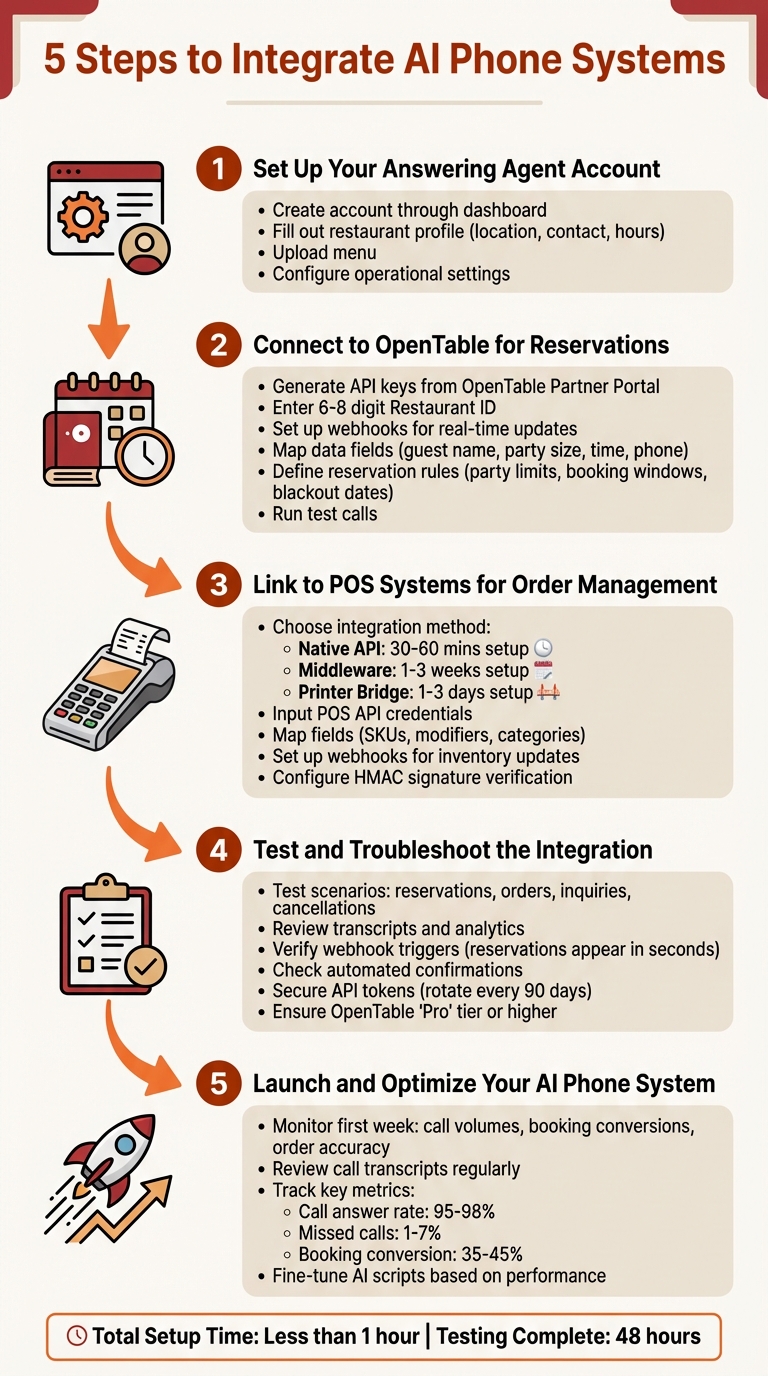
5-Step AI Phone System Integration Guide for Restaurants
Step 1: Set Up Your Answering Agent Account
Create the account and fill in the restaurant profile: location, hours, contact details. Upload the current menu and set staff notifications. The agent answers from this data, so a stale menu or wrong holiday hours will reach callers.
Step 2: Connect to OpenTable for Reservations
In the OpenTable Partner Portal, generate API keys and copy your Restaurant ID into the Answering Agent integration dashboard. Set up OpenTable webhooks so changes sync both ways. Map guest name, party size, reservation time (ISO 8601), and phone number.
Then write the booking rules: maximum party size, how far ahead guests can book, blackout dates, and service hours. Send large parties, VIPs, and anything unusual to a staff member instead of letting the agent guess.
Step 3: Link to POS Systems for Order Management
Square and Toast offer ordering APIs a voice agent can use directly. For other systems, including KwickPOS and Clover, check for a native connection or use middleware such as Checkmate or Olo.
Enter your POS API credentials in the dashboard. Map SKUs, modifiers, and categories so prices come through correctly. Add webhooks for inventory updates and turn on HMAC signature verification for order data. Set a fallback that sends complex orders or failed syncs to staff.
Choose the method that matches your POS:
| Integration Method | Setup Time | Complexity | Pros | Cons |
|---|---|---|---|---|
| Native API | 30–60 mins | Moderate | Real-time sync, built-in payments | Limited to certain POS providers |
| Middleware | 1–3 weeks | Moderate | Works across platforms, full API access | Requires a monthly subscription |
| Printer Bridge | 1–3 days | Low | Quick setup, no API approval needed | Staff must manually enter orders |
Step 4: Test and Troubleshoot the Integration
Before launch, place test calls for each case: new booking, change, cancellation, takeout order with modifiers, and a menu question. A booking should appear in OpenTable within seconds. An order should reach the kitchen display without anyone re-entering it. Check that confirmations and reminders go out, then read the transcripts.
Most failures come from wrong API credentials, mismatched field mappings, or webhooks that never fire. Confirm your OpenTable plan includes API access. Store tokens securely and rotate them every 90 days.
Step 5: Launch and Optimize Your AI Phone System
In the first week, watch call volume, missed-call rate, booking conversion, and order accuracy. Read transcripts weekly. When callers keep asking something the agent handles poorly, fix the script or the rule behind it. Use those numbers to calculate ROI from AI-handled orders and bookings.
Key Features of Answering Agent for Restaurants
Beyond the integrations, three features matter day to day:
- Adjustable tone. You set the voice to match the room, formal for a steakhouse or casual for a neighborhood spot. The agent handles allergy questions and special-occasion requests.
- Concurrent calls. A Friday rush or an after-hours inquiry gets answered, and call routing sends edge cases to the right person.
- Call analytics. The dashboard shows answer rate, conversions, busiest hours, and alerts for volume spikes or sync errors, so you can adjust staffing and scripts.
FAQs
How long does it take to set up an AI phone system with a restaurant's tools?
It depends on the connection method. A native POS or OpenTable API connection takes about an hour. A printer bridge takes a few days. Middleware can take one to three weeks. Leave time for test calls before you go live.
How can AI phone systems help streamline restaurant operations?
Connected to OpenTable, the agent books, changes, and cancels reservations against live availability. Connected to a POS like Toast or Square, it enters takeout orders with modifiers directly into the kitchen flow. Staff stop re-keying phone orders and stay with guests on the floor.
How can AI phone systems help restaurants minimize missed calls and boost revenue?
The agent answers every call, including overlapping calls during a rush and calls after close. It turns them into reservations or orders instead of voicemails. Anything complex goes to a staff member.
Related Blog Posts
Book a walkthrough
See it handle your calls.
Book 20 minutes, or hear a sample call first.


