
Picking a call tool for several locations comes down to three questions. How does it bill as volume grows? How many calls can it take at once? Can each location get its own script, hours, and routing? This guide compares seven tools on those points. For the operating side, see multi-location call handling best practices and how AI improves call handling for service businesses.
The main split is between tools that answer the call for you (Answering Agent, Retell AI, Goodcall, Rosie) and phone systems where your staff still answer and AI helps (CallHippo, JustCall, Dialpad). Decide which one you need before you compare prices.
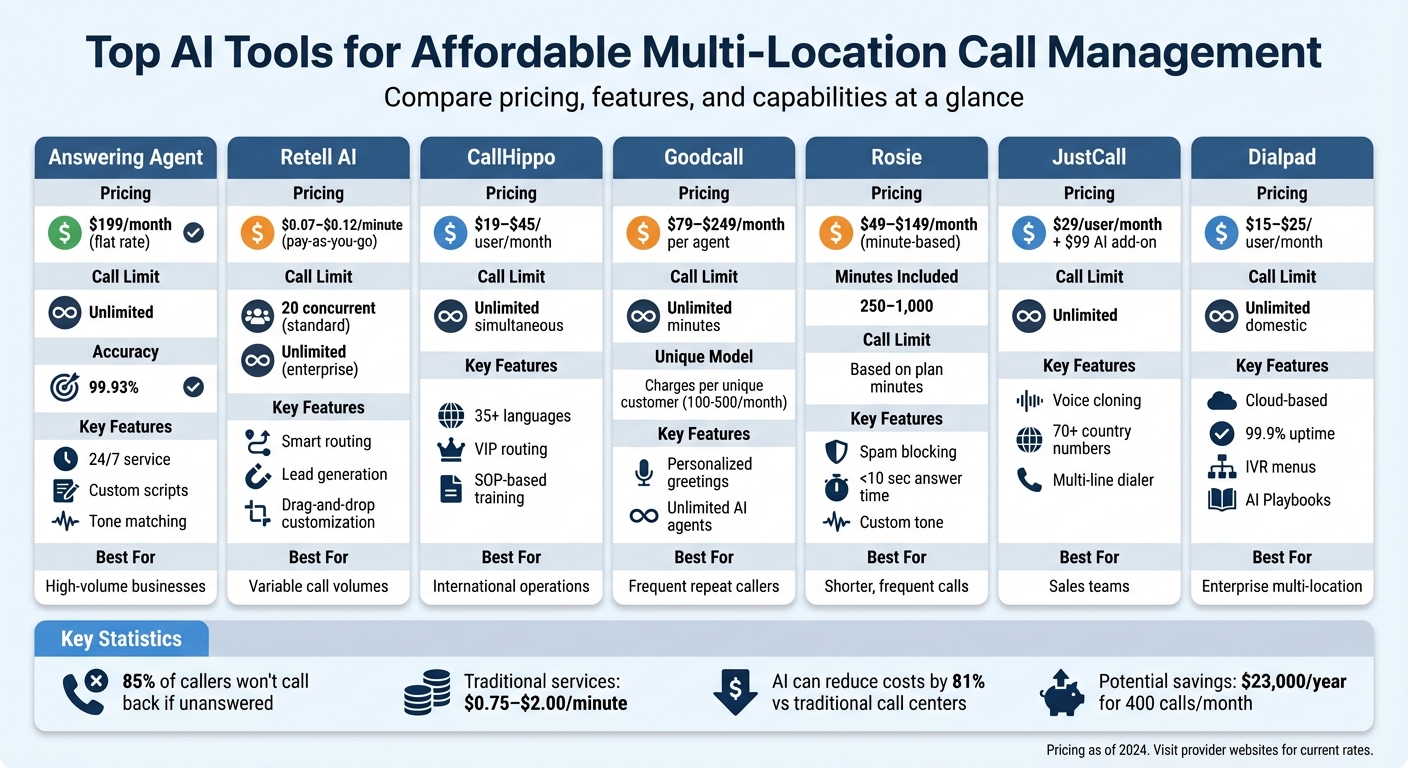
Quick Comparison
| Tool | Pricing Structure | Key Features | Call Handling Limit | Customization Options |
|---|---|---|---|---|
| Answering Agent | Flat monthly rate | 24/7 answering, unlimited calls | Unlimited | Custom scripts, tone matching |
| Retell AI | $0.07–$0.12 per minute | Smart routing, lead generation | 20 concurrent (pay-as-you-go) | Drag-and-drop builder |
| CallHippo | $19–$45/month per user | AI Voice Agent, VIP routing | Unlimited | SOP-based training |
| Goodcall | $79+/month per agent | Charges per unique customer | Unlimited | Personalized greetings |
| Rosie | $49–$149/month based on minutes | Spam blocking, lead collection | Based on minutes | Tone and background sounds |
| JustCall | $29/user/month + add-ons | Local number bundles, voice cloning | Unlimited | On-screen scripts |
| Dialpad | $15–$25/user/month | Cloud-based, multi-office support | Unlimited | IVR menus, real-time scripts |
1. Answering Agent
Answering Agent answers every call on a flat monthly rate, with no per-minute fees, overages, or charges for spam calls. Adding locations or taking a busy week doesn't change the bill.
It takes unlimited simultaneous calls, so a Saturday rush at three sites at once doesn't produce busy signals. It also runs 24/7, which covers locations in different time zones and after-hours calls.
Each location can have its own tone, hours, and answers. It books into your calendar and captures leads through customized AI call scripts.
2. Retell AI
Retell AI is a builder for custom voice agents. It suits teams that have someone who can own the flow design. Its smart routing sends callers from different regions to the right department or contact.
Pricing is pay-as-you-go at $0.07–$0.12 per minute, and the free trial includes 60 minutes. Because you pay per minute, long calls and high volume raise the bill. Run the numbers against an AI phone answering cost-benefit model before you commit.
The standard plan caps you at 20 concurrent calls. The Enterprise plan sets custom concurrency limits, and batch calling for outbound removes the cap.
You build agent behavior in a drag-and-drop editor, set a different voice persona per location, and sync the knowledge base with your website. Outbound calls can show a branded caller ID. Medical Data Systems reports handling all of its inbound calls with a 30% transfer rate.
3. CallHippo
CallHippo is a phone system with an AI Voice Agent built in. It sells virtual numbers in more than 50 countries, so you can give a location a local presence without a physical office. The agent works in 35+ languages and can qualify leads and book meetings.
Paid plans are Starter ($19/month), Professional ($29/month), and Ultimate ($45/month), all per user. Every plan allows unlimited simultaneous calls. Smart Switch reroutes calls through another carrier when it detects connection problems.
You train the agent on your internal SOPs, which keeps answers consistent across sites. CRM-based VIP routing sends your important callers to the right person. This kind of AI call routing works well for multi-location service businesses.
The AI handles routine calls, but you still staff people for the rest. Compare that against the cost of night-shift agents and your per-user seat count.
4. Goodcall
Goodcall charges per unique customer served each month. You pay once for a caller no matter how many times they call. That makes it a good fit for businesses where customers call back several times about the same job.
The Starter plan is $79 per month per agent ($66 billed annually) and covers 100 unique customers. Growth covers 250 for $129, and Scale covers 500 for $249. Each extra customer costs $0.50. Robocalls, blocked numbers, and hang-ups don't count against your quota, and minutes are unlimited.
You can create as many agents as you want, so each location gets its own agent and local number. Pricing is per agent, though, so the cost multiplies with every site.
Agents handle high call volumes with unlimited simultaneous calls. You configure them with "skills" (task workflows) and "flows" (routing and qualifying logic). When the agent can't answer a question, Goodcall notifies you so you can update the response. CRM integrations are available, and setup works from your website or Google listing without engineering.
5. Rosie

Rosie bills by the minute in bundles. That works for businesses whose calls are short and frequent. It blocks spam and robocalls, so those calls don't use up your minutes.
The Professional plan is $49/month for 250 minutes. The Scale plan is $149/month for 1,000 minutes and includes appointment booking and call transfers. Extra minutes cost $0.25 each. The Custom plan starts at $999/month and puts multiple phone numbers under one account with volume discounts.
Rosie learns your business from your website or Google Business Profile. You can also upload training files with each location's pricing, services, and policies. It handles FAQs, collects lead details, and sends appointment links to convert calls into booked appointments.
To stretch your minutes, set conditional forwarding so Rosie only takes after-hours and overflow calls. That is also a cheaper setup than most traditional answering services.
6. JustCall
JustCall is a cloud phone system sold per user, with an AI Voice Agent add-on. The Team plan is $29 per user/month (billed annually) with unlimited calling. The AI Voice Agent starts at $99/month for 100 minutes. Check that minute cap against your real volume.
Local Number Bundles cover more than 70 countries: 50 numbers for $150/month, 100 for $250/month, or 200 for $450/month. For a business that needs a local number in every market, this is the main reason to choose JustCall.
The AI agent handles inbound calls, qualifies leads, and books appointments. You train it with your business details, a call script, and FAQs. For human reps, the multi-line dialer runs up to 10 lines at once, and on-screen scripts and voice cloning keep the brand consistent.
7. Dialpad
Dialpad is a cloud phone system for teams where people still answer the phones. It runs on phones, tablets, and computers with no extra hardware.
Plans start at $15 per user/month with unlimited calls in the US and Canada. The Pro plan ($25 per user/month) adds multi-office management. Enterprise supports unlimited locations with a 99.9% uptime guarantee. Per-user pricing grows with headcount, not call volume.
IVR menus send callers to the right department or location. You can set routing rules by business hours and use separate greetings and hold music for each department. AI Playbooks give live agents custom AI phone scripts during calls. WeWork uses Dialpad across more than 700 buildings, and the platform runs on Google Cloud Platform.
How to Pick a Pricing Model
For a multi-location business, the billing model matters more than the starting price. Match it to how your calls actually behave:
| Billing model | Fits when | Watch for |
|---|---|---|
| Flat rate (Answering Agent) | Volume is steady or growing, or spikes are unpredictable | What "unlimited" covers in the contract |
| Per minute (Retell AI, Rosie, JustCall add-on) | Calls are low-volume and short | Overage rates and long calls |
| Per unique customer (Goodcall) | The same callers ring back often | Per-agent pricing multiplied across locations |
| Per user (CallHippo, JustCall, Dialpad) | Staff answer most calls and you need a phone system | Seat costs as teams grow |
For context, traditional answering services charge $0.75–$2.00 per minute. That is the baseline every tool here competes against.
- Pull a month of call data for each location: total calls, after-hours calls, and calls that went unanswered during peaks.
- Price each shortlisted tool at that volume, including overages and the cost of adding a location.
- Sort out which calls AI can close and which need a person. Start with routine inquiries and call queue issues.
- Test location-specific scripts on real calls before rollout, then use AI-driven quality monitoring to catch wrong answers early.
FAQs
How do I choose the best pricing model for my call volume?
Start with a month of call volume for each location. Flat-rate plans suit steady or growing volume because you never pay overages. Per-minute or per-call pricing suits low, unpredictable volume, but the cost climbs fast as calls increase. Check for setup fees and long contracts before you sign.
Can an AI system manage different scripts for each location?
Yes. Load each location's hours, services, pricing, and staff details into its own agent or script, and manage them all from one dashboard. Answering Agent, Goodcall, and Rosie all support location-specific setups.
What does it take to set up AI call answering with my calendar or CRM?
Pick a provider that integrates with your calendar or CRM. Load your business details and scheduling rules, then write scripts in your brand's tone. Connect the calendar or CRM so bookings sync in real time. Place test calls and adjust until the bookings land correctly.
Related Blog Posts
Book a walkthrough
See it handle your calls.
Book 20 minutes, or hear a sample call first.


