
When call volume outgrows your front desk, you have two options. You can hire another receptionist, or you can let an AI agent answer the routine calls so your staff handles the rest. This guide covers the second option: which calls to hand off, how to set up booking and escalation, and how to tell whether it is paying for itself.
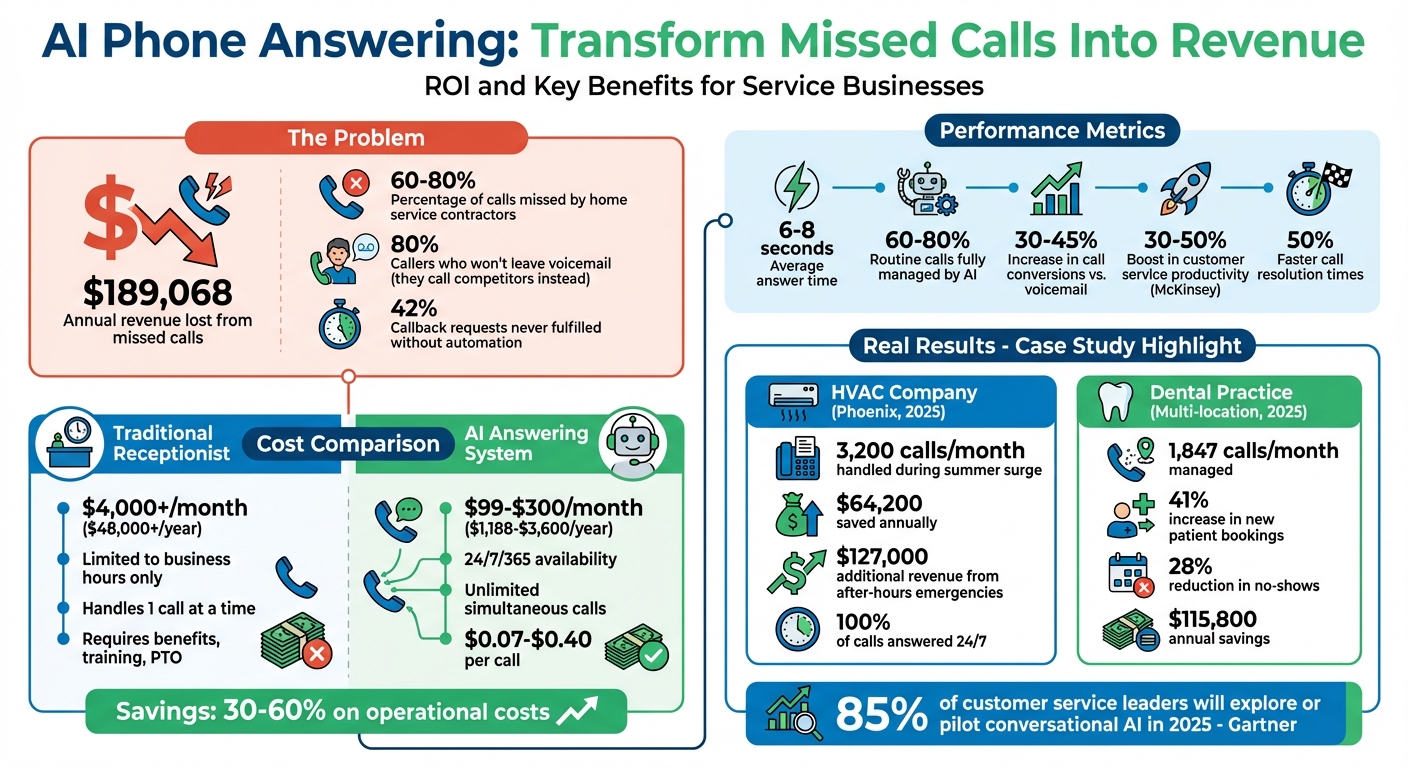
The payoff comes from calls you currently lose, such as after-hours emergencies, callers who hang up at voicemail, and callback requests nobody returns. An AI agent can answer those missed calls, book appointments, and pass real emergencies to a person.
How AI Helps Service Businesses Scale
A receptionist can take one call at a time. An AI agent can take many calls at once, so a Monday rush or a storm-day spike doesn't send callers to voicemail. It transcribes each call, identifies what the caller wants, and routes the call based on that request.
Most calls are routine: hours, pricing, service areas, and scheduling. Those are the calls to hand off. When the agent is connected to your calendar and CRM, it can book the appointment and log the lead while the caller is still on the line. That removes the manual entry and the callback step where many leads are lost.
Urgent-sounding calls need separate rules. Plenty of callers say "ASAP" or "emergency" about problems that can wait until morning. Set rules for what actually counts, like "burst pipe" or "no heat" for a plumber or HVAC shop. Those calls should go straight to the on-call tech. Everything else should get booked into the next open slot.
Pricing for AI answering typically runs $99–$300 a month. A full-time receptionist costs several thousand a month and only covers business hours. For a detailed breakdown, see live vs automated phone services.
How to Scale Your Business with AI Answering
Step 1: Review Your Current Call Volume and Gaps
Pull the last 30 days of call logs and look for three things:
- When calls go unanswered
- Which questions come up repeatedly
- How many callers use urgent language
To estimate lost revenue, multiply missed calls by your close rate and your average job value. That number tells you what the gap costs and which hours to cover first.
Step 2: Set Up Answering Agent
Pick a plan based on your call volume and the number of locations you run:
| Feature | Basic Plan | Enterprise Plan |
|---|---|---|
| Availability | 24/7 coverage | 24/7/365 coverage |
| Call Capacity | Standard volume handling | Unlimited simultaneous calls |
| Integrations | Basic calendar sync | Full CRM integration with API access |
| Voice Options | Standard AI voices | Custom brand voice training |
| Analytics | Standard call logs | Advanced dashboards with sentiment analysis |
| Support | Email and web support | Dedicated account manager |
| Best For | Small teams or solopreneurs | Multi-location or high-volume businesses |
You can take a new number or port your existing one. Then enter your hours, departments, and call preferences. Start with peak-hour overflow, and move to full 24/7 coverage once you trust how it handles calls.
Step 3: Customize Scripts and Voices
Choose a voice that fits how your business sounds on the phone. A law office might want calm and formal, while a home repair shop can be friendlier.
Map the call paths for scheduling, billing questions, and emergencies. Then upload your FAQs, pricing, and policies so the agent gives accurate answers. List any phrases it should always use or never use.
Before launch, test it with background noise, strong accents, and odd requests.
Step 4: Set Up Lead Capture and Appointment Booking
Connect the agent to Google Calendar, Outlook, Salesforce, or HubSpot. Once connected, it books in real time and logs lead details, so nobody waits on a callback.
Set a fallback for anything the agent can't handle, such as a custom project quote. It should transfer the caller to a person and pass along a summary so the caller doesn't have to repeat themselves.
Check the calendar and CRM sync weekly so errors don't pile up.
Step 5: Track Performance with Analytics
Track leads captured, appointments booked, and completed calls. Read a sample of transcripts each week, because the agent's mistakes show up there first.
To check ROI, divide the monthly cost by your average job value. For most service businesses, the result is less than one job, so a single extra booking a month covers the tool.
Managing High Call Volumes at Scale
Using Custom Dashboards for Multiple Locations
Give each location its own agent configuration with that site's hours, staff names, services, and parking notes. Keep the brand voice the same across all of them, and manage everything from one dashboard.
Local area codes help callers recognize the number. If a branch serves a Spanish-speaking area, set that agent to answer in Spanish. When one location is full, route bookings to a nearby location that has openings.
Handling Seasonal Call Increases
Seasonal peaks no longer mean hiring temps, because the agent takes simultaneous calls without putting anyone on hold.
Adjust your AI call routing keywords by season. For example, flag "AC repair" in July and "furnace failure" in January. Offer callbacks so customers keep their place in line instead of waiting on hold.
Test your setup during a quiet month. Connect scheduling tools like ServiceTitan or Dentrix directly, and watch the dashboard closely once the rush starts. For more on this, see seasonal call volume.
Conclusion
Scaling the phones used to mean adding headcount. Now you can hand routine bookings, FAQs, scheduling conflicts, and lead qualification to an agent, and keep your team on the work that needs a person. Green Hill Fence Company put it this way after moving to 24/7 AI answering:
"We instantly were able to grow our revenue because we were able to serve more customers."
FAQs
Will AI answering sound natural to my callers?
Current AI voices sound conversational enough for routine calls. Before you go live, call your own number and test it. Keep a transfer to a person available for callers who ask for one.
How does it handle real emergencies vs. urgent-sounding calls?
You decide what counts as an emergency by setting keywords and rules. Calls that match go straight to your on-call person. Urgent-sounding calls that don't match get booked into the next open slot.
What does it take to connect it to my calendar and CRM?
Native integrations with tools like Google Calendar and common CRMs usually take 30 minutes to 2 hours to set up. Custom API work typically takes 1–2 weeks. Once connected, calls, leads, and appointments are logged automatically.
Related Blog Posts
Book a walkthrough
See it handle your calls.
Book 20 minutes, or hear a sample call first.


