
First call resolution (FCR) is the share of calls where the caller's issue gets closed before they hang up, with no callback, no transfer chain, and no second call. AI phone answering raises FCR by doing three things on the live call: understanding what the caller wants, pulling the record it needs, and finishing the task instead of passing it along.
This guide covers where AI moves FCR, how to measure your baseline, and how to roll it out without creating new repeat calls.
How AI Improves First Call Resolution for Service Businesses
Most repeat calls come from three failures: bad routing, slow access to information, and handoffs. AI addresses each one. A caller who says "I need to reschedule my appointment" doesn't need a menu. The system recognizes the request and either books the new time or routes the call to someone who can.
Natural, Human-like Conversations
Language understanding lets the system read intent, urgency, and emotional cues from what the caller says. It doesn't depend on which button they press. When sentiment analysis picks up frustration, the AI can change its approach or escalate before the call goes sideways.
Context also carries across channels. If a customer starts in chat and then calls, they shouldn't have to explain again. Making callers repeat themselves is one of the most common reasons a call ends unresolved.
Instant Access to Real-time Data
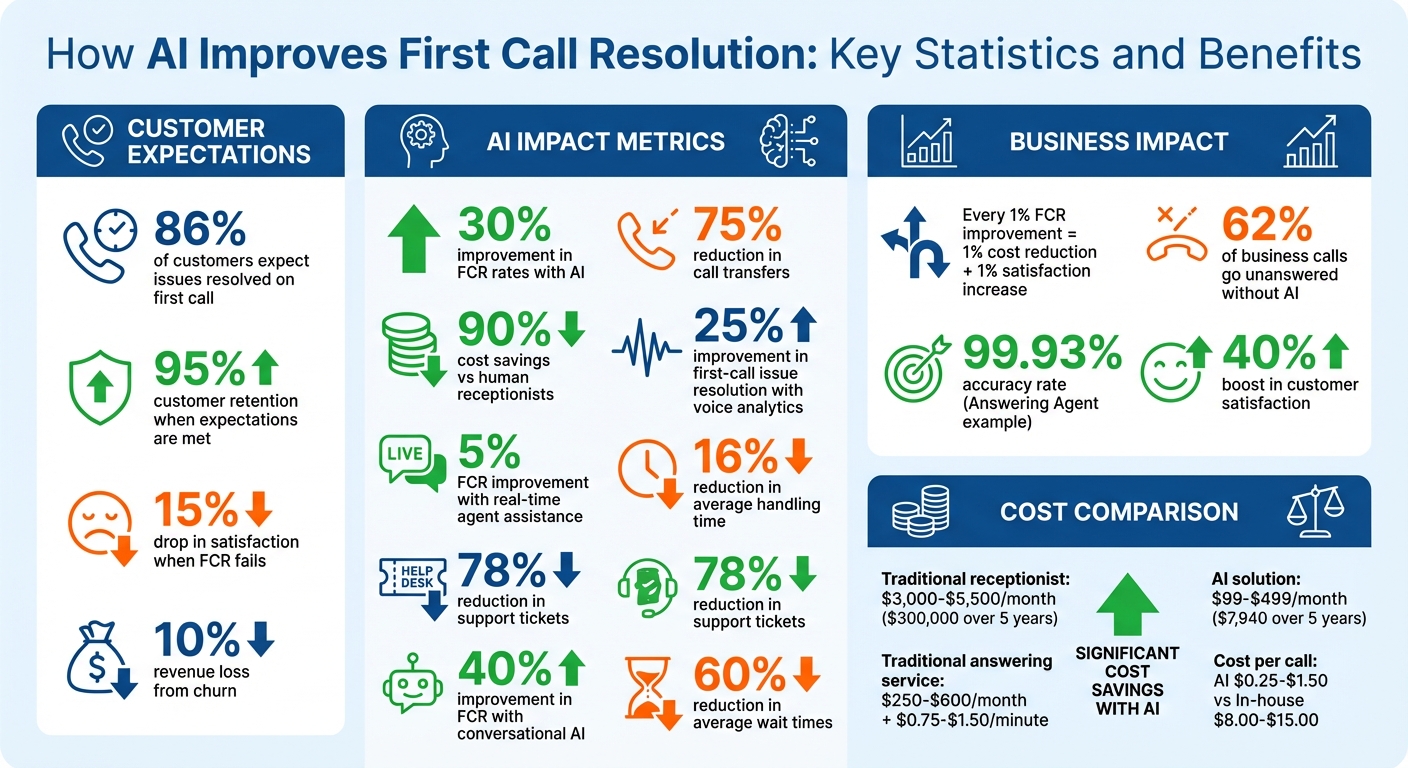
"Let me check and call you back" usually means a second call. "I can see that right now" usually means a resolved one. CRM integration gives the AI customer history, account details, and past interactions during the call, so it can verify or update information without putting anyone on hold.
The same data helps human agents. The AI can surface the right knowledge base article or troubleshooting step mid-call, so fewer calls end with an escalation or a promised callback.
Fewer Transfers and Follow-ups
Every transfer is a chance for the call to fail. An AI voice agent that can verify details, check status, update records, and book or take payment finishes the job without handing it off.
When a transfer is necessary, the next person should see the full conversation and CRM context so they never have to ask "Can you repeat that?" Conversation data also shows which call types keep producing follow-ups, so you can fix those at the first contact.
Key Features of AI Phone Answering Systems That Improve FCR
24/7 Availability and Unlimited Simultaneous Calls
A receptionist can take one call at a time. An AI system answers every call as it arrives, including the fifth call during a morning rush and the one at 11 p.m. Callers who hit hold music or voicemail often hang up and try again later, and every one of those retries counts against FCR. Round-the-clock answering also lets customers book appointments or check prices whenever they call.
Customizable Scripts and Industry-Specific Solutions
Generic scripts cause "scripted deflection": the call ends, but the problem doesn't. Industry-tuned AI knows the vocabulary. A medical office needs insurance verification handled. A home services company needs a burst pipe separated from a routine maintenance request.
Build deterministic resolution paths, meaning workflows that end with the task actually done (the CRM updated, the appointment confirmed) rather than a note for someone to follow up on. Answering Agent lets you adjust scripts and voice for your industry so predictable secondary questions get answered on the first call.
Proven Accuracy and Efficiency Metrics
A wrong answer creates a repeat call, so accuracy is an FCR metric. Answering Agent measured 99.93% accuracy across 17,724 scored calls. Whatever system you evaluate, ask for scored-call data rather than demo transcripts.
Steps to Implement AI for Improved FCR in Your Business
Step 1: Measure Your Current FCR Rate
Calculate your baseline:
(Total issues resolved on the first call ÷ Total eligible calls) × 100.
Decide up front what counts as eligible. Exclude wrong numbers, abandoned calls, and disconnects. Pull from CRM logs, call records, agent notes, and post-call surveys. Then manually audit at least 200 calls over two weeks. The audit catches patterns that dashboards miss, like repeated verification requests or a question nobody answers.
"FCR is not just about operational efficiency, it's a proxy for customer confidence." – Joe Huffnagle, VP Solution Engineering & Delivery, Parloa
Step 2: Select and Customize Your AI System
Pick a platform that connects to the tools you already use and handles your industry's call types. Train it on your own services, pricing, and policies. Write down exactly when it should escalate to a person.
Start small with FAQs and basic business phone automation, then tune it with real call data. Adjust tone and script sensitivity as you learn which calls it handles well.
Step 3: Connect AI with Your Business Tools
Link the AI to your CRM (for example Jobber or Pipedrive), your calendar (Google Calendar), and your payment processor. That lets it look up history, book appointments, and take payments during the first call. Pre-fetch the customer record when the call connects, and automate post-call steps like record updates and confirmation emails.
Use a single session identifier across phone, chat, and email so the context follows the customer.
Step 4: Track Performance and Make Adjustments
After launch, track FCR, answer accuracy, and reasons for repeat contacts. Sort reopened calls into 6–8 buckets, such as billing, technical, and authentication, so recurring gaps stand out. Watch FCR alongside Average Handle Time so speed doesn't come at the cost of resolution. Post-call surveys give you customer-confirmed FCR to check your internal numbers against.
Scaling AI for High Call Volumes and Cost Efficiency
Unlimited Call Handling During Peak Times
Peak hours and after-hours are when calls go to busy signals and voicemail, and most voicemail callers hang up without leaving a message. Cloud-based AI answers calls in parallel, so volume spikes stop turning into missed jobs and callbacks.
Cost Savings Compared to Human Receptionists
Compare a receptionist's monthly cost, or a traditional answering service's base fee plus per-minute charges, against a flat monthly AI plan. Then look at cost per call and at what one recovered job is worth to you. Run it with your own numbers using the ROI calculation guide.
Conclusion
Measure your baseline FCR. Follow a checklist for implementing AI phone answering for your most common call types. Connect the AI to your CRM and calendar, and review repeat-call reasons every week.
Let AI close the routine calls and route complex ones to the right person with full context. That combination is what gets more callers resolved the first time.
FAQs
Which calls should AI handle vs. a human agent?
AI should handle routine calls: hours, pricing, availability, scheduling, lead capture, and after-hours inquiries. People should handle complaints, escalations, and sensitive or emotional calls. That split keeps simple calls fast and gives staff time for the hard ones.
What tools should the AI integrate with first?
Start with your CRM and scheduling software. The CRM gives the AI customer details it can read and update during the call. Scheduling lets it book and confirm appointments before the caller hangs up.
How do I measure and improve my FCR after launch?
Track the percentage of issues resolved on the first contact using call logs, customer surveys, and agent reports. Use call data to find why customers call back, group those reasons, and fix the top ones through better routing, scripts, or automation. Review against a set benchmark regularly.
Related Blog Posts
Book a walkthrough
See it handle your calls.
Book 20 minutes, or hear a sample call first.


