
At 1,000+ calls a month, the intake job is to answer every call, capture the facts an attorney needs, and route urgent matters fast. A receptionist answers one line at a time and goes home at 5 PM. Most missed calls come from that gap.
AI phone systems close it. They answer in seconds, run as many calls at once as come in, qualify leads, and book consultations, then write the record into Clio or MyCase. This post covers where calls get lost, how the AI should handle intake and escalation, and what it costs next to human coverage.
The Challenges of Managing High Call Volumes in Legal Practices
Law firm call traffic is mixed. New client inquiries, existing clients asking for case updates, billing and office-hours questions, and emergencies all come in on the same line. Emergencies follow patterns: DUI arrests spike between 10 PM and 3 AM on weekends, and personal injury calls peak during the 5–7 PM commute.
About 48% of calls are non-billable administrative questions. Attorneys and paralegals still spend up to 3.2 hours a week on intake for cases that don't qualify, and each interruption costs roughly 9.5 minutes of refocus time. The average lawyer bills 2.6 hours in an 8-hour day, so those interruptions come straight out of revenue.
How Missed Calls Hurt Law Firm Revenue
Legal intake rewards the first firm to answer. 78% of potential clients hire the first attorney who responds, and leads reached within five minutes are far more likely to connect than leads reached after 30. A missed call also wastes the ad spend that produced it. Personal injury keywords can run over $400 per click.
Here is how a case gets lost. A Jacksonville personal injury firm missed a $180,000 trucking case when the client called at 6:47 PM on a Tuesday and reached voicemail. By the time the office opened at 8:00 AM, the client had signed with a competitor who picked up.
80% of callers won't leave a voicemail, so most missed calls leave no record. Firms estimate the loss at $18,000–$90,000 a year, and that assumes a modest 10% conversion rate. The damage also reaches reviews. "Never called back" and "couldn't reach them" are common complaints in negative reviews of law firms.
Limitations of Human Receptionists
37–45% of legal inquiries come in outside business hours. Staffing true 24/7 human coverage costs roughly $8,000–$15,000 per month, which most practices can't justify.
Coverage during office hours has gaps too. One receptionist means one call at a time, and 74% of callers hang up on hold. During the 12–1 PM lunch gap, about 45% of calls go unanswered. When an ad campaign works and volume jumps, you can't add reception capacity that afternoon.
"When you have a legal firm, you have high traffic for both SMS and calls. Missing even one is important - and often expensive." - Astrid Rivera, Customer Success Manager, Aloware
Traditional answering services cover nights but mostly take messages, at $200–$1,500+ per month. Virtual receptionists like Smith.ai do more, starting at $285 per month for 30 calls, but that pricing climbs quickly at high volume.
Manual intake also produces bad data: incomplete records, inconsistent notes, and late CRM entry. Intake errors contribute to about 20% of malpractice claims, so accuracy is a liability issue as well as a business one.
How AI Handles Calls at Scale for Law Firms
An AI system answers every call at once, 24/7. Callers never hit a busy signal or a hold queue, even after a campaign spike. It then handles qualification, scheduling, and AI call routing.
The bigger change is structured intake by practice area in place of generic message-taking:
- Personal injury: incident date, police report, insurance information
- Criminal defense: arrest date, charges, upcoming court dates
- Family law: matter type (divorce, custody), routed to the right attorney
Attorneys get a usable file instead of a callback request. One four-attorney PI firm cut missed calls from 30 a week to 4 after deploying AI intake. It also cut attorney time on unqualified calls by 78% and signed two extra cases in the first month from after-hours leads. Frontier Law Center cut case onboarding from 90 minutes to 40.
Lead Capture and Qualification
Set the AI to screen against your practice criteria before a call reaches an attorney. Typical screens are statute of limitations, insurance coverage, and case type. This filtering removes 40–60% of unqualified leads, which is where most of those 3.2 weekly hours go.
The AI also records every party named on the call, so conflict checks start from a complete list. A 2 AM Saturday DUI call gets captured and qualified while competitors' lines go to voicemail.
Automated Appointment Scheduling
The AI checks attorney calendars in real time through Clio, MyCase, PracticePanther, Lawmatics, or Filevine. It offers open consult slots during the call, so a callback never has to happen.
After booking, it sends SMS or email confirmations and reminders to both the prospect and the attorney to cut no-shows. It also pushes the transcript, summary, and contact details into the CRM, so the attorney walks into the consult already briefed.
Call Routing and Escalation Logic
Routine inquiries go through intake and scheduling. Urgent matters skip intake and go straight to an attorney. Write fixed escalation rules for the phrases that matter in your practice:
- "arrested," "detained," "restraining order" → instant SMS alert or live transfer to the on-call attorney
- Statute-of-limitations deadline close → immediate escalation
- Everything else → standard intake and booking
On handoff, the attorney should receive the full transcript and summary. That way the caller doesn't have to repeat the story, and the call is harder to lose at the transfer.
Integration with Law Firm Technology
Call data should land in the systems your team already uses. That means practice management (Clio, MyCase, Filevine, PracticePanther) or CRM (Lawmatics, Salesforce, HubSpot), with no retyping.
Connections are either native or built through APIs and middleware like Zapier or Make.com. Native integrations run faster. Middleware works when there's no direct connector. Goal Line Legal used a Voiceflow build through Make.com that wrote caller names, numbers, and case summaries to Google Sheets and emailed the legal team.
Stronger setups also run conflict checks during the call. They compare caller and party names against your client database and flag matches before an attorney gets involved.
Data Flow and CRM Integration
Each call should write structured fields: case type, incident date, urgency, and involved parties. Staff can then sort and prioritize leads without reading voicemail transcripts. Recordings, transcripts, and action items should attach to the matter, so the full history is there when an attorney opens the lead.
"The AI finds the coachable moments in a call within a few minutes, meaning that process takes one-third of the time." - Joe Phelps, Intake Director, The Husband & Wife Law Team (on RingCentral's AI)
For custom workflows, webhooks can update specific fields, trigger retainer agreements, or send follow-up texts when a call ends. Answering Agent supports this and has scored 99.93% accuracy across 17,724+ scored calls.
Centralized Dashboards for Call Management
A dashboard should let you search transcripts and recordings by practice area, urgency, or lead source. For example, you could pull every call from the past week that mentions "car accident." At 1,000+ calls a month, use it to spot peak hours and drop-off points, then adjust scripts or staffing.
Before signing, check security: AES-256 encryption in transit and at rest, role-based access, and SOC 2 certification.
Cost Efficiency and Measurable Performance
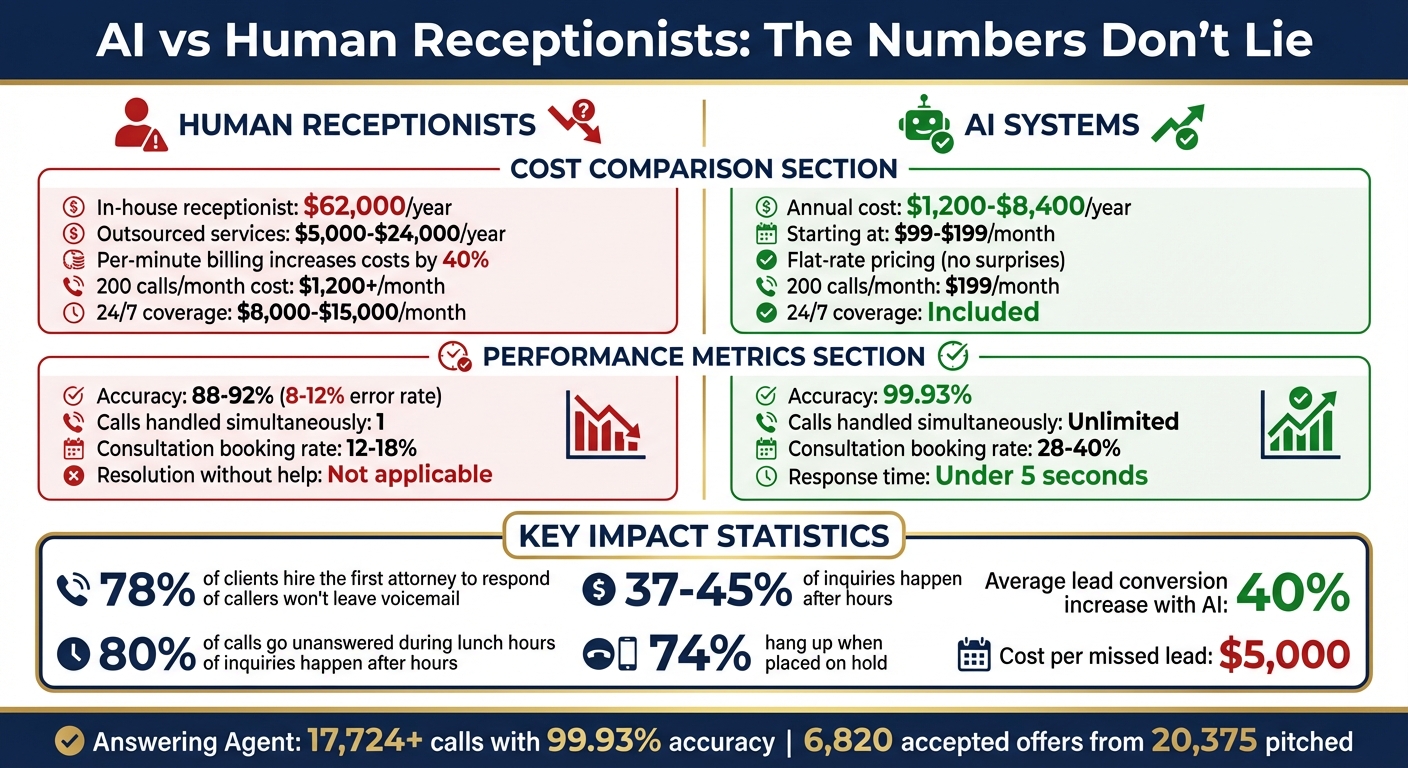
AI vs Human Receptionists for Law Firms: Cost and Performance Comparison
Cost Comparison: AI vs. Human Receptionists
| Option | Annual cost |
|---|---|
| In-house receptionist (salary, taxes, benefits, overhead) | ~$62,000 |
| Outsourced human answering service | $5,000–$24,000+ |
| AI legal answering service | $1,200–$8,400 (plans from $99–$199/month) |
Per-minute billing inflates traditional service costs by about 40% through hold time and transfers. Flat-rate AI pricing stays predictable through mass tort campaigns and accident season. At 200 calls a month averaging three minutes, Answering Agent runs about $199/month, compared with $1,200+ for a human service.
There are hidden costs as well. Firms can lose up to 15 staff hours a week to phone tag and manual data entry.
Key Metrics for AI Performance
- Error rate: human receptionists commonly run 8–12%.
- Resolution: AI resolves 90–95% of calls without a person.
- Consult booking: AI intake books 28–40% of consultations, compared with 12–18% for human receptionists.
- Conversion: many firms report roughly a 40% lift in lead conversion after switching.
Conclusion
Phone capacity caps growth at high-volume firms. AI removes that cap in four ways: it answers every call in seconds, qualifies against your criteria, books straight onto attorney calendars, and escalates arrests and restraining orders through emergency routing logic. For the math on revenue lost to missed calls, compare your after-hours volume against your average case value.
"The real question isn't 'Can I afford $199/month?' It's 'Can I afford to keep losing $5,000 per missed client?'" - NextPhone Proprietary Analysis
FAQs
Will callers know it’s AI?
Most won't. Current systems, including Answering Agent, speak in a natural conversational voice that is hard to tell apart from a live receptionist.
Can it handle conflict checks and save intake information to my CRM?
Yes. The AI records every party named on the call and checks them against your client database. It then writes the intake fields directly into your CRM or practice management system.
What happens if a caller has an emergency?
The AI answers 24/7. When a caller uses an escalation phrase such as "arrested" or "restraining order," it skips standard intake and sends an SMS alert or live-transfers the call to the on-call attorney.
Related Blog Posts
Book a walkthrough
See it handle your calls.
Book 20 minutes, or hear a sample call first.


