
Dispatch has one job: get the right technician, with the right skills, to the right job on time, with as little driving as possible. Manual scheduling breaks down when traffic, job overruns, and emergency calls change the board faster than a dispatcher can recalculate it.
AI dispatch tools rebuild the plan in seconds whenever conditions change. This post covers what changes when you switch, how the tools make decisions, and how to roll one out.
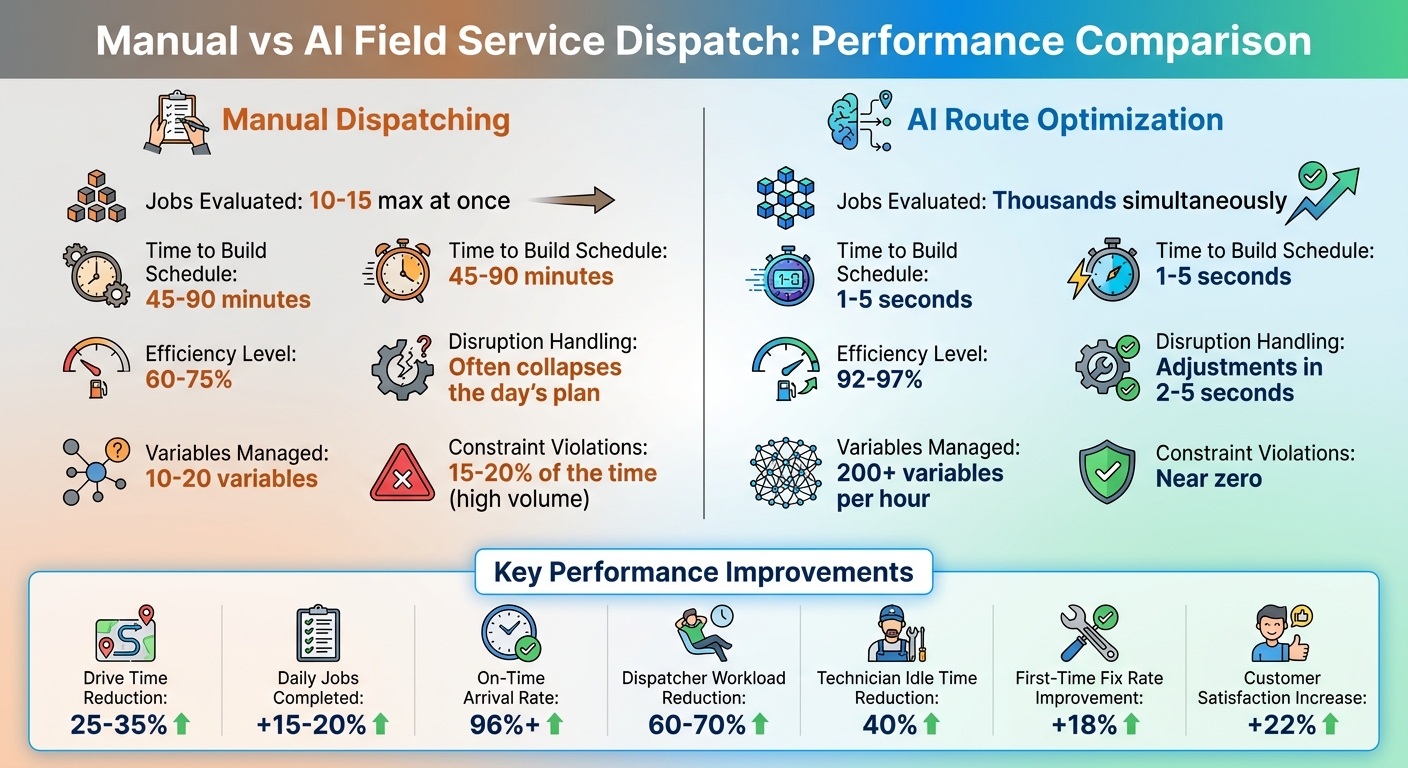
Key Benefits of AI in Field Service Dispatch
Teams that move from manual to AI dispatch report these results:
- Drive time drops 25–35%. On a 100-technician team, that frees about 60 technician-hours a day, roughly the output of 7–8 technicians you didn't hire. See the route optimization ROI breakdown.
- Each technician completes 15–20% more jobs a day with the same headcount.
- On-time arrivals reach 96% or better.
- Dispatchers spend 60–70% less time on routine rescheduling work.
Better Schedule Optimization
An AI system builds a full day's schedule in 1–5 seconds. It weighs more than 50 factors, including certifications, traffic, job complexity, and equipment availability.
| Feature | Manual Dispatcher | AI Route Optimization |
|---|---|---|
| Jobs Evaluated | 10–15 max at once | Thousands simultaneously |
| Time to Build Schedule | 45–90 minutes | 1–5 seconds |
| Efficiency Level | 60–75% | 92–97% |
| Disruption Handling | Often collapses the day's plan | Adjustments in 2–5 seconds |
"Route planning answers 'how do I get from A to B?' Routing optimization answers 'who should go where, in what order, given all the constraints we operate under?'"
— Emiel Sercu, Timefold
Less Downtime and Higher Productivity
AI scheduling cuts technician idle time by about 40%. When EnergyAid, a solar operations company, adopted automated work order management in January 2026, it grew from 20 work orders a week to more than 500.
Balanced workloads also cut overtime, which matters because 66% of technicians report burnout. High-performing field service teams are 2.6 times more likely to use intelligent scheduling tools.
Better Customer Satisfaction
The system recalculates ETAs in real time, so customers get accurate arrival windows. Skill-based matching sends a technician who can fix the problem on the first visit, which cuts callbacks. When an emergency comes in, the system slots it into the technician best positioned to take it without breaking the other appointments.
"The technician 22 minutes away isn't the 'wrong' choice. It's the choice that accounts for certification, workload, customer history, and downstream impact."
— Komal Gurbani, FieldCamp
How AI Optimizes Dispatch Processes
AI drops the "send the closest technician" rule and balances several goals at once. It weighs more than 200 variables every hour. A human dispatcher can track 10–20. At high volume, manual dispatchers break operating constraints 15–20% of the time because the math gets too complex to hold in their heads.
Real-Time Data and Predictive Analytics
Live GPS and traffic feeds replace static map estimates. Two events trigger a re-plan: a job running 30+ minutes over, or traffic adding more than 15 minutes. The system then reshuffles only the affected part of the schedule, in 2–5 seconds.
Machine learning predicts job duration from past performance, equipment age, maintenance records, and technician experience. Predictions hit 70–80% accuracy within 60 days and pass 90% after 7–12 months.
The system also flags no-show risk, such as appointments booked far out or first-time customers. No-shows and late cancellations cost field service teams 15–20% of appointments. Dispatchers can pair a high-risk slot with a lower-priority job nearby, so the technician still has work if the customer doesn't show.
Skill-Based Technician Matching
Matching skills to jobs prevents compliance problems and second truck rolls. Most systems follow three rules:
- Any technician can take a job with no special skill requirements.
- A technician without certifications can only take jobs with no special requirements.
- A job with skill requirements goes only to a technician who meets all of them. Partial matches are excluded.
Hard constraints, such as EPA 608 certification or a gas-line license, remove unqualified technicians from the pool entirely. Soft constraints get scored instead. For example, the system can prefer a senior technician for a complex repair and a junior one for routine maintenance.
Dynamic Rescheduling and Flexibility
When something breaks the plan, the system re-optimizes only the jobs and technicians affected. Confirmed appointments stay locked in their promised windows. Routes and customer ETAs update automatically, with no dispatcher involvement.
The system also stops searching once further gains fall below 2%. You get a schedule that is about 96% optimized in seconds, and no time goes to chasing the last few points.
Integration of AI Phone Answering in Field Service Dispatch
Dispatch quality depends on what gets captured when the customer calls. An AI phone system like Answering Agent collects structured job details on the call and sends them straight to the scheduling engine. Nobody has to re-key them.
Capturing and Managing Service Requests
The agent answers around the clock and asks about urgency, equipment type, and service history. Requests like "my AC isn't cooling" or "I need someone with EPA 608 certification" land in the queue with the details the scheduler needs to match a technician.
Automated Appointment Booking
Automated booking cuts the average booking time from 17 minutes to under 5. The system checks technician availability and required certifications, such as HVAC or gas-line licenses, before it confirms the slot on the call. More on this in AI phone scheduling for service businesses.
Accuracy and Cost Efficiency
Answering Agent has handled 17,724 scored calls at 99.93% accuracy. That accuracy matters because a wrong intake detail sends the wrong technician.
Automated confirmations and reminders cut no-shows by 30–40%. Combined with optimized dispatch, that means fewer wasted trips.
Steps to Implement AI Dispatch Optimization
Assessing Business Needs and Data Readiness
Manual routing usually stops working at 6–10 technicians. Beyond that, the number of possible routes grows faster than anyone can manage by hand.
Audit your asset data before you buy anything. Many companies can't name the make, model, or serial number for half their installed equipment, and the AI can only work with data you actually have. Consolidate fragmented systems into one database first.
"Successful organizations build robust operational field service data foundations before targeting specific AI in field service applications for fast, measurable results."
— Geotab Team
Compare your current performance against your SLAs. Start where the gap is widest, whether that's booking, routing, or predictive maintenance.
Selecting the Right AI Tools
Check each tool for these capabilities:
- Complex routing (CVRPTW+). It should handle technician availability, shift hours, and appointment windows together.
- Hard vs. soft constraints. Certifications and legal rules must be absolute. Travel time and similar preferences should be weighted.
- Real-time re-optimization. When a job runs late or traffic shifts, it should re-plan only the affected routes, within seconds.
- Machine learning on your history. It should predict job duration, flag likely no-shows, and track first-time fix rates.
Training, Testing, and Measuring Success
Run a pilot before a full rollout, and involve field technicians from day one. They'll spot assignments that look fine on paper and fail on the road.
Start with the vendor's default soft-constraint weights, then adjust them by 50–100% based on pilot results. Don't hard-code preferences like same-day service. Give them a high penalty weight (5,000–10,000) instead, so the system can fall back when a same-day slot isn't realistic.
Track first-time fix rate, total drive time, jobs per technician, and SLA compliance. Companies using AI in field service report 18% higher first-time fix rates and 22% higher customer satisfaction. During rollout, review any assignment that looks wrong, and revisit the weights each quarter to account for seasonal changes.
FAQs
What data do I need before using AI dispatch?
You need technician skills and certifications, live GPS locations, availability, and current workloads. For each job, you need location, urgency, expected duration, and customer preferences. You also need your rules: required skills, time windows, and operating constraints. Keep this data clean, because bad inputs produce bad schedules.
How quickly can AI reschedule when plans change?
In 2–5 seconds. When traffic backs up or a technician becomes unavailable, the system re-plans only the affected jobs and leaves confirmed appointments in place.
How does AI phone answering support dispatch?
It answers calls 24/7 and captures urgency, equipment, and skill requirements. It then books the job directly into the scheduling system, which assigns a technician based on skills, location, and priority.
Related Blog Posts
Book a walkthrough
See it handle your calls.
Book 20 minutes, or hear a sample call first.


