
Securing your AI system starts with choosing the right authentication protocols. This is a critical step in your AI implementation checklist for business operations. SAML, OAuth, and OpenID Connect each play a unique role in protecting access, ensuring compliance, and enabling seamless user experiences. Here's what you need to know:
- SAML 2.0: Ideal for enterprise Single Sign-On (SSO) and legacy systems, especially in industries like healthcare and finance.
- OAuth 2.0: Focuses on authorization, allowing systems to access external APIs securely (e.g., calendars, CRMs).
- OpenID Connect (OIDC): Built for modern, cloud-based and mobile applications, combining authentication and ease of integration.
Key benefits include:
- Centralized identity management via your Identity Provider (IdP).
- Role-based access control to ensure users only access what they need.
- Automated provisioning and de-provisioning with SCIM 2.0.
- Enhanced security with features like token rotation, PKCE, and certificate management.
Quick Comparison Table
| Feature | SAML 2.0 | OAuth 2.0 | OpenID Connect (OIDC) |
|---|---|---|---|
| Purpose | Authentication (SSO) | Authorization | Authentication + Authorization |
| Data Format | XML | JSON or Opaque Tokens | JSON Web Tokens (JWT) |
| Best Use Case | Corporate SSO, admin dashboards | API access, external services | Mobile apps, modern interfaces |
| Implementation | Complex (XML, certs) | Moderate | Easier (SDK support) |
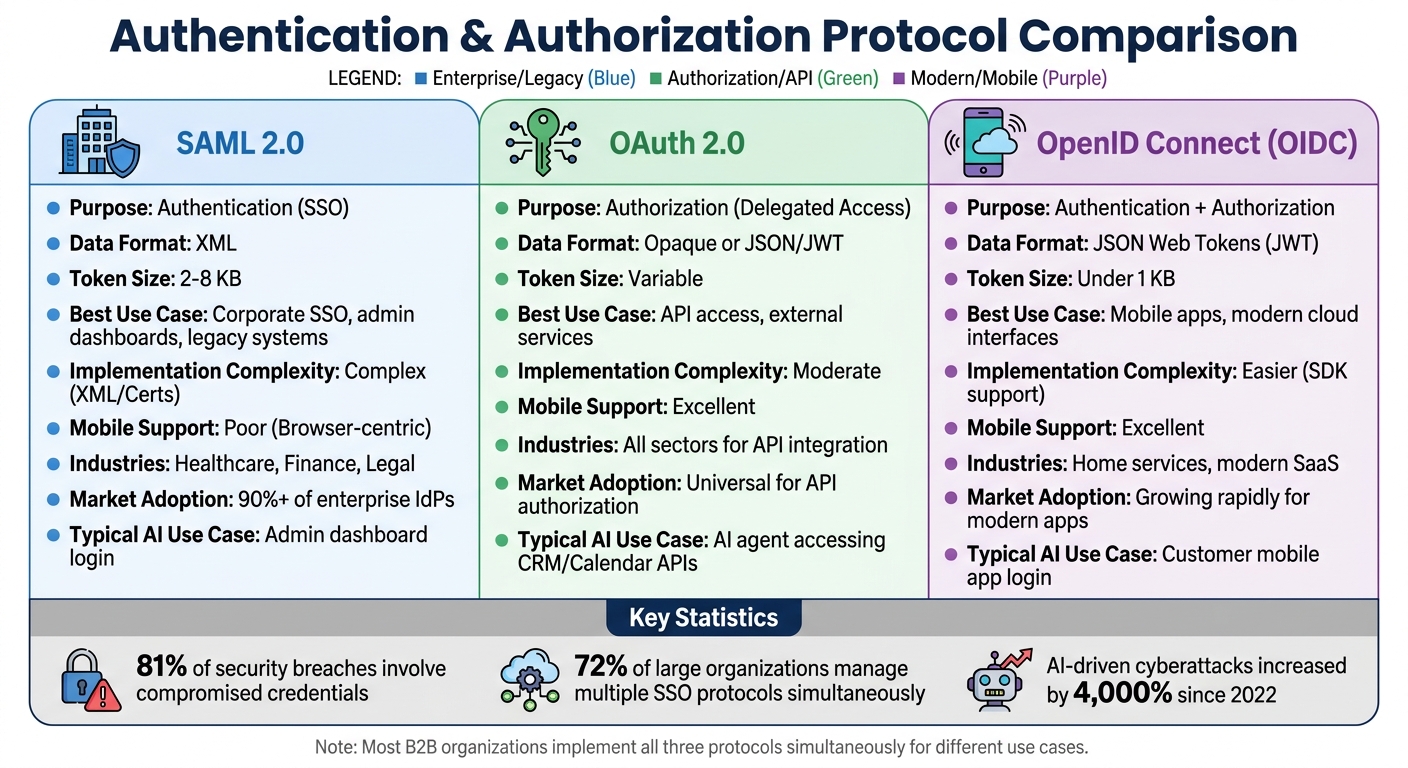
SAML vs OAuth vs OpenID Connect Protocol Comparison Chart
Single Sign-On (SSO) Explained | SAML vs OAuth vs OpenID Connect | #systemdesign #sso
sbb-itb-abfc69c
Prerequisites for Integration
Before setting up your AI phone system, it's crucial to ensure your environment meets the necessary security and compatibility standards for smooth SSO integration.
Check System Compatibility
Start by confirming that your AI system supports the required protocol-specific formats. For SAML 2.0, this means handling XML assertions and X.509 certificates for signing and encrypting data. On the other hand, OpenID Connect 1.0 relies on JSON Web Tokens (JWT) and works through RESTful APIs.
Make sure all endpoints use HTTPS and can manage multiple certificates simultaneously to avoid service interruptions. If you're working with OpenID Connect, the system should support Proof Key for Code Exchange (PKCE) to guard against authorization code interception.
For SAML integrations, verify that your system can handle XML metadata files containing entity IDs and SSO URLs. OpenID Connect systems, meanwhile, should allow for automated discovery using the .well-known/openid-configuration endpoint. Additionally, check if your AI phone system supports Just-in-Time (JIT) provisioning or SCIM 2.0 (System for Cross-domain Identity Management) to automate user account creation and deactivation based on identity provider data.
Once compatibility is established, focus on selecting the protocol that best suits your system's infrastructure and operational needs.
Determine Which Protocol to Use
The choice of protocol depends on your system's architecture and specific use case:
- SAML 2.0 is ideal for enterprise applications, legacy systems, and integrations with Active Directory or LDAP. It's commonly used in B2B environments and industries like finance and healthcare, where compliance is critical.
- OpenID Connect (OIDC) works best for modern, cloud-based architectures, mobile apps, and customer-facing platforms. It's often recommended for newer agent platforms due to its ease of debugging, strong library support, and compatibility with mobile devices. If your system, like an Answering Agent, operates across multiple devices, OIDC might be the better choice.
- OAuth 2.0, while not an authentication protocol, is useful for authorization. Use it when your AI system needs to access external APIs - like syncing with a calendar for scheduling - or for machine-to-machine communication via the Client Credentials flow.
Many organizations use all three protocols simultaneously, tailoring each to different application needs within their infrastructure.
After choosing the right protocol, ensure your identity provider setup aligns with the integration requirements.
Review Your Identity Providers
Take inventory of your identity providers (IdPs), noting key details like metadata URLs and configuration specifics. Whether you're using Okta, Microsoft Entra ID (formerly Azure AD), Auth0, or Ping Identity, each provider has unique features and supported protocols that will influence your integration strategy.
For OpenID Connect, locate your IdP's metadata URL. For SAML, download the metadata XML file. Create a mapping table to align your corporate groups with specific AI agent permissions. Use immutable identifiers like Object IDs instead of display names to avoid permission-related errors.
Set up a dedicated group mailbox to receive notifications about certificate expirations. Since SAML signing certificates often expire annually, missing a renewal can result in authentication outages. For added security, consider storing certificates in Hardware Security Modules (HSMs) or cloud-managed key services.
If your IdP supports SCIM 2.0, enable it for automated provisioning. This ensures that when an employee leaves your organization, their access to the AI phone system is immediately revoked across all connected systems. Automated de-provisioning is critical for maintaining security.
Integration Checklists
Once you've confirmed compatibility and selected a protocol, it's time to follow the necessary steps to securely integrate your AI phone system. Each protocol has its own set of steps to establish a secure connection between your identity provider (IdP) and your AI phone system.
SAML 2.0 Integration Checklist
SAML 2.0 is widely used for enterprise integrations, with more than 90% of enterprise IdPs supporting it. It establishes trust through metadata exchange and the use of X.509 certificates.
- Obtain the IdP's metadata XML file: This file contains the Entity ID, SSO URL, and public certificate.
- Generate Service Provider (SP) metadata: Create an X.509 certificate for signing. Ensure your SP Entity ID and Assertion Consumer Service (ACS) URL are registered with the IdP. The ACS URL must use HTTPS.
- Validate XML signatures server-side: This step is critical. A common vulnerability in SAML setups is failing to validate XML signatures on assertions. Enable protections against XML External Entity (XXE) and XML Signature Wrapping (XSW) attacks, and use SHA-256 instead of outdated algorithms like SHA-1.
- Map IdP attributes: Attributes like email and name should be mapped to local user sessions. Allow for a clock skew of 2–3 minutes (120–180 seconds) to account for minor time differences between servers.
- Test flows: Ensure both SP-initiated and IdP-initiated flows work correctly.
"Building a service provider (SP) isn't just about the code; it's about navigating the trust relationship between your app and their identity provider (idp)."
– Devraj Patel, Founder & Identity Architect, SSOJet
Make sure every SAML assertion is signed and validated before proceeding.
OAuth 2.0 Integration Checklist
OAuth 2.0 is designed for API authorization, allowing your AI phone system to access external resources like calendars for scheduling via access tokens.
- Register your application with the IdP: Obtain a client_id and client_secret. Store the client secret securely using encryption, and never expose it in public or client-side applications.
- Define authorization scopes: Specify the required scopes, such as profile or email, and register all redirect URIs with the IdP.
- Use the Authorization Code flow: Exchange authorization codes for tokens securely.
- Implement PKCE: This prevents code injection attacks.
- Validate tokens: Check the signature, expiration, audience, and issuer of tokens.
- Secure cookies: Use httpOnly, Secure, and properly configured cookies to minimize XSS risks.
- Test error scenarios: Simulate situations like tampered signatures, expired tokens, and incorrect audiences to ensure your system rejects invalid requests with proper 401 errors.
OpenID Connect Integration Checklist
OpenID Connect (OIDC) builds on OAuth 2.0 by adding an identity layer using JSON Web Tokens (JWT) for authentication. It's a strong choice for modern, cloud-based AI phone systems because of its debugging ease, library support, and compatibility with mobile platforms.
- Fetch the OIDC Discovery document: Retrieve it from the "/.well-known/openid-configuration" endpoint to automatically locate the authorization, token, and UserInfo endpoints.
- Register your RP with the IdP: Configure your client_id and ensure redirect URIs match.
- Generate a nonce and state parameter: These protect against replay and CSRF attacks.
- Exchange the code for an ID Token: Validate the token's signature, issuer, and audience. If needed, use the UserInfo endpoint to get additional user profile details.
- Use the Authorization Code flow with PKCE: This applies to all application types, whether server-side or client-based.
- Enable dynamic metadata updates: Configure your system to automatically pull metadata from the IdP's URL. This ensures new certificates are applied before old ones expire.
This method ensures that systems like Answering Agent maintain secure and seamless authentication across web dashboards, mobile apps, and API integrations. This level of security is essential when handling missed calls and sensitive customer data automatically.
SAML vs OAuth vs OpenID Connect
Differences and Use Cases
When it comes to securing your AI phone system, understanding the differences between SAML, OAuth, and OpenID Connect (OIDC) is crucial. SAML and OpenID Connect focus on verifying who a user is, while OAuth 2.0 focuses on verifying what a user can access.
"SAML answers the question 'Who is this user?' OAuth answers the question 'What is this app allowed to do?'"
– WorkOS Guides
These protocols differ in their design and purpose. SAML 2.0, an older standard, is tailored for browser-based enterprise single sign-on (SSO), relying on XML assertions that can range from 2–8 KB in size. On the other hand, OpenID Connect is a modern identity layer built on top of OAuth 2.0, using compact JSON Web Tokens (JWTs) that are typically under 1 KB. This makes OIDC a better fit for high-traffic AI phone systems that need to handle thousands of simultaneous requests efficiently.
Here’s how these protocols are applied in a practical setting:
- SAML: Ideal for enterprise clients needing corporate SSO, such as logging into admin dashboards.
- OIDC: Suited for modern web and mobile interfaces, enabling customers to manage AI answering service settings.
- OAuth 2.0: Used for delegated API access, such as allowing AI agents to book appointments in Google Calendar or retrieve customer information from CRM systems.
This breakdown highlights how each protocol serves distinct purposes, paving the way for practical integration steps.
| Feature | SAML 2.0 | OAuth 2.0 | OpenID Connect (OIDC) |
|---|---|---|---|
| Primary Purpose | Enterprise SSO / Authentication | Delegated Authorization | Modern Authentication |
| Data Format | XML | Opaque or JSON/JWT | JSON / JWT |
| Mobile Support | Poor (Browser-centric) | Excellent | Excellent |
| Implementation | Complex (XML/Certs) | Moderate | Low to Moderate (SDK-heavy) |
| Typical AI Use Case | Admin dashboard login | AI agent accessing CRM/Calendar APIs | Customer mobile app login |
"If you have a mobile app, OIDC is not optional. Trying to graft SAML onto mobile is one of the fastest ways to create a security incident."
– David Brown, Head of B2B Marketing, SSOJet
Industries like healthcare and legal often rely on SAML to meet HIPAA compliance requirements, while sectors such as home services prefer OIDC for its mobile-first capabilities and support for social logins. No matter the industry, OAuth 2.0 plays a vital role whenever your AI system needs to interact with external applications on behalf of users.
Best Practices for Using Multiple Protocols
Using Identity Brokers
An identity broker acts as a central hub for protocol translation, allowing your AI phone system to handle both SAML for enterprise clients and OIDC for mobile apps through a unified internal token format.
"The trick is coexistence, not cutover. Put an identity broker or protocol proxy in front of your app that accepts both SAML and OIDC and emits a single normalized internal token format."
– Devraj Patel, Founder & Identity Architect, SSOJet
This approach is particularly useful for service-oriented businesses. For instance, a medical practice might rely on SAML for its enterprise EHR system while using OIDC for mobile access to Answering Agent. The identity broker seamlessly converts SAML AttributeStatement values into OIDC claims and maps SAML NameIDs to OIDC sub claims. With 72% of large organizations now managing multiple SSO protocols simultaneously, this hybrid model has become the norm across industries.
Before deploying an identity broker, it's essential to create an inventory of each tenant's NameID formats, attribute mappings, and certificate expiration dates. This preparation minimizes authentication issues during the transition and ensures the broker can accurately translate between protocols. Once implemented, maintaining robust security and performance monitoring becomes critical to protecting these integrations.
Security and Performance Monitoring
Although identity brokers simplify protocol management, ongoing monitoring is vital to ensure both security and performance. Set up audit logs to track login attempts, token events, session changes, and SSO configuration updates. This is especially important given that 81% of security breaches involve compromised credentials.
Token lifecycle management is another key area. ID and access tokens should expire within 15–60 minutes, while refresh tokens can have a longer lifespan of 30–90 days if you use token rotation. This process involves issuing a new refresh token and invalidating the old one with each use, enhancing security.
Certificate management also varies by protocol. SAML requires manual rotation of X.509 certificates, often with a 30-day overlap to prevent service disruptions. In contrast, OIDC supports automatic key rotation via jwks_uri, which reduces manual effort.
To strengthen authentication, apply Multi-Factor Authentication (MFA) and adaptive access policies at the identity provider level. This ensures uniform security whether users log in through SAML or OIDC. With AI-driven cyberattacks increasing by 4,000% since 2022, consider leveraging machine learning to analyze authentication logs. Such systems can detect unusual access patterns - like logins from unexpected locations - and immediately terminate suspicious sessions.
"In B2B, it is always 'and.' You are not going to pick one protocol. You are going to ship all three, plus SCIM, plus MFA, plus audit logging."
– Devraj Patel, Founder & Identity Architect, SSOJet
Conclusion
Key Takeaways
To secure your AI phone system, it’s essential to integrate SAML, OAuth, and OpenID Connect effectively. Each protocol serves a specific purpose:
- SAML 2.0: Best suited for enterprise environments, especially for legacy systems and industries like healthcare and finance that require strict compliance measures.
- OpenID Connect: Offers a lightweight, developer-friendly solution tailored for modern web and mobile applications.
- OAuth 2.0: Manages delegated authorization, allowing AI agents to securely interact with third-party APIs (like CRMs) without sharing sensitive credentials.
Why is this critical? With 81% of security breaches tied to compromised credentials and AI-driven attacks increasing by 4,000% since 2022, strong authentication isn’t optional - it’s essential. Enterprise SSO simplifies identity management, enables granular role-based access, and ensures audit trails are tied to actual user identities rather than anonymous API keys. This is particularly crucial for service-heavy businesses, where high call volumes mean even one compromised credential could lead to a significant data breach.
"In B2B, it is always 'and.' You are going to ship all three [protocols], plus SCIM, plus MFA, plus audit logging - because your customers will demand it." – Devraj Patel, Founder & Identity Architect, SSOJet
By following this checklist-based approach, you can ensure these protocols are implemented correctly, forming a secure foundation for your AI phone system.
How Answering Agent Supports Secure Integration
Answering Agent applies these principles to deliver secure and efficient integrations. Our platform supports SAML, OAuth, and OpenID Connect, handling unlimited simultaneous calls with 17,724+ scored calls at 99.93% accuracy - around the clock.
Service-oriented businesses like medical practices and law firms rely on Answering Agent for its secure, multi-tenant isolation and role-based access. For instance, when the system books appointments, captures leads, or interacts with CRM data, OAuth 2.0 ensures external services identify real users rather than shared accounts. This approach not only increases accountability but also provides the robust audit trails needed for regulatory compliance.
FAQs
Should I use SAML or OIDC for SSO in my AI phone system?
Choosing between SAML and OpenID Connect (OIDC) for Single Sign-On (SSO) largely depends on what you're looking to achieve.
SAML works best for enterprise-level web-based SSO, particularly when dealing with legacy systems or industries with strict regulations. On the other hand, OIDC, which is built on OAuth 2.0, is more modern, easier to implement, and a better fit for mobile applications and APIs.
When it comes to AI phone systems, OIDC is often the go-to choice for its flexibility and scalability. However, if you're working with a setup heavily reliant on older systems, SAML might be the better option.
How do I prevent SSO outages from certificate or key rotation?
To prevent SSO outages during certificate or key rotation, it's essential to stay proactive. Regularly check the validity of your certificates and keys to ensure they aren't close to expiring or at risk of being revoked. Automating the rotation process with scheduled updates can save time and reduce human error. Always test new certificates in a staging environment before deploying them to production. Additionally, make sure the clocks on your Identity Provider (IdP) and Service Provider (SP) are properly synchronized to avoid time-related issues. Implementing structured logging for trust fields and metadata can also be a lifesaver, helping you quickly identify and resolve any problems that arise during rotation.
When should I use SCIM instead of Just-in-Time (JIT) provisioning?
When it comes to managing user identities and attributes efficiently, SCIM (System for Cross-domain Identity Management) is a solid choice for automating user provisioning and de-provisioning across various applications. It provides a standardized way to handle these processes, reducing manual effort and ensuring consistency.
On the other hand, JIT provisioning (Just-In-Time provisioning) is perfect for situations where user accounts need to be created dynamically during their first login. This method relies on SAML or OIDC assertions to generate accounts on the spot, making it an excellent option for environments where users require immediate access without any pre-provisioning setup.
Related Blog Posts
Book a walkthrough
See it handle your calls.
Book 20 minutes, or hear a sample call first.
Ready to see it handle your calls?
Book a walkthrough, or hear a short sample call first.
Related Articles

Car Wash Membership Phone Calls: A Desk Guide
A desk guide to the membership phone calls car washes take, with links to the deep how-tos.

How to Handle Pickleball Guest Fee Calls
Handle pickleball guest fee calls by identifying the visit type, quoting the written fee sheet, and confirming payment, court access, and check-in requirements.

How to Handle Car Wash Membership Pause Calls
Handle car wash membership pause calls with written hold rules, clear dates, billing and plate status, and a reopen note the next shift can use.