
An AI phone system does not get better on its own. It improves only when someone reviews what happened on calls, finds the patterns, and ships fixes safely. That cycle is the feedback loop:
- Monitor interactions: Track AI responses and caller behavior.
- Evaluate performance: Score responses against your quality benchmarks.
- Identify issues: Look for repeated errors, not one-off bad calls.
- Apply updates: Change prompts or the knowledge base, test the change, then roll it out.
A working loop means fewer repeat callers, higher first-call resolution, and fixes that don't break something else.
Setting Goals and KPIs for Feedback Loops
Decide what success means before you collect any feedback. Tie each goal to a business outcome such as booked appointments, lead quality, or retention. Technical stats come second.
Aligning Feedback Goals with Business Outcomes
Weight your scorecard by what costs you money. Resolution accuracy might carry about 30% of the score and the greeting about 10%, because a wrong answer loses customers and an imperfect opening line rarely does.
What counts depends on the business. A home service company should measure whether the AI converts missed calls to booked appointments. A medical practice should measure whether the AI captures complete patient information, even if that makes calls a little longer.
Key Metrics to Track
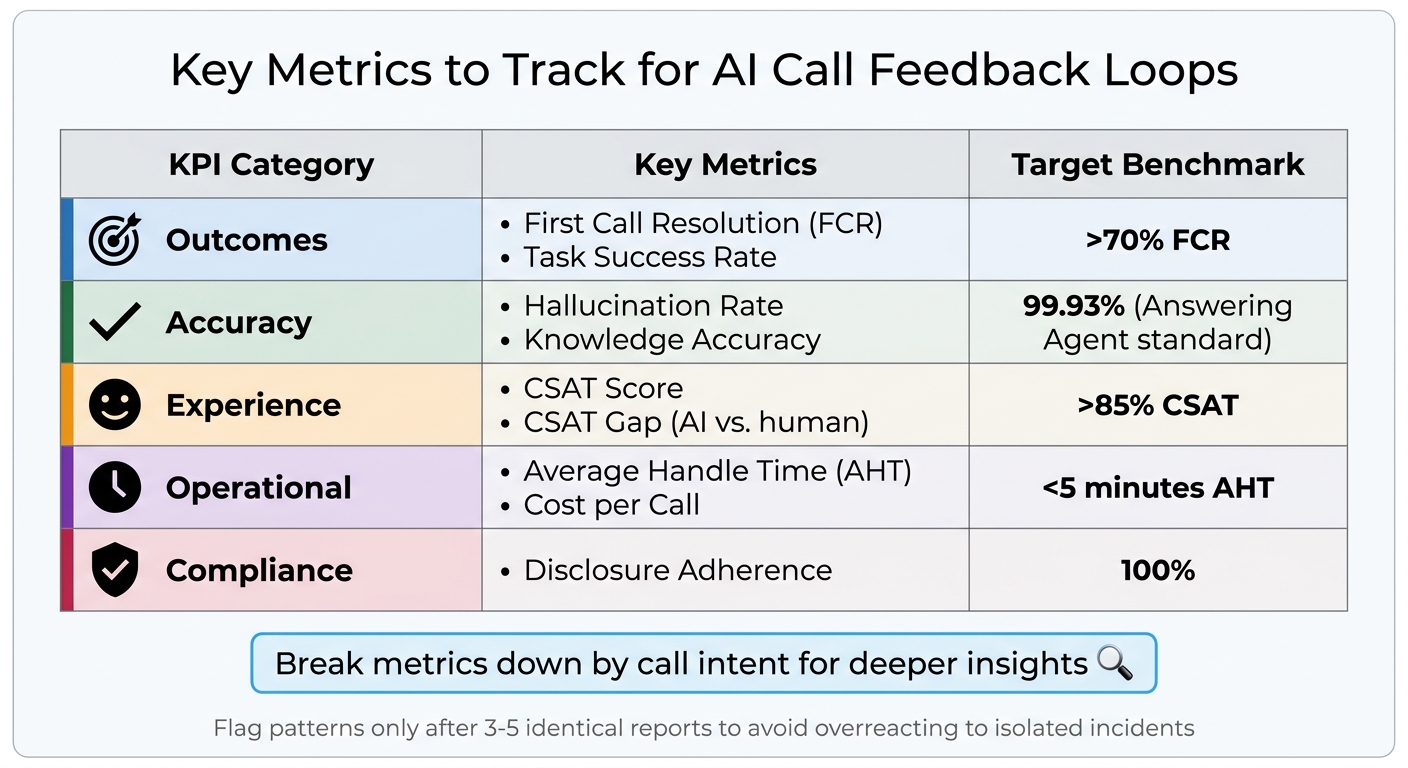
| KPI Category | Key Metrics | Target Benchmark |
|---|---|---|
| Outcomes | First Call Resolution (FCR), Task Success Rate | >70% FCR |
| Accuracy | Hallucination Rate, Knowledge Accuracy | Near-zero hallucinations |
| Experience | CSAT Score, CSAT Gap (AI vs. human) | >85% CSAT |
| Operational | Average Handle Time (AHT), Cost per Call | <5 minutes AHT |
| Compliance | Disclosure Adherence | 100% |
Break every metric down by call intent. An overall average can hide a lot. The AI might book appointments successfully 85% of the time and resolve billing questions only 45% of the time, and the billing number shows you where to work first.
Track two AI-specific rates separately:
- Hallucination rate: how often the AI invents information.
- Self-aware failure rate: how often the AI admits it can't help.
The second is a safe failure. The first costs you customers.
How to Collect Feedback Effectively
Combine automated checks with human review. Automation alone misses judgment calls, such as whether the tone fit a sensitive call. Human review alone covers too few calls to show patterns. Use a checklist for implementing AI phone answering so you capture the right data from the start.
Using Human and System Feedback Together
Few callers leave a rating, so collect two kinds of signal:
- Explicit signals: thumbs up/down and star ratings.
- Implicit signals: hang-ups mid-conversation, repeated questions, and requests to "speak to a human."
Implicit signals fill the gap left by missing ratings.
Manual QA usually covers 1–4% of calls. Spend that time on the calls automation flags, such as low satisfaction scores, compliance risk, or escalations. Don't spend it on a random sample.
Log every interaction:
- The caller's question and the AI's response
- The call context
- The prompt version in use
- Latency and cost
With these logs you can replay any call to debug it. Run consistency checks on the logs after each call ends so the checks never slow down a live conversation.
Focusing on High-Priority Issues First
Wait for 3 to 5 identical reports before you act on an issue. A single thumbs-down is noise.
Tag feedback by type, such as "hallucination," "wrong answer," "incomplete data," or "compliance violation." Then rank the tags by frequency and business impact. If the AI misquotes prices on 60 calls a week and phrases something awkwardly on 5, fix the pricing first. Treat hallucinations and high-volume errors as urgent. Incomplete answers can wait until a pattern shows up.
Set escalation triggers for high-stakes calls. Keywords like "emergency," "complaint," or "manager" should route a call to human review. Do the same for billing disputes, cancellations, and legally required disclosures.
Track your feedback-negative rate, the share of conversations that get negative feedback. If it doesn't fall after several review cycles, adjust your tags or thresholds.
Building Safe and Scalable Feedback Systems
Treat every update like a production deploy. One bad knowledge-base entry can corrupt every answer that depends on it. Version your changes, validate them, and keep a way to roll them back.
Protecting AI Memory and Knowledge During Updates
Roll out every change in stages:
- Test the change in isolation against known failure cases.
- Send it to 5–10% of live traffic.
- Watch accuracy, escalation, and task success.
- Roll back immediately if any of them drops.
Store prompts, knowledge, and routing logic as timestamped versions so you can revert quickly. Add validation gates that block any update that fails your latency, safety, or task-success thresholds. Keep your top-level business rules in a read-only layer that feedback-driven updates cannot change. This keeps a pile of small fixes from gradually changing what the AI is supposed to do.
Managing Feedback at Scale
Keep feedback collection separate from live call handling. Collect feedback asynchronously, after calls end. That way the loop can't slow calls down or feed half-processed data into a live conversation.
At high volume, use risk-tiered routing. Automation scores the low-risk calls, and people review the low-confidence and high-risk ones.
Before you ship a new prompt, run it in shadow mode. It processes copies of real calls, but callers never hear its output. Shadow testing catches edge cases before customers find them.
Tools and Technologies for Feedback Loops
Your stack needs to do three things: capture every interaction, process the feedback, and ship fixes without disrupting live calls. Harrison Chase, CEO of LangChain, explains why traces matter so much:
"In software, the code documents the app; in AI, the traces do".
Core Tools for Processing Feedback
| Tool Category | Specific Technologies | Primary Function |
|---|---|---|
| Orchestration | LangChain, AutoGen, CrewAI | Managing agent logic and tool usage |
| Vector Storage | Pinecone, Weaviate, Chroma | Semantic search through feedback storage |
| Observability | LangSmith, Langfuse | Tracing, debugging, and scoring runs |
| Memory | ConversationBufferMemory | Retaining multi-turn chat history |
Set up tracing first, because every evaluation depends on it. Then keep costs down in three ways:
- At high volume, evaluate a random 10–20% of traces.
- Score with a smaller, cheaper model.
- Use plain code checks for deterministic tasks like schema validation.
How Answering Agent Handles Feedback Loops
Answering Agent follows the same pattern. It collects feedback asynchronously, separate from live calls. It flags implicit signals such as repeated questions and "speak to a human." Each fix is validated in staging before it reaches production. On scored calls, Answering Agent reports 99.93% accuracy.
Measuring Results and Improving Over Time
Tracking Feedback Loop Performance
Track three numbers over time:
- Negative feedback rate: the share of interactions with negative signals.
- Resolution rate: how often issues are resolved without escalation.
- Repeat-contact rate: how often callers come back with the same unresolved issue.
All three should move toward the benchmarks in the KPI table.
AI scoring can cover every call, where manual QA covers only a sample. Vik Chadha, Founder & CEO of Globalify, describes what good QA delivers:
"A well-run QA program improves CSAT by 15–25% within 6 months by catching coaching opportunities early and reinforcing good behaviors".
Check that your internal QA scores track your external CSAT. Keep the scoring variance between reviewers, or between scoring models, under 5%. Compliance adherence must stay at 100%.
Keeping AI Aligned with Business Goals
Never let automated prompt changes go straight to production. CallSphere Blog puts the rule plainly:
"A single thumbs-down should never trigger an automated system prompt change".
Make a change only after several reports confirm the same issue. Before you deploy, run evals that compare the new outputs with known-good responses. Use A/B tests with statistical significance to confirm the change actually helps.
Review your monitoring rules at least once a quarter so they keep up with updates to products, scripts, or compliance requirements. Keep human-in-the-loop oversight on hallucinations and financial disclosures.
Key Takeaways
- Score every call. Sampling 1–5% hides patterns that analyzing high-volume interactions reveals.
- Where you can, use real-time intervention to catch script or compliance errors during the call.
- Weight implicit signals such as hang-ups, repeats, and escalation requests as heavily as ratings.
- Act only after 3–5 matching reports, and stage every update before it goes live.
- Let automation score most calls. Send escalations, compliance issues, and frustrated callers to people.
FAQs
Which KPIs should I track first for my AI phone system?
Start with call accuracy, CSAT, first-call resolution, and handle time. If the system books appointments or captures leads, add conversion rate. Break each metric down by call intent so you can see where the AI struggles.
How do I spot and reduce AI hallucinations on calls?
Score every call for invented information, and track the hallucination rate separately from general accuracy. Ground answers in your own knowledge base with retrieval-augmented generation (RAG). When the same error shows up 3–5 times, correct the source content and test the fix in staging.
What’s the safest way to roll out prompt or knowledge updates?
Test the change against known failure cases, then release it to 5–10% of live traffic. Watch accuracy and escalation rates, and roll back if either one drops. Keep every version timestamped so you can revert quickly.
Related Blog Posts
Book a walkthrough
See it handle your calls.
Book 20 minutes, or hear a sample call first.


