
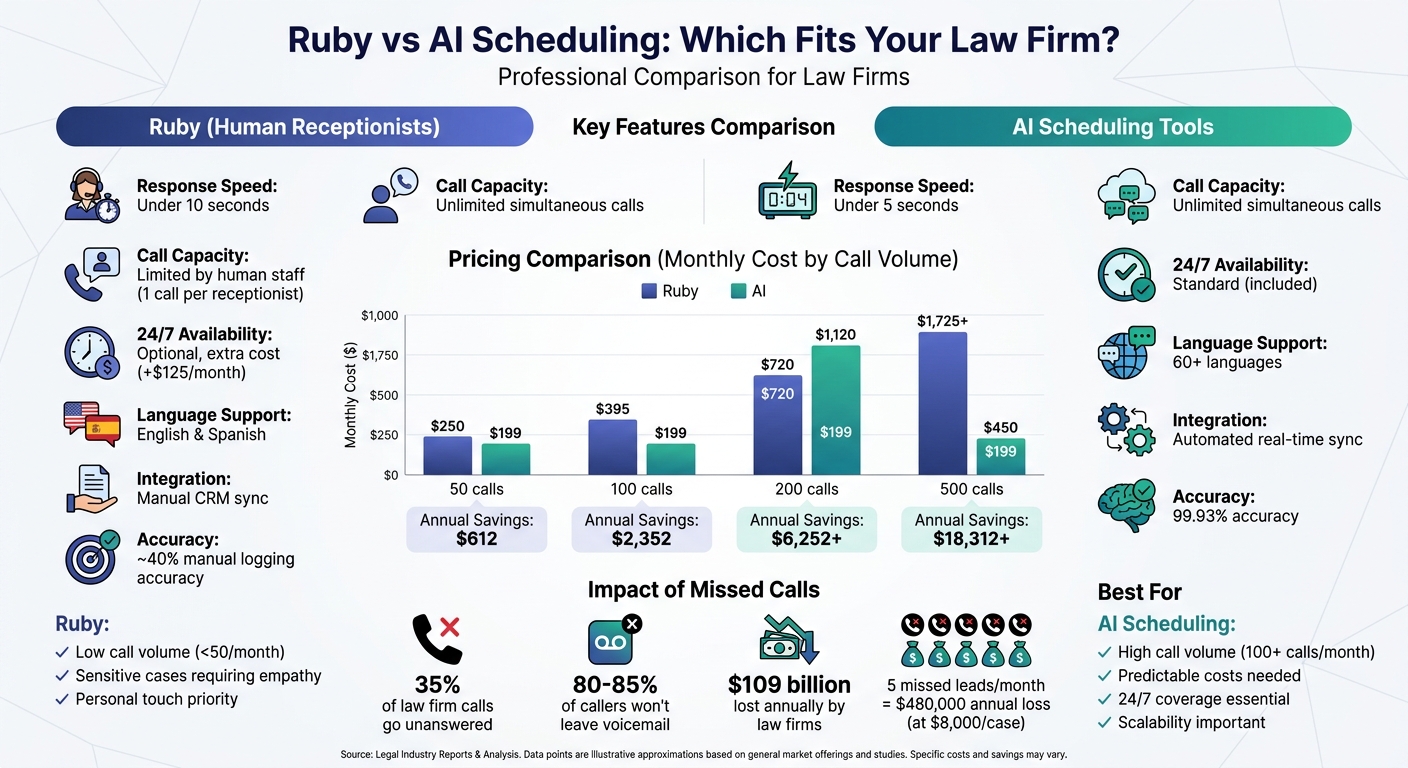
Pick based on call volume and how much of your intake needs a human voice. Ruby gives you U.S.-based live receptionists billed by the minute. AI scheduling tools answer every call, book directly into your calendar, and usually charge a flat monthly fee.
If your firm takes few calls and many of them are emotional, Ruby's per-minute cost is easy to justify. If volume is high, spiky, or after hours, a flat-rate AI tool like Answering Agent costs less and doesn't queue callers.
What Ruby Virtual Receptionists Offer
Every Ruby caller reaches a live person, 24/7/365. That matters most in family law and personal injury, where the first call often decides whether the client trusts you. For more on how that trust affects return, see the ROI of virtual receptionists.
Ruby reports answering 98% of calls within 9 seconds. Receptionists follow your branded script, handle English and Spanish at no extra charge, and run intake questionnaires to qualify leads. They collect conflict-check details such as opposing parties and case type, and they escalate urgent calls by your rules. If you plan to automate this step instead, see our AI call handling lead conversion tips.
Ruby connects to Google Calendar, Clio, MyCase, and Rocket Matter. It also makes outbound confirmation and follow-up calls, helps collect retainer payments, filters spam calls, and signs BAAs for HIPAA-sensitive matters.
"Ruby goes above and beyond for me. They will note my preferences and remember them during phone calls, and they even take initiative to contact me immediately on all of my numbers when a court clerk calls for an upcoming case."
– Andrew Bahr, Attorney
Ruby Pricing
Ruby bills receptionist minutes in 30-second increments. Overage minutes are charged at the plan's effective rate.
| Plan | Monthly Price | Minutes Included | Effective Cost Per Minute |
|---|---|---|---|
| Grow | $250 | 50 | ~$5.00 |
| Growth | $395 | 100 | ~$3.95 |
| Expand | $720 | 200 | ~$3.60 |
| Advanced | $1,725 | 500 | ~$3.45 |
Lead qualification, CRM integrations, and a dedicated account manager are only on the higher tiers. Chat-only plans start at $140/month for 10 chats.
What AI Scheduling Tools Offer
AI scheduling tools answer calls, qualify leads, and book consultations without staff involvement. They pick up in under 5 seconds and take any number of calls at once, so a busy morning never produces a hold queue.
On a legal intake call, the AI asks about jurisdiction, case type, and urgency. It then routes the call by practice area, so a custody question reaches family law and an arrest reaches criminal defense. It collects opposing party names for your conflict check. It can also send SMS and email reminders and take consultation deposits. Words like "arrested" or "statute of limitations" trigger an immediate alert to the on-call attorney.
Most AI tools charge a flat rate. NextPhone charges $199/month for unlimited calls, and ClaireAI ranges from $195 to $450/month, with no overage fees on either.
Answering Agent for Law Firms
Answering Agent books consultations around the clock and syncs lead details to your CRM and calendar. It scored 99.93% accuracy across 17,724 scored calls. It charges a flat monthly rate with unlimited concurrent calls, and setup takes 15 minutes to 2 days. Ruby needs 3 to 7 days of operator training.
Ruby vs AI Scheduling: Feature Comparison
The main operational difference is booking. Ruby receptionists check availability and enter appointments by hand. AI tools read your Google or Outlook calendar in real time and write the booking straight into Clio or MyCase. That removes the double-booking risk covered in avoiding calendar sync errors.
| Feature | Ruby (Human-First) | AI Scheduling Tools |
|---|---|---|
| Handling | Live human; under 10 seconds | AI voice; under 5 seconds |
| Booking | Manual entry | Automated, real-time calendar sync |
| Clio/MyCase | Basic message/appointment sync | Two-way sync |
| Scalability | Limited by staff; cost rises with minutes | Unlimited concurrent calls; flat rate |
| Languages | English & Spanish | 60+ languages |
| Reporting | Call summaries | Full transcripts logged to CRM |
| 24/7 Coverage | Available, often at premium rates | Standard |
Ruby vs AI Scheduling: Cost Comparison
Ruby's bill tracks minutes, while AI bills stay flat. Extras such as after-hours coverage (+$125/month) and billed hold time push Ruby higher.
The estimates below assume about one minute per call. Intake calls usually run longer, so treat the Ruby column as a floor. Family law suffers most here because emotional calls drain minute plans fast.
| Monthly Call Volume | Ruby (Est. Cost) | AI Flat-Rate (Est. Cost) | Annual Savings with AI |
|---|---|---|---|
| 50 calls | $250 | $199 | $612 |
| 100 calls | $395 | $199 | $2,352 |
| 200 calls | $720–$1,120 | $199–$450 | Up to $6,252+ |
| 500 calls | $1,725+ | $199–$450 | Up to $18,312+ |
Spend also varies by practice area. Criminal defense firms average $523/month on answering services, and estate planning firms average about $265. For flat-rate after-hours coverage, see 24/7 AI phone answering.
Legal Software Integrations
Ruby supports Clio Manage, Clio Grow, MyCase, and Rocket Matter. Receptionists log calls against matters and contacts, and new calls feed Clio Grow's Matter Pipeline. For any other software, firms connect through Zapier.
AI tools push data through webhooks and APIs. For example, Smith.ai connects natively to Clio, Lawmatics, CASEpeer, Assembly Neos, Lawcus, and MyCase. It reaches more than 5,000 other apps through Zapier and Make. New leads, contact updates, and workflow triggers happen with no one retyping anything.
If you use lead scoring or automated intake forms, choose a tool with native integrations. If you take fewer than 50 calls a month and use Clio or MyCase lightly, Ruby's manual sync is enough.
Performance and Scalability
Each Ruby receptionist handles one call at a time. A campaign launch or a news-driven spike can send callers to hold or voicemail, and the only fix is a bigger plan.
AI tools answer the 500th call of the day the same way as the first, and the price doesn't move. For firms with multiple locations, seasonal swings, or heavy ad spend, that difference decides the choice. For options, compare the best AI tools for appointment scheduling.
Which Solution Fits Your Law Firm?
Choose Ruby if you take under roughly 80–100 calls a month and want a person on every call, especially for sensitive intake.
Choose AI scheduling if you take more calls than that, practice in speed-sensitive areas like personal injury or criminal defense, or need predictable costs as you grow. Most callers who hit voicemail call the next firm instead of leaving a message. To estimate what that costs you, see missed calls vs. AI answering.
FAQs
How do I know if my call volume is high enough to switch to AI?
Look at your minutes. Ruby runs $395 for 100 minutes and $720 for 200, before overages. Once you regularly pass about 100 minutes a month, a flat-rate AI tool like Answering Agent usually costs less.
Will an AI scheduler handle conflict-check questions correctly?
It collects the inputs, such as opposing party names, case type, and jurisdiction, and logs them for your team. Your staff still runs the actual conflict check. Set sensitive or ambiguous calls to escalate to a person.
How hard is it to connect AI scheduling to Clio or MyCase?
Clio is straightforward because it syncs with Google Calendar and Microsoft 365. MyCase usually needs a calendar feed or an API setup, which may take some technical help. Overall the difficulty is moderate and depends on the tool.
Related Blog Posts
Book a walkthrough
See it handle your calls.
Book 20 minutes, or hear a sample call first.


