
A prospective client who reaches voicemail usually calls the next firm on the list. An AI answering service picks up every call, at any hour, runs a structured intake, flags emergencies to an on-call attorney, and books the consultation before the caller hangs up.
This guide covers what the AI should handle, how to measure your current gap, how to connect it to your practice management system, and which numbers to watch after launch. For more on turning those calls into signed matters, see 24/7 AI call handling.
How AI Answering Services Prevent Missed Calls
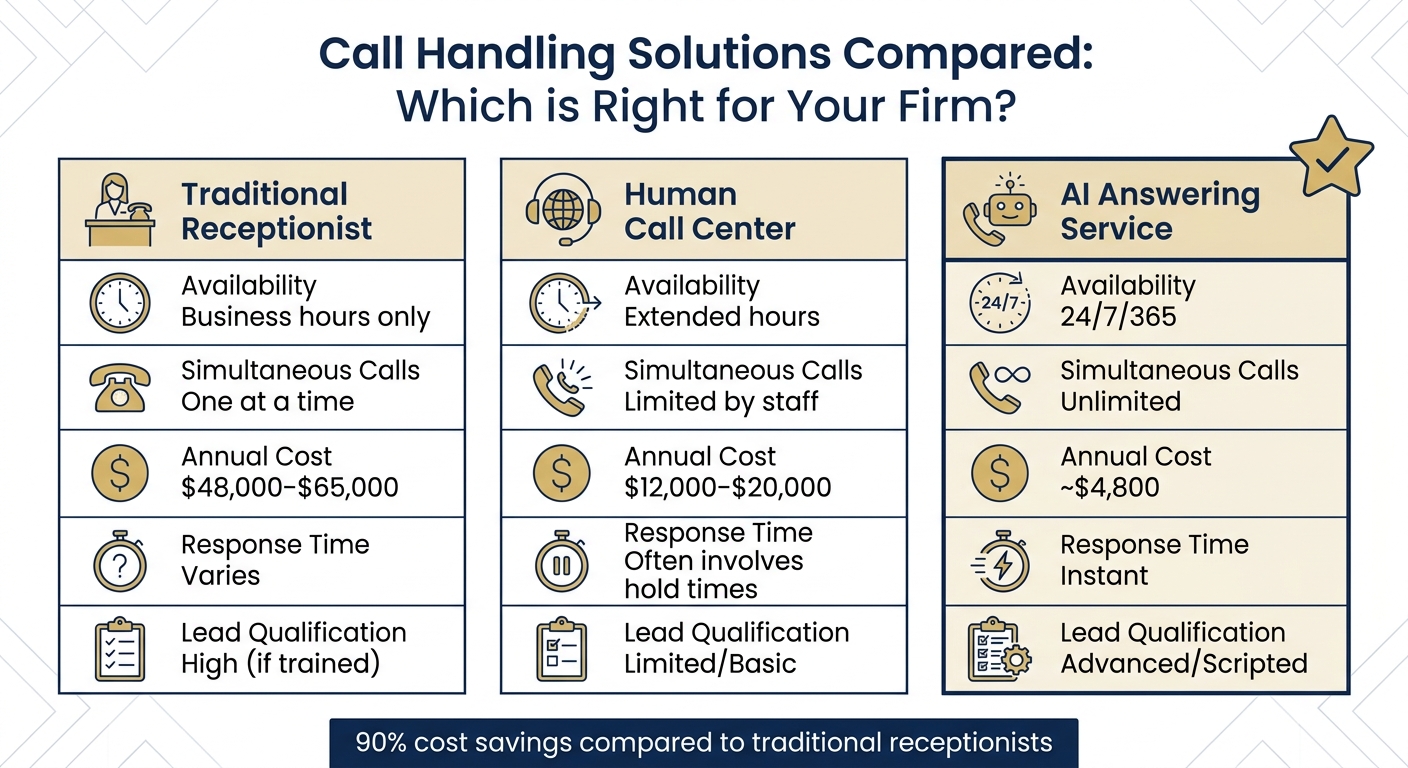
A receptionist can take one call at a time during office hours. AI answers instantly, around the clock, and handles as many simultaneous calls as come in. That covers the two places firms lose leads: after hours and during spikes.
What AI Answering Services Do
The AI greets the caller and asks intake questions specific to the practice area, such as booking number and bail amount for a criminal matter or injury severity for a PI case. It then checks the caller against your criteria and schedules a consultation on your calendar. Every interaction is logged in tools like Clio or MyCase.
Urgent calls go straight to an attorney. If a caller says a family member was just arrested, the system sends a real-time alert to whoever is on call. Routine questions about office hours or case status get answered without staff involvement.
Why Law Firms Need AI Phone Systems
Legal callers are often in the middle of an arrest, an accident, or a custody dispute, and they hire whoever responds first. The AI has to be fast and composed, and it has to stay inside intake without drifting into advice.
Cost matters too. A full-time receptionist runs roughly $48,000–$65,000 a year with benefits. An AI service runs a fraction of that and covers nights and weekends. For a fuller breakdown, see AI vs. hiring a human receptionist.
| Feature | Traditional Receptionist | Human Call Center | AI Answering Service |
|---|---|---|---|
| Availability | Business hours only | Extended hours | 24/7/365 |
| Simultaneous Calls | One at a time | Limited by staff | Unlimited |
| Annual Cost | $48,000–$65,000 | $12,000–$20,000 | ~$4,800 |
| Response Time | Varies | Often involves hold times | Instant |
| Lead Qualification | High (if trained) | Limited/Basic | Advanced/Scripted |
How to Implement AI Phone Answering in Your Law Firm
Step 1: Evaluate Your Call Patterns
Pull 30–60 days of phone logs and count the unanswered calls. Break them down by hour so you can see how much of the loss happens after close, at lunch, or when two calls land at once.
Sort the calls into new-client intakes and administrative calls such as directions, hours, and status updates. The first group is the revenue you're losing. The second is staff time you can free up.
Then put a dollar figure on the gap. Suppose you miss 10 intake calls a month, convert 25%, and your average PI case is worth $8,000. That comes to about $240,000 a year.
Step 2: Choose an AI Answering Service
Pick a provider that fixes the gap you found in Step 1. Check for these:
- 24/7/365 coverage, including simultaneous calls.
- Intake flows by practice area, because a DUI call and a divorce call need different questions.
- Encryption and confidentiality that meet your state bar's standards. Look for AES-256 at minimum.
- AI disclosure: the system identifies itself as AI to callers.
Basic plans start around $59–$150 a month. Staffing a human seat costs $1,500–$4,000 a month.
Step 3: Connect AI to Your Current Tools
Most services sync with Clio, MyCase, and PracticePanther. Caller name, contact details, and case description land as a new contact or matter, and the consultation gets booked on the first call. If you don't have a native integration, Zapier can fill the gap.
Capture the opposing party's name during intake so the conflict check runs before the consultation is booked.
Define your escalation rules. Keywords like "arrested," "served," or "custody" should trigger an SMS alert or a live transfer to the on-call attorney. Everything else follows the standard intake.
How Answering Agent Works for Law Firms
How Answering Agent Handles Legal Calls
Answering Agent identifies itself as AI, runs the intake for the caller's practice area, and routes the call from there. For personal injury it asks for:
- incident date
- injury type
- treatment so far
- liable parties
- insurance
- police report
For family law it asks about custody, the divorce timeline, and the opposing party. It never gives legal advice.
When a caller qualifies, it books against your live calendar. It then syncs the details to Clio, MyCase, or Filevine and can trigger follow-ups.
Results Law Firms Get with Answering Agent
Answering Agent has scored 99.93% accuracy across more than 17,700 scored calls, so booking numbers, injury details, and opposing-party names are captured correctly. At your own firm, measure results with the metrics below.
How to Track and Improve AI Performance
Metrics to Monitor
| Metric to Monitor | Target Benchmark | Why It Matters |
|---|---|---|
| Response Time | < 60 seconds | Legal clients hire the firm that responds first |
| Missed Call Rate | < 5% | Every missed intake is a case that may go elsewhere |
| Lead Capture Rate | 90%+ | Most callers hang up on voicemail |
| Consultation Booking | 25%+ increase | AI books into calendars 24/7 |
Also track three things:
- Qualified-lead percentage: callers who fit your jurisdiction, case type, and coverage.
- Consultation-to-signed rate: how many booked consultations become engagement letters.
- Referral source: which marketing channels bring in the callers who sign.
How to Improve Your AI System
Audit recordings weekly. Listen for callers who drop off, questions the AI handled poorly, and escalations that should have fired.
Refine intake scripts with conversion data. If calls end without a booking, move the qualifying questions earlier. Use the dashboard to find where callers drop off.
Test it yourself. Call at lunch, after hours, and on a weekend. Say a trigger word and confirm the on-call attorney actually gets the alert.
FAQs
Will callers know they’re speaking to AI?
They should. Set the AI to identify itself at the start of the call to meet ethical disclosure expectations. A natural conversational tone keeps the intake smooth after disclosure.
How does AI avoid giving legal advice?
Its script is limited to intake, qualification, and scheduling. When a caller asks for an opinion, it books a consultation with an attorney instead of answering.
How do I roll this out without disrupting my current intake?
Start with after-hours and overflow calls only. Route urgent calls to your team and review recordings weekly. Expand to daytime coverage once the intake data is clean and staff know how to pick up the handoffs.
Related Blog Posts
Book a walkthrough
See it handle your calls.
Book 20 minutes, or hear a sample call first.


