Speech Analytics Setup for AI Call Monitoring
Speech analytics turns every phone call into actionable insights. By analyzing 100% of conversations, it identifies customer sentiment, tracks keywords, flags compliance issues, and measures performance - all in real time. This technology replaces manual call reviews, which typically cover only 2–5% of calls, and delivers measurable results like a 90% reduction in compliance review time and a 300–400% ROI within a year.
Key steps to set up speech analytics include:
- Choose tools: Use AI phone systems with high transcription accuracy (e.g., over 90%) and low latency (under 800ms).
- Configure systems: Ensure audio quality, integrate with CRM tools, and comply with regulations like GDPR or HIPAA.
- Set KPIs: Focus on metrics like First Call Resolution (>75%) and Word Error Rate (<8%).
- Test thoroughly: Validate AI accuracy with human reviews and adjust based on findings.
Platforms like Answering Agent simplify this process, offering real-time analytics with 99.93% accuracy and seamless CRM integration. Start by targeting high-priority use cases to improve call monitoring efficiency and customer outcomes.
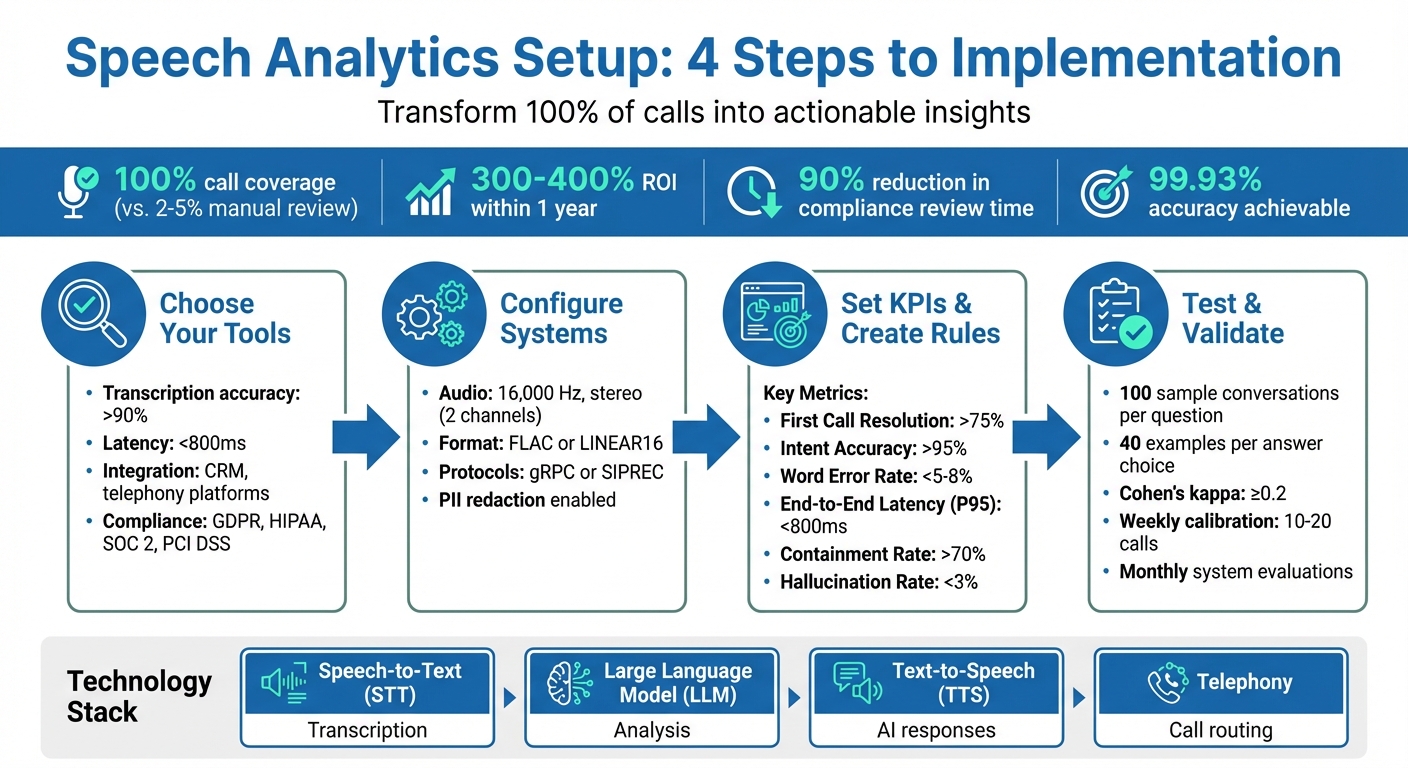
4-Step Speech Analytics Setup Process with Key Metrics and Requirements
Quality Management & Speech Analytics: Live Monitoring
sbb-itb-abfc69c
What You Need Before Setting Up Speech Analytics
Before diving into speech analytics, it’s important to have your technology, business goals, and systems aligned. Start by gathering the necessary tools, defining your KPIs, and preparing your systems to ensure everything integrates smoothly.
Required Technology and Tools
Speech analytics relies on a four-layer tech stack: speech-to-text (STT) for transcription, a large language model (LLM) for analysis, text-to-speech (TTS) for AI responses, and telephony for call routing. Here’s what you’ll need:
- Automatic Speech Recognition (ASR): Converts audio into searchable text.
- Natural Language Processing (NLP): Interprets intent and sentiment.
- Acoustic Analysis Tools: Detects emotional cues like stress or frustration based on tone and pitch.
For call routing and phone line provisioning, platforms like Twilio, Vonage, or Telnyx are popular options. If you’re looking for AI-driven answering services with built-in analytics, Answering Agent (https://answeringagent.com) is a robust solution. It has processed over 17,724 scored calls with 99.93% accuracy and supports unlimited simultaneous calls without requiring extra infrastructure. Additionally, you’ll need data storage and CRM integration (e.g., Salesforce) to link call insights to customer profiles. Dashboards are essential for visualizing real-time metrics like sentiment analysis, call trends, and performance indicators.
Latency is critical - keep round-trip latency under 1,000ms to avoid dropped-call perceptions. For STT, prioritize speed. For instance, Deepgram Nova-2 offers latency between 300–500ms, significantly faster than OpenAI Whisper, which exceeds 800ms.
Setting Your Key Performance Indicators (KPIs)
To measure success, define KPIs across four layers: infrastructure (audio quality), execution (accuracy of ASR/LLM), user reaction (sentiment and frustration levels), and outcomes (business goals). Instead of relying on averages, focus on P90 or P95 thresholds to identify outliers that could negatively impact a large portion of your calls.
Here are some benchmarks used by top-tier systems:
| KPI | Target Metric |
|---|---|
| First Call Resolution (FCR) | >75% |
| Intent Accuracy | >95% |
| Word Error Rate (WER) | <5–8% |
| End-to-End Latency (P95) | <800ms |
| Containment Rate | >70% |
| Hallucination Rate | <3% |
After setting these KPIs, confirm that your systems can meet these targets for dependable analytics.
Preparing Your Systems for Integration
Start by evaluating your existing VoIP or PBX setup to ensure it supports APIs or call recording. Your speech analytics platform will need to connect via API or SIP trunk to access live audio streams or recorded files. Integration should follow a logical sequence: begin with CRM systems, then move to helpdesk software, and finally, integrate telephony infrastructure.
Compliance is another critical aspect. Your solution must adhere to regulations such as GDPR, HIPAA, SOC 2, or PCI DSS to protect sensitive customer data. Additionally, train your AI models on company-specific terms to improve transcription accuracy. Finally, test your system thoroughly to ensure seamless data flow across CRM, workforce management, and quality systems. This eliminates the need for managers to juggle multiple dashboards.
"Don't take 80% or 90% [transcription] accuracy at face value. What matters most is if the context behind the words is captured and critical business terms are recognized." – Jithendra Vepa, Chief Scientist, Observe.AI
How to Set Up Speech Analytics: Step-by-Step
Step 1: Choose Your Speech Analytics Tools
Start by assessing tools for their transcription accuracy, speed, and ability to integrate with your existing systems. Look for transcription engines that can achieve over 90% accuracy with clear audio, though performance may vary depending on accents or industry-specific jargon. For real-time monitoring, tools with latency under 800 ms are ideal.
Ensure the tool integrates seamlessly with platforms like Twilio, Vonage, Salesforce, or HubSpot. It's critical to choose a platform that complies with regulations such as TCPA, HIPAA, GDPR, and PCI DSS, especially if you're handling sensitive data. Depending on your needs, you might opt for developer-friendly solutions like Vapi (priced at $0.15–$0.25 per minute) or user-friendly platforms like Synthflow ($0.45–$0.58 per minute). For businesses looking for an all-in-one option, Answering Agent offers built-in analytics with 99.93% accuracy across 17,724+ scored calls and supports unlimited simultaneous calls without requiring additional infrastructure.
"STT quality directly affects every downstream step - garbage in, garbage out." - PxlPeak
Choose tools that provide 100% call coverage rather than relying on traditional sampling. Start small by focusing on one or two high-priority use cases, like compliance monitoring or assessing sales performance, before broadening the scope. Finally, set up audio capture and transcription to ensure a steady flow of accurate data.
Step 2: Configure Audio Capture and Transcription
Record audio in stereo (two channels) to clearly separate the agent's voice from the customer's, reducing the risk of crosstalk that could confuse the transcription engine. Use a sampling rate of 16,000 Hz and lossless formats like FLAC or LINEAR16 to maintain audio quality.
In contact center environments, specialized models like Chirp 3 or other telephony-optimized engines can significantly improve transcription accuracy. Set the singleUtterance parameter to false so the system transcribes continuously throughout a conversation. Improve accuracy for industry-specific terms by using "phrase sets" or model adaptation, which involves adding relevant phrases to the system.
Stream audio reliably using protocols like gRPC or SIPREC. If a stream restarts, make sure to re-send the audio generated between the last processed result and the new stream start to avoid data loss. Include metadata like BCP-47 language tags (e.g., en-US), channel labels, and unique identifiers such as Agent ID and Team to enrich your analysis. To protect privacy, configure redaction tools to remove personally identifiable information (PII) before storing the data.
Step 3: Create Analytics Rules and Dashboards
Once your audio data is ready, focus on building actionable analytics rules and dashboards. Develop scorecards with clear, structured questions, defined answer types, and assigned point values. Use templates like "Did the agent…?" for specific actions or "What/Why…" to encourage deeper insights. Assign numerical scores (e.g., 0–10) to reflect the importance of each response.
Organize related questions into categories like "Business", "Customer", or "Compliance", allowing dashboards to calculate separate scores for different areas. Include an "N/A" option for questions that may not apply to every call, ensuring these do not affect the overall score. Use a JSON schema to extract structured data, such as customer names, phone numbers, or appointment times, for consistent dashboard input.
Set up dashboards to display key metrics like Average Handling Time (AHT) and sentiment analysis, turning these into actionable insights. Train the AI using at least 100 sample conversations per question and 40 examples for each specific answer choice to improve accuracy.
Step 4: Test and Validate Your Analytics
Once your analytics system is in place, validate its performance through rigorous testing. Compare AI-generated transcripts with manual evaluations to ensure accuracy. During the first eight weeks, have multiple human reviewers assess the same calls to calibrate the AI against consistent grading standards. Use a Cohen's kappa coefficient of at least 0.2 to measure agreement among annotators.
Establish benchmarks for metrics like First-Call Resolution (FCR) and Average Handling Time (AHT) before implementation, so you can measure the system's impact effectively. Advanced systems allow supervisors to manually adjust AI-generated scores, feeding these corrections back into the system for ongoing improvement. Keep an eye out for issues that may arise when analyzing all calls instead of small samples, and address them promptly.
Best Practices for Speech Analytics
Monitor and Update Regularly
To keep your speech analytics system effective, you need to review it consistently. A weekly check of analytics data can help you spot trends, such as fallback utterances, and group similar requests to address any gaps proactively. If you notice recurring unrecognized intents, update your training data to include those scenarios.
Adopt a 4-layer monitoring approach to track performance at every stage: telephony (audio quality), ASR (transcription accuracy), LLM (intent understanding), and TTS (synthesis quality). This layered approach allows you to pinpoint the exact source of issues instead of guessing. Also, set alerts based on high-percentile latency thresholds to identify specific caller segments, rather than relying on average metrics.
To ensure accuracy, calibrate AI scores with manual reviews of 10–20 calls each week. Pair this with monthly system evaluations and quarterly updates to scorecards.
"The teams that succeed in production share three practices: they instrument all four layers (telephony, ASR, LLM, TTS) independently, they alert on percentile distributions rather than averages, and they correlate upstream failures to downstream business impact." - Hamming.ai
Once you’ve refined your insights, connect them directly to your CRM and other business systems for seamless integration.
Connect Analytics to Your CRM and Business Tools
Integrating speech analytics with your CRM and business tools can drive immediate operational improvements. For example, you can automate after-call tasks like summarizing notes, categorizing contacts, and updating customer records.
Choose platforms that offer open APIs or pre-built integrations to ensure smooth data flow with tools like Salesforce, HubSpot, or quality management software. Set up automatic triggers based on specific keywords. For instance, flag high-value leads or send confirmation emails after appointment bookings.
Here’s a real-world success story: In 2025, Cdiscount used Sprinklr's speech analytics to analyze 100% of its voice calls, integrated with chat and social data. This approach uncovered a payment issue affecting 12,000 customers - something manual sampling had overlooked - and increased their CSAT by over 15%. Similarly, Oportun achieved full QA coverage while cutting its manual quality management workload in half by linking analytics to coaching workflows.
Share these insights across teams. Product managers can refine features based on customer feedback, marketers can craft messaging that resonates, and HR can design better training programs. Tools like Answering Agent simplify this process by offering built-in analytics that integrate seamlessly with systems like Salesforce, eliminating the need for additional infrastructure.
Track Performance Before and After Implementation
Before rolling out a new system, establish a 30-day baseline to set realistic performance benchmarks. Focus on 3–5 core KPIs, such as efficiency (Average Handling Time), quality (CSAT, First Call Resolution), and compliance, instead of overwhelming yourself with dozens of metrics.
Analyzing 100% of interactions removes the sampling bias that comes with reviewing just 2–5% of calls. This shift from manual sampling to full analysis sharpens your performance benchmarks. Many organizations report a 300–400% ROI within a year of deploying AI call monitoring, with compliance review time slashed by 90%.
For example, in March 2026, CallHippo reported a 20% drop in revenue churn and a 21% boost in CSAT scores after implementing automated QA monitoring. The key was linking specific agent behaviors - like asking discovery questions or using advocacy language - to measurable outcomes such as higher sales and better resolution rates. Tracking these behaviors alongside traditional metrics gives you a deeper understanding of what drives success.
Use percentile distributions for technical metrics. If your P90 latency exceeds 3.5 seconds, set alerts to catch issues before they impact most users. For First Call Resolution, flag interactions as unresolved if a customer contacts you again within 48–72 hours about the same issue.
Conclusion and Key Takeaways
Summary of Speech Analytics Setup
Speech analytics is transforming the way businesses monitor and analyze calls. To get started, you’ll need to define clear goals, choose the right platform, integrate it with your existing tools, create custom analytics rules, and test everything with a pilot program before rolling it out fully. The results speak for themselves: companies have reported 300–400% ROI within a year and a 90% reduction in compliance review time.
This approach replaces outdated quality assurance methods that only review 2–5% of calls, leaving the majority of conversations unanalyzed. By achieving 100% call coverage, businesses can eliminate blind spots and ensure every interaction contributes to better quality and compliance. The benefits extend beyond compliance, with measurable improvements such as reduced customer churn and increased satisfaction.
For companies managing a high volume of calls, platforms like Answering Agent make implementation easier. With proven 99.93% accuracy across over 17,724 scored calls and seamless integration with tools like Salesforce, you can achieve comprehensive call monitoring without the need for complex infrastructure.
What to Do Next
Now’s the time to take action. Start by identifying inefficiencies in your current call management system - issues like long handle times, poor first-call resolution rates, or compliance gaps. Focus on 1–2 high-impact use cases that represent 60–70% of your call volume. This targeted approach delivers quicker results compared to trying to monitor everything at once.
If your business operates 24/7, consider a solution designed for constant availability. Answering Agent can handle unlimited simultaneous calls with transparent pricing. Its ability to analyze every interaction while maintaining natural, conversational quality ensures that no critical insights slip through the cracks. By focusing on these priorities, you can ensure your speech analytics setup consistently drives improvements that align with your business objectives.
FAQs
What call volume is needed for speech analytics to be worthwhile?
Speech analytics starts to show its value when call volumes reach around 40 or more calls daily. At this scale, AI-driven tools like Answering Agent shine. These systems can process an unlimited number of calls, making them an efficient and cost-effective solution for gaining insights while scaling operations seamlessly.
How can I ensure customer data compliance during call analysis?
To stay compliant, always inform callers if AI is recording or analyzing their calls, and make sure to obtain proper consent. This aligns with regulations like the TCPA (Telephone Consumer Protection Act). If you’re in industries like healthcare or payments, you’ll also need to meet standards such as HIPAA (Health Insurance Portability and Accountability Act) or PCI-DSS (Payment Card Industry Data Security Standard).
AI tools can help by flagging potential risks, ensuring necessary disclosures are made, and keeping compliance-ready records. Automating these processes not only reduces regulatory risks but also ensures that your data handling practices meet legal requirements.
How can I validate AI accuracy before going live?
To ensure your AI system is accurate before launch, start by defining clear success criteria. Test it with representative data that includes both typical situations and edge cases to cover all possible scenarios. Use measurable benchmarks like task success rate, word error rate, and recovery rates to evaluate performance. Pair these metrics with qualitative reviews to understand where failures occur and why.
Even after launch, ongoing monitoring is crucial. Regularly track performance to catch issues early and address any regressions. This proactive approach helps maintain quality standards and ensures your AI system operates reliably over time.
Related Blog Posts
See how AI handles calls for your business
Enter your business name and we'll build a personalized AI receptionist demo in under 2 minutes. Talk to it right in your browser.
No signup required · Free to try · Works for any business
Related Articles
AI Call Answering ROI for Franchise Businesses
AI phone agents recover missed calls, cut receptionist costs, and boost franchise revenue with 24/7 accurate call handling.
How AI Handles 1,000+ Calls/Month for Law Firms
AI phone systems answer calls 24/7, qualify leads, schedule consults, integrate with CRMs, and reduce revenue lost from missed calls.
AI Call Handling ROI: Productivity Metrics Explained
AI call agents cut missed calls, halve average handle time, raise first-contact resolution, and recover lost revenue.