Ultimate Guide to API Integration for AI Phone Systems

How to connect AI phone systems to CRMs, calendars, and telephony with secure webhooks, API keys, and best practices to capture more leads and cut missed calls.

Ultimate Guide to API Integration for AI Phone Systems

API integration connects your AI phone system with tools like CRMs, calendars, and messaging apps to automate processes and improve efficiency. By linking these systems, you can instantly log call details, schedule appointments, and notify your team - all in real time. This eliminates manual data entry, reduces missed opportunities, and boosts revenue potential.

Key Takeaways:

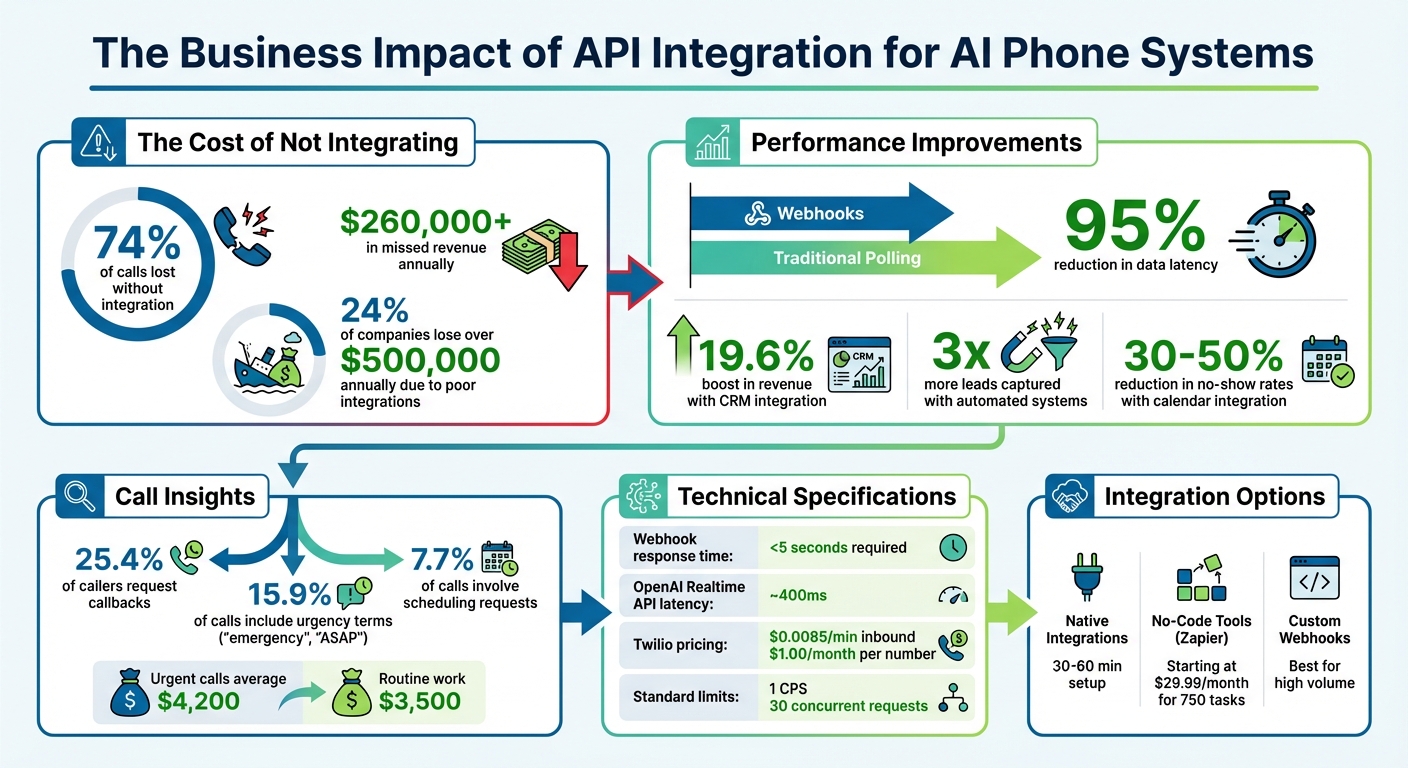
  • Why It Matters: Without integration, businesses lose up to 74% of calls, translating to $260,000+ in missed revenue annually.
  • How It Works: API integration automates data sharing through webhooks, reducing latency by 95% compared to traditional methods.
  • What You Need: API keys, secure infrastructure, and proper field mapping are essential for smooth integration.
  • Benefits: Capture 3x more leads, save hours on manual entry, and route urgent calls to the right person instantly.

This guide covers everything from technical setup to linking CRMs, calendars, and telephony providers. Whether you're handling 100 or 10,000 calls a month, integration ensures no lead is left behind.

API Integration ROI: Key Statistics for AI Phone Systems

API Integration ROI: Key Statistics for AI Phone Systems

Build an AI Phone Agent in 20 Minutes | OpenAI Real-time API + Twilio + NestJS

OpenAI

What You Need Before Starting

To ensure smooth integration of your AI phone system with your business software, preparation is key. By organizing your tools and clearly defining your needs, you can avoid costly mistakes and streamline the process.

Technical Requirements

A successful integration starts with the right technical setup. First, gather essential credentials like your API key, Account SID, and Agent ID from your AI phone provider. These are crucial for authenticating and authorizing API requests.

Next, focus on your telephony infrastructure. If you're building a custom solution, you’ll need a programmable voice provider, such as Twilio or Vonage, to manage phone numbers and call routing. For example, Twilio charges $0.0085 per minute for inbound calls and $1.00 per month for local numbers.

Your webhook infrastructure must include a server capable of receiving real-time HTTPS POST requests. Frameworks like Express.js or Flask are great for processing incoming call data. During development, tools like ngrok can create a public HTTPS tunnel to your local machine, while Postman helps test API endpoints manually.

Security is critical. Use TLS 1.2+ encryption for data in transit and verify HMAC signatures on incoming webhooks to ensure authenticity. Store API keys securely in environment variables (via a .env file) instead of hardcoding them. Tools like Webhook.site or RequestBin can also be used to inspect webhook payloads before coding the integration.

Once your technical setup is ready, define the specific actions your business will need to take after each call.

Identifying Your Business Requirements

Start by determining the key actions required immediately after a call. For instance, if 25.4% of your callers request callbacks, but you’re not logging these requests, you could be losing potential revenue. Identify and document critical tasks, such as creating CRM contacts, booking appointments, or routing urgent calls to a technician.

Call volume plays a big role in deciding the best integration method. Businesses handling fewer than 1,000 calls per month can use no-code tools like Zapier (starting at $29.99/month for 750 tasks) to manage workflows. However, for higher call volumes or when speed is essential, custom webhooks are better suited, as they avoid the 1–15 second delays common with no-code platforms.

Ensure your AI-collected data (e.g., [first_name], [email], [service_type]) aligns with your CRM fields (like firstname in HubSpot or Contact.FirstName in Salesforce). Also, plan workflows for keywords such as "emergency" or "ASAP", since 15.9% of calls include urgency indicators.

For calendar integrations, set clear availability rules ahead of time, including business hours, buffer times between appointments, and appointment durations.

Lastly, address compliance needs. For industries like healthcare or legal services, ensure you have Business Associate Agreements (BAA) for HIPAA compliance and minimize the transmission of personally identifiable information (PII) through webhooks. Document these security measures thoroughly before initiating your integration.

How to Integrate APIs: Step-by-Step Process

Once you’ve set up your technical environment and identified your business needs, the next step is to integrate your API effectively. This process involves three key phases: obtaining and securing credentials, configuring robust security measures, and building the logic for your automated phone interactions.

Getting and Setting Up API Credentials

Start by logging into your Answering Agent dashboard. Navigate to Settings > API Keys or Integrations to generate your unique API credentials. Be sure to copy these credentials immediately, as the secret key will only be displayed once.

Gather any additional identifiers required for the integration. For example, telephony providers like Twilio typically require an Account SID and an Auth Token, while many AI phone systems provide an API Key along with an Agent ID. Store these credentials securely, using environment variables (e.g., in a .env file) to keep them safe.

When making API requests, include your credentials in the headers. Common header formats include X-API-Key, X-Agent-ID, or Authorization: Bearer <token>. If you’re setting up webhooks to receive real-time data from your AI system, you’ll need to provide a Webhook URL during the configuration process.

Configuring Authentication and Security

To secure your API interactions, verify the HMAC signature included in incoming webhook headers. For instance, headers like X-NextPhone-Signature or X-Calldock-Signature contain this signature. Your server must recompute the signature using a shared secret and compare it with the header value to authenticate the data before processing it.

"OWASP identifies broken authentication as the #1 API security vulnerability." – OWASP

Ensure all traffic is encrypted by using HTTPS with TLS 1.2 or higher. To further protect your system, configure your firewall to allow requests only from IP addresses provided by your AI phone system. Implement rate limiting - such as restricting users to 100 requests per hour - to prevent abuse. Additionally, rotate your API keys every three months or immediately after staff changes to maintain security.

When setting up your webhook endpoint, ensure it responds with a 200 OK status within 5 seconds. If processing takes longer (e.g., updating a CRM or sending follow-up emails), queue these tasks to run asynchronously. Use unique identifiers like call_id to implement idempotency, which prevents duplicate actions if a webhook is retried.

Creating Custom Call Flows and Scripts

To design an effective call flow, start by identifying the data your AI system needs to collect and deciding when specific actions should be triggered. For example, configure the system to ask callers for their name, email, budget, and timeline. Map their responses to structured parameters such as [first_name] or [service_type]. You can also set up triggers for real-time actions, like routing calls containing "emergency" keywords to a live technician, or for post-call actions, like logging details into your CRM.

If you’re using Twilio, you can create custom solutions with TwiML. Use the <Say> verb for text-to-speech, <Gather> to collect user input, and <Dial> to route calls to specific numbers or SIP endpoints. For low-latency AI interactions, <Stream> can open a WebSocket connection between Twilio and your AI model.

To test your call flows, use tools like ngrok to create a public HTTPS tunnel. This allows you to receive live webhook data and make quick adjustments before deploying to production. Modern AI systems can even format spoken data automatically, such as converting “john at example dot com” into john@example.com for seamless CRM updates. To ensure a smooth experience, design fail-safes so that if a webhook fails, the call continues uninterrupted while the system logs the error and retries the operation later.

With your custom call flows in place, you’re now ready to troubleshoot and fine-tune performance to maximize efficiency and results.

Connecting AI Phone Systems with Other Business Software

Once you've set up API credentials and custom call flows, the next step is to link your AI phone system with essential business software. These integrations streamline data flow, cutting out manual entry and ensuring accurate caller details are captured automatically. By doing this, you expand the system's functionality, automating key processes and improving overall efficiency.

CRM Integration (e.g., Salesforce)

Salesforce

Integrating your AI phone system with a CRM allows caller information - like names, phone numbers, emails, call intent, and urgency levels - to be instantly added to your customer database. This real-time syncing is a game changer. Businesses that use automated CRM integrations report capturing three times as many leads, as the data is logged the moment a call ends. This is especially crucial for high-priority calls that demand immediate follow-up.

Here are the main ways to integrate a CRM:

  • Native Integrations: Pre-built connectors for platforms like HubSpot or Salesforce. These are quick to set up but may lack flexibility.
  • No-Code Tools: Middleware platforms such as Zapier or Make can link your AI system to thousands of apps. Plans typically start at $29.99/month for up to 750 tasks.
  • Custom Webhooks: For proprietary systems or high call volumes, this option sends HTTP POST requests directly to your CRM.

To get started, generate API keys or OAuth tokens from both platforms and configure a webhook URL in your AI system. Map variables like [first_name], [caller_number], and [email] to the corresponding fields in your CRM. Use HMAC-SHA256 to verify incoming data and avoid fraudulent entries. Implement unique call IDs to ensure that retries don’t result in duplicate records.

Platform Best For Setup Time Key Features
HubSpot Small to mid-sized businesses 30–60 mins Native API with createOrUpdate to prevent duplicates
Salesforce Enterprise organizations 2–4 hours Advanced field mapping; OAuth required
Pipedrive Sales-focused teams 45–90 mins Great for deal tracking and pipeline automation
Monday.com Service businesses 30–45 mins User-friendly, visual interface for non-technical teams

Once your CRM is integrated, the next logical step is to streamline appointment scheduling.

Calendar and Appointment Booking Tools

linking your AI phone system to AI scheduling tools automates appointment booking during calls. Since about 7.7% of calls involve scheduling requests, automating this process can cut no-show rates by 30% to 50% through timely confirmation messages.

The key to success here is two-way synchronization. Your AI system should check live availability to avoid double bookings and update calendars with new appointments while reflecting any manual changes made by staff. You can also set appointment durations based on the service type (e.g., 30 minutes for consultations, 2 hours for repairs) and add buffer times of 15–30 minutes between slots for flexibility.

For basic setups, use native integrations like Google Calendar (15–30 minutes) or Outlook Calendar (20–40 minutes). For more advanced scheduling needs - like setting appointment limits per day or enforcing lead times - tools like Calendly (30–60 minutes) or Acuity Scheduling (45–90 minutes) are great options. Clearly define availability windows (e.g., Monday–Friday, 8:00 AM – 6:00 PM) to avoid after-hours bookings and configure automatic SMS or email confirmations for both customers and staff.

Telephony Providers (e.g., Twilio, Vonage)

Telephony providers handle the backbone of your phone system - things like number provisioning, call routing, and voice quality - while your AI solution manages the conversational aspects. Integrating with a telephony provider ensures smooth call routing and delivers high-quality interactions. For instance, Twilio charges $0.0085 per minute for inbound calls and $1.00/month for a local U.S. number.

To integrate a provider, start by purchasing a voice-enabled number through their console. Retrieve your Account SID and Auth Token, then store them securely as environment variables. Set up an HTTPS POST endpoint on your server to receive call metadata via webhooks. Configure the provider's dashboard by linking the "A Call Comes In" URL to this endpoint.

For real-time AI interactions, use media streams that support bidirectional audio through WebSockets - this is essential for services like OpenAI’s Realtime API, which operates with a latency of about 400ms. If you're connecting existing infrastructure, configure SIP (Session Initiation Protocol) by whitelisting IP addresses and using E.164 phone number formatting. Always validate webhook signatures (e.g., X-Twilio-Signature) with HMAC-SHA1 to block fraudulent data. During testing, tools like ngrok can create a public HTTPS tunnel to your server. Finally, set up a fallback URL in your provider console to reroute calls to a backup script or message if the primary server is down.

Fixing Problems and Improving Performance

Connecting your AI phone system to CRMs, calendars, and telephony providers can streamline operations, but it also comes with its share of technical challenges. Most integration issues are predictable and have straightforward solutions. Knowing how to address these common problems ensures your system runs smoothly, even as call volumes grow.

Common API Errors and How to Fix Them

The most frequent errors during API integration come down to authentication and timing issues. For example, 401 (Unauthorized) and 403 (Forbidden) errors often mean expired API keys or incorrect OAuth tokens. Always double-check your credentials and ensure the Authorization header is formatted correctly. If you're using webhooks, verify HMAC signatures like X-Twilio-Signature to confirm the data's authenticity.

Timeout errors are another common issue, occurring when your server takes longer than 5 to 15 seconds to respond. Providers like Twilio assume a failure if no response is received within this window, resulting in retries. To avoid this, return a 200 OK immediately and offload time-consuming tasks - like CRM updates or email notifications - to a background queue using tools such as Redis or AWS SQS.

Errors from data format mismatches can be harder to spot. For instance, inconsistent naming conventions - like using firstname instead of FirstName - or treating phone numbers as integers instead of strings can break integrations. Always validate input data against the target system's schema to prevent these silent failures.

Duplicate records often occur when retries are triggered by network delays or timeouts. To prevent this, implement idempotency by using unique identifiers like call_id or an idempotency-token.

Error Code Likely Cause Recommended Fix
401 / 403 Invalid API key or signature Verify credentials and Authorization header
404 Incorrect endpoint URL Check the resource path and ensure it's public
408 / Timeout Slow server response Optimize processing; use async queues
500 Server crash Review logs; ensure all required fields are handled
502 / 504 Gateway or upstream issue Confirm backend service availability

Sometimes, errors are out of your control, like service disruptions from providers such as OpenAI, Anthropic, or Twilio. Always check their status pages.

Keeping Data Synchronized Across Systems

Error management is just one piece of the puzzle. Keeping data synchronized across systems is equally critical, especially when 25.4% of callers request callbacks and 15.9% of calls involve urgency terms like "emergency" or "ASAP". Delayed or missed data updates can lead to significant losses - 24% of companies report losing over $500,000 annually due to poor system integrations.

Real-time synchronization is key. Set your AI phone system to send HTTP POST requests to your CRM or database immediately after a call ends. This ensures that essential details - like names, phone numbers, and call intent - are logged without delay.

To avoid duplicate entries during retries, apply the idempotency techniques mentioned earlier. Use unique identifiers like call_id or I-Twilio-Idempotency-Token to check if a record already exists before creating a new one. This is especially important since providers use exponential backoff for retries, with intervals of 10 seconds, 30 seconds, 1 minute, and 5 minutes.

Field mapping is another critical step. Use template variables like [first_name], [caller_number], and [email] to match the exact fields your CRM expects. Mismatched data types - like sending a string when an integer is required - can cause silent failures, so always validate data formats and adhere to strict schemas (e.g., E.164 for phone numbers).

For secure data transfers, ensure all communications use HTTPS/TLS 1.2+ and verify webhook signatures with HMAC-SHA256. Monitor your webhook success rate and investigate if it drops below 95% or if response times exceed 5 seconds.

By addressing these synchronization challenges, you not only resolve immediate issues but also set the stage for reliable, scalable integrations.

Scaling for High Call Volumes

As your business grows, your API setup needs to handle increasing call volumes without compromising performance. Two key metrics to understand are Calls Per Second (CPS) and API Concurrency. CPS tracks how many outbound calls you can initiate per second, while API Concurrency measures how many simultaneous requests your system can process. Most standard accounts start with limits of 1 CPS and 30 concurrent requests, but these can often be increased.

"Scaling Voice applications is complex. From making an API request to Twilio, to ensuring your calls are answered by end users, there is a lot to consider." - Erika Kettleson, Senior Solutions Engineer, Twilio

For high-volume campaigns, consider building custom queuing logic on your application side. This gives you more control over call prioritization and throttling than relying solely on the provider's queue. When rate limits are reached, handle 429 Too Many Requests errors with retries using exponential backoff.

To optimize performance, monitor headers like Twilio-Concurrent-Requests and Twilio-Request-Duration in API responses. These can help you adjust request rates proactively before hitting system limits. Reducing latency is also crucial - route calls through geographic edge locations closest to your infrastructure. Always configure fallback URLs in a different region or cloud provider to maintain service continuity during outages.

For webhook processing at scale, asynchronous job queues like Redis, BullMQ, or RabbitMQ are indispensable. These tools allow you to process heavy tasks outside the critical response path, ensuring your system can acknowledge incoming webhooks within the required 5-second window while managing thousands of simultaneous calls. To prevent interference with active traffic, schedule tasks like deleting old data during off-peak hours.

Conclusion

API integration transforms your AI phone system into a tool that drives revenue growth. Instead of losing 74.1% of calls - equating to over $260,000 in missed revenue - bridging the gap between answering and taking action ensures no lead slips through the cracks.

"Answering the call is only half the battle. Integration is what closes the loop - automatically logging the lead in your CRM, booking the appointment on your calendar, sending a confirmation SMS, and routing emergencies to your phone." - NextPhone

When businesses integrate their AI phone systems with CRMs, they see impressive results: a 19.6% boost in revenue and three times more leads captured. This happens because data flows into their systems within seconds of a call ending, eliminating delays and improving lead management.

A solid technical setup is key to achieving these outcomes. Webhook-based integrations, for example, cut data latency by up to 95% compared to traditional polling methods. This is critical for the 15.9% of calls that include urgent keywords like "emergency" or "ASAP", which often represent higher-value jobs averaging $4,200, compared to $3,500 for routine work.

FAQs

What security measures should I take when integrating APIs for AI phone systems?

When working with APIs for AI phone systems, security should be a top priority to safeguard customer data and ensure the system remains dependable. Start by securing API credentials - store them in a safe location and rotate them on a regular basis to reduce risks. For data protection, use encryption protocols like TLS 1.2 or higher for data in transit, and secure stored data with robust encryption standards such as AES-256.

To control access, implement OAuth2 authentication and enforce role-based permissions. This approach limits unauthorized access and ensures users only have access to what they need. Additionally, monitoring API activity is crucial - use logging tools and anomaly detection systems to spot unusual behavior early. Having a well-defined incident response plan in place will also prepare you to act swiftly in the event of a breach.

Finally, make sure your API integration complies with regulations like GDPR or CCPA. Meeting these legal standards not only avoids penalties but also helps build trust with your customers.

By combining strong encryption, strict access controls, and vigilant monitoring, you can establish a secure and reliable API setup for your AI phone system.

What steps can businesses take to keep data synchronized across integrated systems?

To keep data in sync across connected systems, businesses should rely on real-time data transfer methods like webhooks. Unlike traditional polling methods, webhooks immediately update information whenever an event occurs, reducing delays and improving responsiveness.

It's equally important to implement secure authentication protocols, such as API keys or signature verification, to safeguard sensitive data and block unauthorized access. Alongside this, businesses should establish error handling mechanisms, retry processes, and maintain detailed logs. These steps ensure data synchronization remains dependable, even in complex workflows.

For example, AI phone systems like Answering Agent automatically sync caller data with CRMs and other tools. This ensures customer information is always accurate and readily available across platforms, helping businesses operate more smoothly and efficiently.

What are the advantages of using custom webhooks instead of no-code tools for API integration?

Using custom webhooks for API integration offers some clear advantages compared to relying solely on no-code tools. One standout benefit is real-time data transfer. Webhooks push information instantly when specific events happen, so data like customer details, call logs, or lead information is available right away. This immediacy can improve responsiveness and overall efficiency.

Another key advantage is the flexibility and control they provide. Custom webhooks allow businesses to design integrations that fit their unique workflows or meet specific compliance standards, such as HIPAA. They also support advanced features like secure authentication, error handling, and dynamic payloads, making them a solid choice for handling complex or high-volume integrations.

No-code tools might work well for simpler setups, but custom webhooks are better suited for scalable and more sophisticated integrations. They ensure reliable performance and can adapt to the specific needs of a growing business.

Related Blog Posts

Answering Agent