
Missed calls are costing businesses thousands of dollars every year. Over 60% of small business calls go unanswered, and 85% of those callers won’t try again, leading to lost revenue - an average of $127 per missed call. Traditional call handling methods can’t keep up with growing demand, especially when 35–40% of calls happen outside business hours. Hiring more staff is expensive, and burnout leads to high turnover rates.
AI call management solves these problems by answering unlimited simultaneous calls, 24/7, at a fraction of the cost. For as little as $150–$400 per month, AI voice agents can handle routine tasks like scheduling appointments, answering FAQs, and capturing lead information with 99.93% accuracy. Businesses using AI have seen results like a 60% boost in new intakes and $1.7 million in additional revenue.
Here’s how to get started:
- Analyze current call issues: Identify peak call times, missed call rates, and repetitive tasks.
- Set up AI voice agents: Automate routine calls, integrate with tools like Google Calendar or HubSpot, and enable 24/7 coverage.
- Integrate with workflows: Link AI to your CRM, phone system, and scheduling tools.
- Monitor and optimize: Track metrics like abandonment rates and customer satisfaction to fine-tune performance.
Switching to AI call handling can save 80–95% on staffing costs while recovering lost opportunities from missed calls. Start small with after-hours automation and scale as needed.
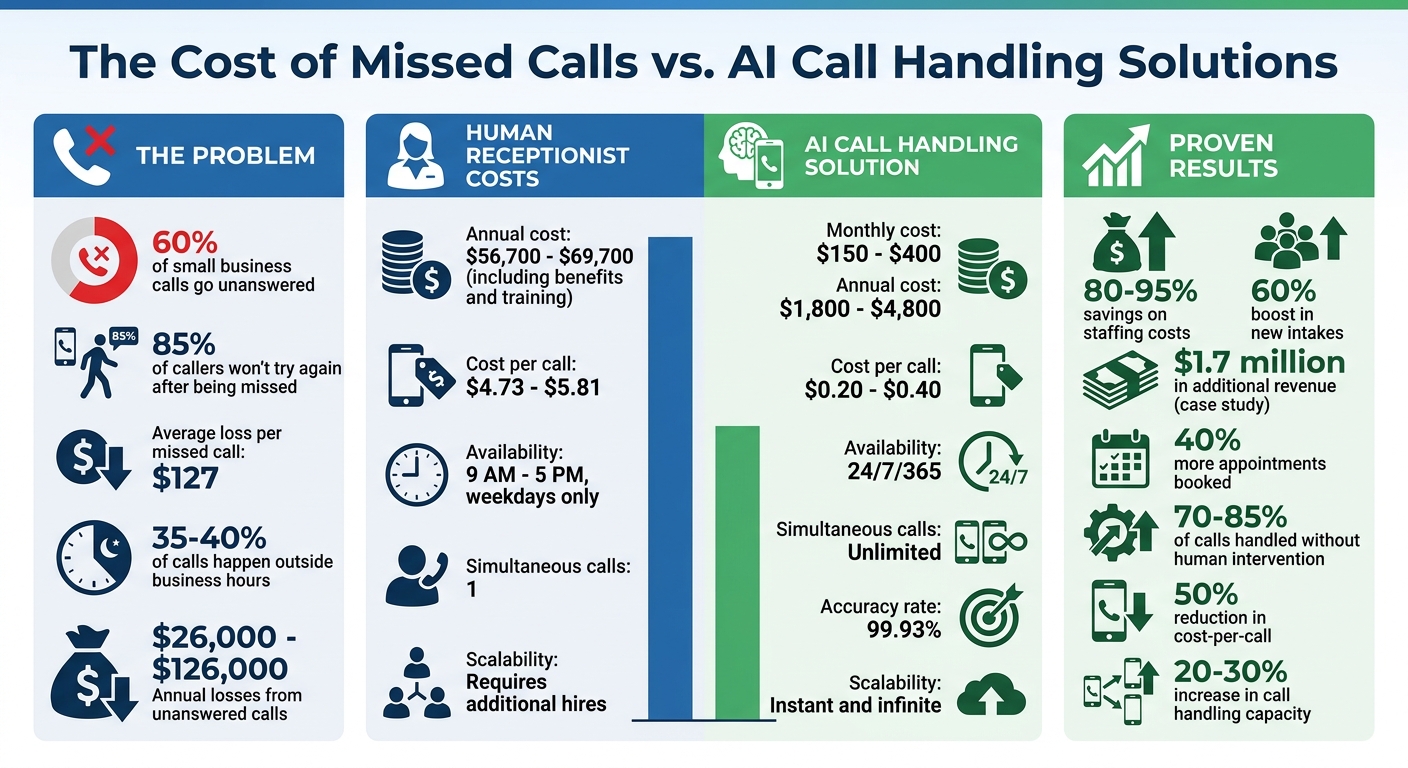
AI Call Handling Cost Savings and ROI Statistics
This AI Receptionist Answers Every Call (Even While You Sleep)
sbb-itb-abfc69c
Step 1: Analyze Your Current Call Handling Problems
Take a close look at your call data to figure out where your current system is falling short.
Review Call Volume and Traffic Patterns
Start by digging into 12 months of call data to uncover when calls are coming in and where the bottlenecks are. Are Monday mornings overwhelming your team? Do you see a surge during tax season or summer? If your queue depths regularly exceed 10 minutes or hold times are climbing during peak hours, that’s a clear sign your system is struggling.
Keep an eye on your abandonment rate - the percentage of callers who hang up before reaching an agent. If it’s over 8%, you’re losing out on potential business. To stay ahead of these issues, set up alerts in your phone system to notify you when call volume jumps by 15% above your normal levels. This way, you can activate overflow protocols before customers give up.
Now, shift your focus to identifying which types of calls can be automated.
Find Repetitive and Routine Tasks
Listen to 20–30 call recordings to figure out what customers are calling about. You’ll likely find that 40% to 60% of calls revolve around the same 20 questions, while 20% to 30% involve appointment bookings. Tasks like checking hours, confirming order statuses, or scheduling appointments dominate these calls and are perfect candidates for automation.
Talk to your team about which tasks feel like a grind. If automating a specific task could save at least one hour per week per employee, it’s worth considering. Common tasks that are ripe for automation include identity verification, balance inquiries, password resets, and answering FAQs. Focus on tasks that follow predictable patterns and don’t require complex problem-solving or emotional intelligence.
Once you’ve identified these issues, it’s crucial to back them up with data from key performance metrics.
Measure Key Performance Metrics
Track these key metrics to establish a baseline before diving into AI solutions:
Metric What It Measures Warning Sign Average Handling Time (AHT) Total time spent per call (including hold, talk, and wrap-up) A 20%+ increase without added complexity Abandonment Rate Percentage of callers who hang up Over 8% First-Contact Resolution (FCR) Calls resolved without follow-ups Consistent declines Cost Per Call Total operating costs divided by calls handled Steady increases Missed Call Rate Number of unanswered calls High rates signal deeper issues
For example, if your Average Handling Time jumps by more than 20%, and there’s no clear reason like added call complexity, it could point to inefficiencies in your scripts or systems. Similarly, track your missed call rate - with 62% of calls to small businesses going unanswered, you could be losing anywhere from $26,000 to you could be losing anywhere from $26,000 to $126,000 annually26,000 annually.
"Every time your phone rings and nobody answers, you're probably losing money." – Nick Lau, Content Lead, Upfirst.ai
Finally, don’t overlook customer feedback. If 37% of your negative reviews mention poor communication, your call handling process might be dragging down your reputation. These metrics provide the foundation for making improvements with AI, which will be explored in the next steps.
Step 2: Set Up AI Voice Agents for Automation
After identifying your call handling challenges, the next move is to implement AI voice agents. These systems can take over repetitive tasks that often consume your team's time and energy.
Automate Core Call Handling Tasks
AI voice agents excel at tasks like scheduling appointments, capturing leads, and answering frequently asked questions. They integrate seamlessly with tools like Google Calendar, Calendly, ServiceTitan, and HubSpot, enabling them to check availability, book appointments, and send automated SMS or email confirmations.
When a caller reaches out, the AI gathers essential details - such as names, contact information, budgets, and specific needs - and logs this data directly into your CRM. For common questions about pricing, hours, locations, or services, these systems can handle up to 70%-85% of calls without requiring human involvement. They also filter out spam and robocalls, ensuring only legitimate leads make it through.
Take the example of a Phoenix HVAC company managing 3,200 calls a month during peak summer. By using a Bland AI voice agent integrated with ServiceTitan for just $300 per month, they ensured 24/7 call handling, saved $64,200 annually, and captured $127,000 in revenue from after-hours emergency calls.
Once these core tasks are automated, the next step is implementing scalable AI phone systems to handle surges in call volume.
Use Cloud-Based Scalability
Cloud-based AI voice agents can handle multiple conversations simultaneously, making them a perfect fit for businesses experiencing fluctuating call volumes. Unlike human receptionists, who can only manage one call at a time, AI systems can manage 10, 20, or even 100+ calls at once without any drop in quality. Whether it’s a roofing company handling 47 calls in two hours during a storm or an HVAC service facing a 300%-600% spike in calls during a heatwave, every caller is answered immediately.
Golden Nugget Hotels & Casinos provide a great example. They deployed PolyAI voice agents to handle 87% of non-reservation calls. In just one month at a single property, the AI system managed 3,000 reservations, generated $600,000 in direct revenue, and supported 15 different room types - all without human intervention. With a 99.9%+ uptime, the system even remained functional during local infrastructure failures.
After ensuring scalability, the focus shifts to making these interactions feel natural and human-like.
Maintain Natural Conversations
To gain and maintain customer trust, AI interactions need to feel as natural as possible. Modern AI voice agents achieve a voice-to-voice latency of about 800 milliseconds, which is faster than the average human response time. They also allow callers to interrupt naturally ("barge-ins") and use context-aware turn detection to avoid awkward pauses.
The best systems mirror the caller’s question in their response to confirm understanding, use straightforward language, and detect emotional cues like frustration or excitement. For instance, a multi-location dental practice using a Vapi-based AI agent integrated with Dentrix managed 1,847 calls per month, increased new patient bookings by 41%, and reduced no-shows by 28% through natural-sounding interactions and automated reminders.
"The problem isn't volume. It's the assumption that human labor is the only solution to human conversation." – Divyang Mandani, CEO, OnDial
To ensure a seamless experience, always include an immediate option to escalate to a human agent if the AI struggles to understand a caller after two attempts or detects high frustration levels.
Step 3: Integrate AI into Your Business Workflow
Once your AI voice agents are up and running, the next step is connecting them to your existing business systems. Without proper integration, you’re stuck manually transferring data, which defeats the whole purpose of automation. By linking AI to your operational systems, you create a seamless flow of information that builds on the benefits of automated call handling.
Connect All Communication Channels
Start by integrating your phone system using SIP or VoIP forwarding. This lets you redirect calls in one of three ways: forward all calls, forward only during busy times or after hours, or fully port your number to the AI platform.
Next, sync your AI with tools like Salesforce, HubSpot, or Zoho to automatically feed caller details - such as intent, transcripts, and lead scores - into your CRM. Calendar integrations with Google Calendar, Outlook, or Calendly allow real-time checks for availability and instant appointment bookings, eliminating manual data entry.
For more complex workflows, APIs or middleware like Zapier can connect AI to internal systems like billing platforms, databases, or dashboards. This setup enables immediate follow-up actions, such as sending SMS confirmations. It’s worth noting that over 70% of callers hang up if their call isn’t answered within 60 seconds, so these integrations help ensure you don’t lose potential business.
Here’s a real-world example: In December 2025, Marcus Chen, owner of Summit HVAC in Phoenix, implemented the Dialiq AI phone agent to handle high call volumes. Within just one week, the system managed 47 calls, booked 23 service appointments, and captured 8 emergency calls after 6 PM. Those after-hours calls alone brought in $4,200 in revenue - income that would have otherwise been missed.
Customize AI Scripts and Responses
A one-size-fits-all approach won’t work when it comes to customer interactions. After connecting your channels, focus on tailoring AI scripts to reflect your brand’s personality. For example, a law firm might prefer a formal tone, while a casual, friendly vibe might suit a restaurant or coffee shop better.
Start with a professional greeting that includes your business name, a welcoming tone, and a clear invitation for the caller to speak. Beyond the basics, train your AI using a detailed knowledge base covering your hours of operation, service descriptions, pricing, and answers to common questions. Many AI platforms provide tools like "personality sliders" or descriptive options (e.g., "Professional" or "Energetic") to help fine-tune the voice and tone.
Document your call-handling process to define when and how the AI should escalate calls or flag specific issues. Map out how data - like names, emails, and service types - flows into your business software. Small businesses that have adopted AI receptionists report booking 40% more appointments and reducing the phone workload for their staff by 60%.
"When aligned with your phone system, CRM, and workflows, an AI receptionist stops being a tool and starts acting like a reliable team member." – VoAgents
Set Up Escalation to Human Agents
Even the most advanced AI systems can’t handle every situation. That’s why you need clear rules for transferring calls to human agents. For example, configure your AI to recognize phrases like “I want to speak to a person” or emergency keywords such as “flooding” or “chest pain.” These triggers should prompt an immediate handoff to a live agent.
Modern AI platforms can also use sentiment analysis to detect frustration, anger, or distress based on tone and keywords. When these signals are flagged, the system routes the call to a human queue automatically. Scenarios like multi-party negotiations, high-stakes legal or medical advice, or emotionally charged situations should always be handled by a person.
The transfer process must be smooth. The AI should pass along the transcript, a summary of the conversation, and the caller’s intent so the customer doesn’t have to repeat themselves. This seamless handoff ensures that every customer gets the attention they need without delay. Studies show that lead conversion rates drop by 391% when response time goes from one to five minutes, making instant transitions critical.
Escalation Trigger Reason for Handoff Recommended Action High Emotion Anger, grief, or panic requires empathy Route to senior agent with sentiment context Complex Negotiation Multi-party calls exceed AI capabilities Transfer to specialist with full transcript Technical Failure Background noise or accents affect accuracy Prompt for human callback or transfer Regulatory/Legal AI cannot provide legal or clinical advice Route to qualified professional Direct Request Customer asks for a human Bypass AI and connect to live queue
Start by testing these escalation rules during after-hours calls to fine-tune the system before rolling it out full-time. This approach helps ensure your AI is not just functional but also aligned with your customer service goals.
Step 4: Choose the Right AI Solution
Once you've mapped out your workflows and integrated your systems, the next step is picking an AI platform that aligns with your business needs. It’s essential to find a solution that not only automates processes but also grows with your operations.
Why Choose Answering Agent?
Answering Agent delivers results that go beyond expectations. With over 17,724 scored calls and an impressive 99.93% accuracy rate (just a 0.07% hallucination rate), it far surpasses the 95% accuracy typical of many AI voice agents. This precision isn’t just a number - it directly impacts revenue. For example, the system has pitched 20,375 offers, leading to 6,820 acceptances, proving it’s more than just a call handler.
What’s more, Answering Agent can handle unlimited simultaneous calls around the clock, unlike human receptionists who can only manage one call at a time. And it does so at a fraction of the cost. While a receptionist costs $56,700–$69,700 annually (including benefits and training), Answering Agent operates for just $1,800–$4,800 per year. During high-demand periods, like a surge in HVAC emergency calls during a storm, the system scales instantly without making callers wait. This avoids the average loss for each missed call of average $127 loss for each missed call27. Plus, the cost per call drops dramatically - from $4.73–$5.81 with human receptionists to just $0.20–$0.40 with AI.
Here’s a real-world example: In December 2025, a dental practice with multiple locations started using Answering Agent. For $350 per month, the system integrated with their Dentrix software, replacing three receptionists who cost $120,000 annually. The result? A 41% jump in new patient bookings and a 28% drop in no-show rates, thanks to automated reminders.
With these benefits in mind, here’s how to get started with Answering Agent.
Implementation and Setup Process
Setting up Answering Agent typically takes 2–4 weeks and follows a clear, step-by-step process:
- Week 1 – Workflow Mapping: Review call data to identify the 20 most common questions that account for 80% of call volume. This ensures the AI is trained for the most frequent scenarios right from the start.
- Week 2 – Building and Integration: The team creates custom AI phone scripts tailored to your brand’s tone and integrates the system with your existing tools, such as Salesforce, ServiceTitan, or scheduling platforms like Google Calendar. For medical practices, HIPAA-compliant versions cost about $350–$400 per month.
- Week 3 – Testing: Run over 50 internal test calls to fine-tune responses, train the AI for edge cases (e.g., accents or background noise), and set triggers for when human intervention is needed.
- Week 4 – Live Launch: Go live with the system, monitoring the first 100 calls closely to make real-time adjustments.
"AI voice agents handle 1,000+ calls monthly for $150-300/month. Learn how businesses scale phone coverage infinitely without hiring staff." – Renzo Orellana
Start with a pilot run during after-hours to test its performance and ensure no revenue is lost from missed calls.
Compare Pricing and Features
Answering Agent offers plans designed to fit businesses of all sizes:
- Starter Plan: $149 per month for basic features and limited call volume - ideal for small teams new to AI.
- Professional Plan: $299 per month for unlimited calls and full CRM integration, perfect for businesses handling 1,000+ calls monthly.
- Managed/Enterprise Plan: Starting at $599 per month, this plan includes dedicated support and is built for high-volume operations.
One-time setup costs range from $1,000 to $6,500, depending on complexity. Professional implementation ensures the system is ready to perform from day one. Compared to the rising costs of hiring additional staff (which double for every extra 1,000 monthly calls), the savings are undeniable.
Here’s how it stacks up:
Feature Human Receptionist Answering Agent (AI) Annual Cost (1k calls/month) $56,700 – $69,700 $2,400 – $4,800 (Year 2+) Availability 9 AM – 5 PM, Weekdays 24/7/365 Simultaneous Calls 1 Unlimited Response Time Variable (with hold times) Less than 1 second Reliability Subject to breaks/absence 99.9% Uptime Scalability Requires more hires Instant & Infinite
Businesses miss about 27% of their calls, and 85% of those callers often turn to competitors. With annual losses from unanswered calls ranging from $26,000 to $126,000, investing in a solution like Answering Agent can pay for itself quickly - often within just a few months.
Step 5: Monitor Performance and Optimize
Integrating AI into your workflow is only the beginning; keeping an eye on its performance ensures it remains effective over time. Once your system is live, track key performance metrics to identify what’s working and where adjustments might be needed. Focus on four key areas: containment rate (the percentage of calls resolved by AI without needing human intervention), cost per call, customer satisfaction (CSAT) scores, and repeat call rates. For containment rate, use this formula: (AI-handled calls ÷ total calls) × 100. Aiming for an 80-90% containment rate is a solid target. For example, a home services business using Answering Agent saw a 40% drop in repeat calls by consistently analyzing these metrics. This kind of data-driven approach sets the stage for using real-time dashboards to catch and address issues quickly.
Set Up Real-Time Dashboards
Platforms like CallRail, Gong, or Answering Agent’s analytics tools can help you track performance in real time. By linking your AI logs to your CRM (e.g., HubSpot or Salesforce), you can define KPIs and set automated alerts for when metrics fall below acceptable levels - such as CSAT dropping below 4.0 out of 5. Weekly performance reviews are also critical. For instance, one medical practice implemented this system and achieved a 25% reduction in cost per call within just three months.
Leverage Sentiment Analysis
Natural language processing tools can analyze customer interactions for tone and keywords, categorizing calls as positive, neutral, or negative. When Answering Agent detects frustration - like a rising pitch or phrases such as “I’m unhappy” - it flags the call for review. A staffing agency used this data to retrain their AI, boosting their CSAT score from 3.8 to 4.6 in just three months. Similarly, ADT Security, using Five9’s Intelligent Virtual Agent, achieved a 75% containment rate on 1.2 million calls between January and June 2023. They improved first-contact resolution by 35% (from 55% to 74%) and reduced costs by 62% through performance dashboards and machine learning retraining [five9.com/customers/adt]. Insights from sentiment analysis can also help refine your system further with tools like predictive call routing and proactive outreach.
Expand with Predictive Features
As your AI system matures, consider adding predictive capabilities to handle surges and improve customer experiences. Predictive call routing uses machine learning to prioritize urgent calls based on keywords, while proactive outreach includes automated reminders or follow-ups. For example, during a cold snap causing a spike in emergency plumbing calls, Answering Agent scaled automatically without increasing costs. A law firm similarly used this feature to manage lunch-hour call surges, maintaining 99.93% accuracy across all interactions.
To stay ahead, define and monitor key metrics - containment rate, cost per call, CSAT, and repeat call rates - and set up automated alerts for any dips in performance. Adopt a monthly optimization cycle to review results, refine scripts using sentiment data, and test predictive features. Aim for small, consistent improvements, like a 5-10% boost in containment rates each month. Continuous refinement keeps your system running smoothly and effectively.
Conclusion
Transforming your call handling process can turn a frustrating bottleneck into a source of revenue. AI-powered solutions make it possible to recover lost opportunities from missed calls. For context, many small businesses struggle with missed calls, and 85% of those callers won’t try again - they’ll contact a competitor instead. With AI, you can instantly answer calls around the clock, manage multiple calls at once, and automate repetitive tasks, ensuring no revenue slips through the cracks.
The financial impact is hard to ignore. Take, for example, an HVAC company that saved over $60,000 annually by switching from a traditional receptionist setup to an AI-based system. Similarly, a dental practice saw a 41% increase in bookings after adopting AI. On average, businesses using AI call centers cut their cost-per-call by 50% while handling 20–30% more calls. These numbers highlight how AI can deliver real, measurable results.
To get started, examine your current call patterns and identify areas where AI call handling can make the biggest difference. Look for a solution that integrates seamlessly into your workflow, offers clear escalation options for complex issues, and provides transparent pricing. For example, Answering Agent has a track record of handling over 17,724 scored calls with an impressive 99.93% accuracy rate. It operates 24/7, uses a natural, human-like voice, and handles unlimited simultaneous calls - all at a fraction of the cost of traditional setups.
Don’t let missed calls drain your revenue. With tools like Answering Agent, you can capture every opportunity, reduce costs, and scale your operations effortlessly.
FAQs
How do I know which calls to automate first?
To get started, look at calls that are routine, high-volume, or take up a lot of time - things like scheduling appointments, qualifying leads, or handling FAQs. These types of calls are perfect candidates for automation, especially when they tend to come in after business hours. Automating these repetitive tasks can boost efficiency and ensure you don’t miss out on opportunities. Dive into your call data to identify the most common requests or tasks. By automating the ones that matter most, you can significantly enhance customer satisfaction and even drive more revenue.
Will the AI work with my CRM and scheduling tools?
AI systems, such as Answering Agent, work seamlessly with well-known CRM and scheduling tools like Salesforce, HubSpot, and Zoho. These integrations allow the AI to handle tasks like capturing leads, updating records, and scheduling appointments in real time. By automating these processes, it simplifies workflows and enhances customer interactions. Answering Agent ensures smooth operation and accurate performance, fitting effortlessly into your current systems.
How do I hand off calls to a human when needed?
To transfer calls effectively, focus on ensuring the process is seamless and keeps the customer informed. Choose the appropriate method based on the situation: cold transfer, where the call is passed without prior discussion; warm transfer, where the next representative is briefed before taking over; or conferenced calls, allowing all parties to communicate together before the handoff.
It's equally important to know when escalation is necessary. Always pass along the customer’s details and context to avoid making them repeat their concerns. A well-handled transfer builds trust and delivers a smooth experience for the customer.
Related Blog Posts
Book a walkthrough
See it handle your calls.
Book 20 minutes, or hear a sample call first.
Ready to see it handle your calls?
Book a walkthrough, or hear a short sample call first.
Related Articles

How to Handle Lost or Stolen Car Wash Membership Tag Calls
Handle lost or stolen car wash membership tag calls. Check five tag paths before promising a free replacement, then follow wash rules.

How to Handle Pickleball After-Hours and Door Access Calls
Handle pickleball after-hours door access calls by forking member fob, guest, hours, and booking asks before you promise entry.
Car Wash Membership Billing Phone Calls: A Desk Guide
Desk guide for car wash membership billing calls: fork failed payment, double charge, plan change, and pause vs cancel before you process.