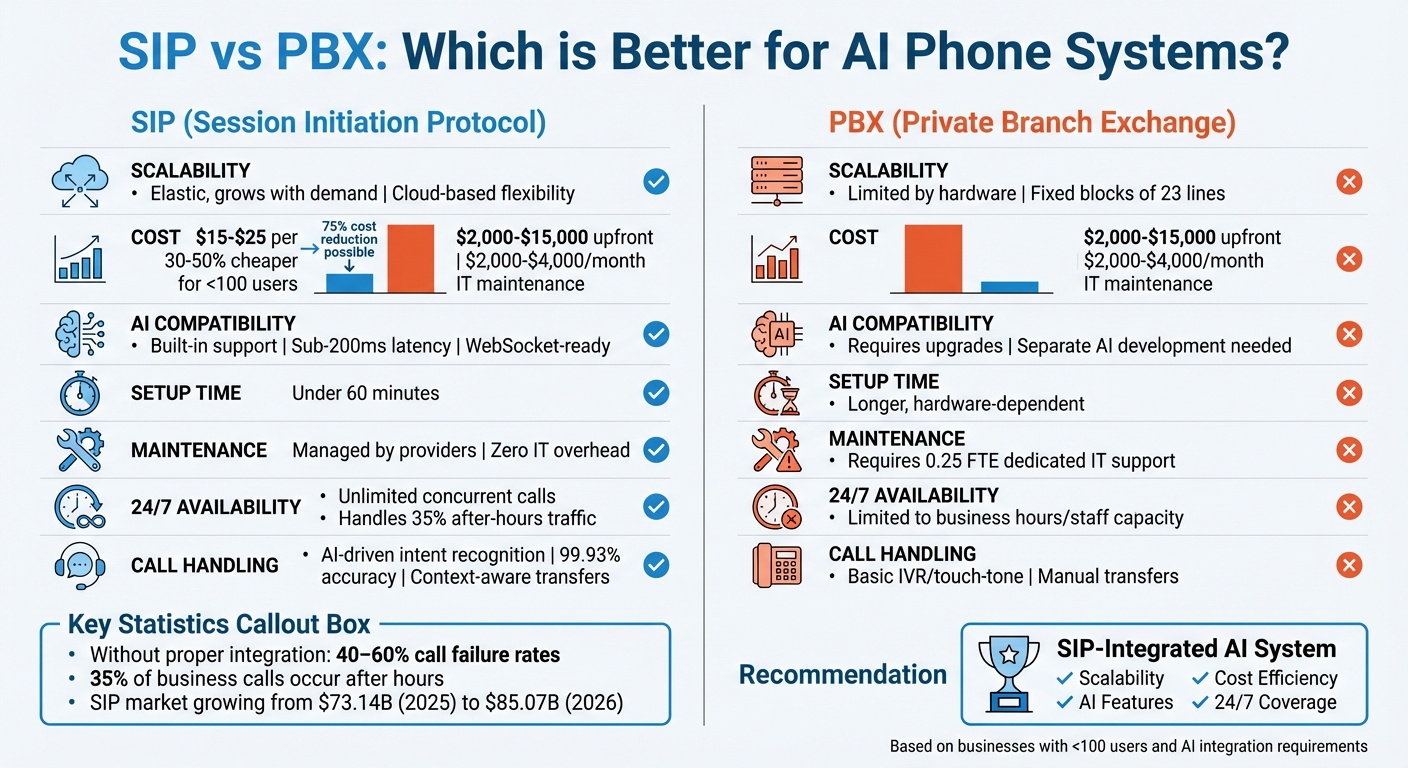
SIP vs PBX: Resolving AI Integration Issues
SIP (Session Initiation Protocol) and PBX (Private Branch Exchange) are essential for modern phone systems, especially when integrating AI. SIP acts as the bridge between your phone system and internet-based services, enabling AI to handle calls. PBX manages internal call routing and voicemail.
Here’s the key takeaway:
- SIP offers flexibility and scalability, connecting your phone system to AI platforms for features like 24/7 call handling and real-time data processing.
- PBX focuses on managing internal calls but often requires SIP for external AI integration.
Why does this matter? AI-enabled systems improve customer service by reducing call abandonment rates and providing round-the-clock support. SIP integration is faster and cost-effective, while PBX systems may need upgrades to ensure compatibility.
Quick Comparison:
| Feature | SIP | PBX |
|---|---|---|
| Scalability | Elastic, grows with demand | Limited by hardware |
| Cost | Lower upfront, pay-per-use | High upfront, ongoing costs |
| AI Compatibility | Built-in support | Requires upgrades |
| Maintenance | Managed by providers | Requires IT support |
| Setup Time | Under 60 minutes | Longer, depending on system |
SIP systems are ideal for businesses looking to integrate AI quickly and affordably, while PBX may require additional work to support modern AI features.
SIP vs PBX for AI Phone Systems: Feature Comparison Chart
Connect your 3CX PBX to AI Calling Agents using SIP Trunking + Livekit
sbb-itb-abfc69c
SIP vs PBX: Main Differences for AI Integration
When considering AI integration in communication systems, understanding the differences between SIP and PBX is crucial. While these systems can complement each other, their distinct roles can significantly impact how effectively AI operates within your business.
Scalability and Flexibility
SIP trunking connects your on-premise PBX to AI platforms via the internet. However, its scalability is tied to the capacity of your existing PBX hardware. This means that as your communication needs grow, you may face hardware limitations that restrict expansion.
On the other hand, Cloud PBX offers unmatched flexibility. Through a simple web portal, you can instantly add users or increase call capacity without needing extra hardware. This makes it ideal for businesses expecting growth or seasonal fluctuations in call volume.
Customization is another area where these systems differ. SIP trunking, especially when paired with open-source platforms like Asterisk, allows for extensive customization if you have the necessary coding expertise. In contrast, Cloud PBX often limits you to the features provided by your vendor. As the CallSphere Team explains:
"SIP trunking is a component; cloud PBX is a complete solution".
These scalability and customization differences also influence costs and maintenance, as explored below.
Cost and Maintenance
For smaller organizations (fewer than 100 users), Cloud PBX is often 30–50% cheaper when considering the total cost of ownership. On-premise PBX systems come with significant upfront costs, ranging from $2,000 to $15,000, plus ongoing IT maintenance expenses of $2,000 to $4,000 per month.
SIP trunking costs around $15–$25 per channel per month (each channel supports one concurrent call) or can be billed on a metered basis at $0.005–$0.02 per minute. Meanwhile, Cloud PBX services are priced at $18–$25 per user for basic plans, with premium tiers (including AI features) costing $45–$65 per user. Additionally, switching from traditional PRI lines to SIP trunks can reduce connectivity costs by 30–50%.
Maintenance responsibilities also differ. On-premise systems require dedicated IT support, typically about 0.25 full-time equivalents (FTE). In contrast, Cloud PBX providers handle all maintenance, reducing operational complexity. These cost and maintenance factors directly influence how AI features are implemented, as discussed next.
AI Feature Compatibility
AI integration capabilities vary significantly between these systems. With a SIP and on-premise PBX setup, AI functionalities - like speech-to-text or real-time data processing - often need to be developed or purchased separately, leaving the integration work up to you.
Cloud PBX providers, however, are increasingly offering AI features as part of their service packages. These include tools like intent recognition, sentiment analysis, and automatic CRM updates, making it easier to leverage AI without additional development. Both systems generally support the G.722 codec (16kHz audio), which is critical for accurate speech recognition.
SIP trunking also provides deployment flexibility. You can assign AI to specific extensions (Extension-Based deployment) or route certain phone numbers to AI (Number-Based deployment), giving you precise control over how AI is incorporated into your call workflows. These capabilities can significantly enhance the quality and efficiency of AI-driven call management.
Common AI Integration Problems with SIP and PBX
SIP and PBX systems, while central to modern telephony, face notable challenges when integrated with AI platforms. These issues arise largely from the inherent differences between traditional telephony protocols and the architecture of AI systems.
At the heart of the problem lies the fact that SIP systems rely on Real-time Transport Protocol (RTP) for audio transmission, which uses UDP and codecs like G.711 or G.729. On the other hand, AI platforms require PCM audio streams over WebSocket connections, often accompanied by JSON-formatted events. This fundamental mismatch creates a translation gap, leading to latency and errors.
Without proper connector architecture, organizations report call failure rates as high as 40–60% during AI-to-human handoffs. Additionally, when audio latency exceeds 500ms, conversations can feel unnatural, significantly affecting the quality of interactions. These integration challenges not only degrade voice quality but also undermine the effectiveness of AI systems - an issue that can be especially detrimental for customer-facing businesses. Below are the specific technical issues tied to SIP and PBX integrations.
SIP Integration Problems
SIP systems face a range of compatibility challenges that can disrupt AI functionality. The table below outlines the key issues:
| Problem | Technical Cause | Impact on AI Features |
|---|---|---|
| Codec Mismatch | SIP uses G.711/G.729 (8kHz), while AI requires PCM/Opus (16kHz+) | Leads to poor transcription accuracy and unnatural, "robotic" audio |
| Protocol Mismatch | SIP operates on RTP/UDP, whereas AI uses WebSockets | Results in high latency (over 500ms) and frequent connection drops |
| Jitter/Packet Loss | Unstable UDP transmission affects audio quality | Causes choppy sound and failed intent recognition |
| DTMF Incompatibility | Issues processing RFC 2833 out-of-band tones | Prevents AI from capturing numeric inputs like PINs or account numbers |
| State Desync | Missed SIP BYE signals prevent AI from recognizing call termination | Leads to bots continuing to process or bill after the caller disconnects |
PBX Integration Problems
PBX systems, particularly those relying on older infrastructure, encounter a different set of hurdles. These issues often stem from outdated hardware and limited support for modern APIs and protocols.
| Problem | Technical Cause | Impact on AI Systems |
|---|---|---|
| Firewall/NAT Blocks | Restricted SIP signaling or RTP port ranges | Causes one-way audio or complete failure to initiate AI sessions |
| Outdated APIs | Legacy PBX systems lack modern webhooks or REST API support | Makes it difficult to sync call data with CRMs or AI logs |
| Limited Mobile Support | Older proprietary protocols don't support 4G/5G callers effectively | Results in subpar AI performance for mobile users |
| Resource Exhaustion | High CPU usage from Echo Cancellation (AEC) | Reduces system capacity for concurrent calls and increases lag |
| Transfer Failures | Improper SIP REFER or signaling handling | Leads to dropped calls during AI-to-human transitions |
These integration problems also have real-world consequences. For instance, about 35% of business calls that occur after hours are often mishandled due to these technical limitations. This results in missed opportunities, as AI systems struggle to effectively manage calls in the absence of proper integration. The next section will delve into practical solutions to address these challenges.
How to Fix SIP and PBX Integration Issues for AI Phone Systems
You can address AI integration challenges without overhauling your current phone system. The trick is knowing which fixes match your setup - whether you're working with SIP protocols or managing a legacy PBX system.
"Most businesses assume they need to replace their entire PBX infrastructure to add voice AI capabilities. That's simply not true." - Izhar Hussain, Founder, VoiceInfra
How to Fix SIP Issues
SIP integration problems often come down to protocol mismatches between traditional telephony systems and AI platforms. One effective solution is deploying a SIP-to-WebSocket connector at your network’s edge. This tool converts RTP/UDP audio streams into WebSocket connections, which AI platforms can process, significantly reducing call failure rates that can range from 40–60%.
Another critical step is transcoding audio formats. Adjust SIP profiles to convert G.711/G.729 audio into 16kHz PCM or Opus formats before the data reaches the AI engine. This adjustment enhances transcription clarity and natural voice quality. For DTMF (Dual-Tone Multi-Frequency) inputs, prioritize RFC 2833 to lower CPU usage and ensure accurate capture of numeric inputs like PINs or account numbers.
To avoid one-way audio issues, configure your firewall to allow SIP signaling on ports 5060/5061 and open a broad RTP media range (10,000–60,000). Adaptive jitter buffers (set between 60–120ms) and keeping total one-way latency under 150–200ms are also essential for maintaining high-quality conversations. For added reliability, implement a circuit breaker pattern to detect AI platform timeouts and redirect calls to a human agent or IVR system when necessary.
Some platforms, like Answering Agent, simplify these challenges by automatically managing SIP complexities. With built-in support for telephony protocols, they achieve high performance across thousands of calls, handling unlimited simultaneous connections without codec or latency issues.
Once SIP issues are resolved, it’s time to tackle legacy PBX configurations.
How to Fix PBX Issues
While SIP fixes focus on protocol-level adjustments, PBX issues require changes to legacy system configurations. Start by setting up a SIP trunk that connects your PBX to the AI platform’s endpoint. This allows seamless AI integration without replacing your existing hardware.
"Your existing PBX can become an intelligent revenue machine in under 60 minutes... SIP integration enables you to add AI voice agents to any business phone system without replacement." - Izhar Hussain, Founder, VoiceInfra
If your PBX lacks modern APIs, consider adding RESTful webhooks or upgrading to support SIP trunking protocols. For better audio quality, configure your PBX to use the G.722 codec, which delivers high-definition 16kHz audio and significantly improves speech recognition compared to older 8kHz formats.
To prevent one-way audio issues, deploy STUN/TURN servers for proper media traversal. Additionally, set the "ext-rtp-ip" parameter on your PBX to "auto-nat" or use your static public IP address. For security, enable Digest Authentication and restrict SIP trunk access to specific AI platform IP ranges to guard against toll fraud.
To streamline call handling, configure routing rules that retain context when transferring calls from AI to human agents. Map DTMF events to AI intent triggers and ensure your dial plan supports SIP REFER methods for both blind and attended transfers. This prevents customers from having to repeat themselves during escalations.
Modern IP-PBX systems like 3CX, Asterisk, Avaya, FreePBX, Cisco, and Yeastar often support these configurations, enabling quick deployments - sometimes in under 60 minutes - with no downtime.
Side-by-Side Solution Comparison
Here’s a breakdown of how SIP and PBX solutions address common integration challenges:
| Issue Type | SIP Solution | PBX Solution | AI-Specific Benefit |
|---|---|---|---|
| Protocol Mismatch | Use a SIP-to-WebSocket connector | Implement RESTful APIs or SIP trunking | Enables real-time, low-latency data flow |
| Audio Quality | Transcode to 16kHz PCM or Opus | Upgrade to G.722 codec | Improves speech recognition and intent accuracy |
| Connectivity | Open ports 5060/5061 and 10,000–60,000 | Use STUN/TURN servers for NAT traversal | Prevents one-way audio and connection issues |
| Input Handling | Standardize on RFC 2833 for DTMF | Map DTMF events to AI intent triggers | Ensures reliable data collection (e.g., PINs) |
| Call Escalation | Use SIP REFER for call transfers | Configure smart routing rules | Retains context during AI-to-human transfers |
| Security | Use TLS for signaling and SRTP for media | Restrict SIP trunk access to specific IPs | Protects against fraud and unauthorized access |
SIP solutions primarily tackle technical protocol challenges, while PBX solutions handle infrastructure and routing configurations. Often, combining both approaches is the best way to achieve seamless AI integration, tailored to fit your technical setup and business needs.
SIP vs PBX: Which Works Better for AI Phone Systems?
What to Consider When Choosing
When deciding between SIP and PBX for an AI phone system, focus on scalability, cost efficiency, and AI feature support.
Scalability plays a critical role for businesses managing fluctuating call volumes. SIP trunking allows you to add channels one at a time, offering flexibility during peak periods. In contrast, traditional PBX systems require purchasing fixed blocks of 23 lines, which can be limiting. For industries like medical practices or home services, where after-hours calls account for about 35% of total volume, a system that adapts to sudden demand without overpaying for unused capacity is essential.
Cost efficiency depends largely on your current setup. If you already own PBX hardware from providers like 3CX, Avaya, or Cisco, SIP trunking can integrate AI capabilities without the need for a full system overhaul. For example, businesses with 20 channels but an average usage of only 5 could cut costs by up to 75% by switching to SIP, which eliminates the expense of unused lines.
AI feature compatibility is another area where SIP shines. AI platforms require seamless protocol translation between telephony (RTP) and AI systems (WebSocket). SIP achieves this with lower latency compared to traditional PBX setups, ensuring smoother AI interactions. To deliver natural AI conversations, latency must stay below 150ms–200ms, a benchmark SIP meets more effectively than PBX systems.
Performance Comparison After Fixes
After resolving typical integration issues, here's how SIP and PBX compare for AI deployment:
| Feature | Traditional PBX (Standalone) | SIP-Integrated AI System |
|---|---|---|
| Scalability | Limited by physical hardware/lines | Highly elastic; scales with cloud capacity |
| Always-On | Limited to business hours/staff | AI manages 24/7 traffic |
| AI Accuracy | Basic IVR/Touch-tone | Advanced NLP for natural conversations |
| Cost Efficiency | High upfront costs for upgrades | Low; utilizes existing infrastructure |
| Call Handling | Static IVR/Phone trees | AI-driven intent recognition |
| Handoffs | Manual or blind transfers | Context-aware transfers with transcripts |
| Latency | Minimal (local) | Sub-200ms (optimized for AI) |
A system like Answering Agent showcases the potential of SIP integration. With 99.93% accuracy across 17,724+ scored calls and the ability to handle unlimited simultaneous calls, it demonstrates how SIP-based AI systems outperform traditional PBX setups, especially for businesses managing high call volumes.
Which System to Choose
Considering the benefits outlined above, SIP-integrated systems emerge as the better option for AI-driven call management. They are particularly well-suited for businesses with high call volumes or significant after-hours activity.
"SIP trunking is no longer 'telecom plumbing.' In 2026, it is the backbone for PBX deployments, BYOC for UCaaS and CCaaS, and the fastest path to production-grade PSTN access for AI agents." - Ryan Drof, Demand Generation Specialist, Viirtue
The market for SIP trunking is expected to grow from $73.14 billion in 2025 to $85.07 billion by 2026, fueled by AI adoption. This trend highlights a shift in strategy: businesses are increasingly retaining their existing PBX systems while using SIP to integrate AI capabilities instead of replacing entire infrastructures.
For service-oriented businesses - whether you're operating a medical practice, law firm, or staffing agency - SIP provides the flexibility to implement AI-first call routing while keeping PBX as a backup for complex cases. This hybrid approach allows AI to handle high call volumes efficiently, transferring to human agents only when necessary.
When comparing standalone PBX to SIP-integrated AI systems, the advantages of SIP are clear: lower latency, elastic scaling, and better after-hours coverage. Platforms like Answering Agent leverage these strengths to deliver 24/7 service at a fraction of the cost of traditional receptionists, all while managing unlimited simultaneous calls - something PBX systems simply can't match.
Conclusion
Integrating AI with your phone system using SIP technology offers clear advantages over traditional PBX setups. With latency under 200ms and the ability to handle unlimited concurrent calls, SIP provides the performance and flexibility modern businesses need. Even better, it works seamlessly with your existing infrastructure, avoiding costly replacements or overhauls.
SIP integration also allows businesses to deploy AI voice agents without sacrificing their current hardware or phone numbers. This means no extended downtime or hefty upfront investments. On the flip side, companies without proper SIP-to-AI setups face call failure rates of 40–60% during transfers. Considering that 35% of business calls take place after hours and every second of delay reduces customer satisfaction by 16%, having 24/7 AI coverage with minimal latency is no longer optional - it's a necessity.
For real-world applications, platforms like Answering Agent showcase what optimized SIP integration can do. Whether you're running a medical practice, law firm, home service company, or staffing agency, Answering Agent delivers the reliability and scalability that traditional PBX systems simply can't match. With 99.93% accuracy across more than 17,724 scored calls and the ability to handle unlimited simultaneous calls, this platform transforms your phone system into a round-the-clock revenue generator - all at a fraction of the cost of hiring human receptionists. This includes the ability to build custom AI phone scripts tailored to your specific business needs.
"Your PBX system doesn't need replacement. It needs intelligence." - Izhar Hussain, Founder, VoiceInfra
FAQs
Do I need to replace my PBX to add voice AI?
No, you don’t need to replace your PBX to integrate voice AI. By setting up a SIP trunk, you can connect AI capabilities to your existing PBX system. This approach keeps your current infrastructure intact while maintaining your carrier relationships.
Why is this a smart move? It’s cost-effective, avoids the hassle of downtime, and can be deployed incredibly fast - sometimes within minutes. With SIP integration, you can add AI features to your system without the hefty expense or disruption of a complete replacement.
Why do AI calls get choppy or delayed on SIP?
AI calls over SIP can sometimes experience interruptions or delays. This often stems from issues like misconfigured SIP trunks, network latency, or restrictive security settings. Such problems can interfere with the smooth flow of voice data, causing noticeable dips in call quality. To keep AI calls running seamlessly, it’s essential to fine-tune your network and ensure the SIP setup is correctly configured.
How do I fix one-way audio and failed transfers in SIP systems?
To fix issues like one-way audio or failed transfers in SIP systems, you’ll need to fine-tune several key settings.
Start with NAT traversal - make sure it’s configured correctly, and check that your firewalls are allowing both SIP and RTP traffic to pass through. On the SIP trunk side, enable SIP ALG if necessary and confirm that RTP port forwarding is properly set up.
For transfer problems, dig into your PBX settings to ensure transfer options are enabled. Confirm that your SIP server supports call transfers and that the codecs in use are compatible. Additionally, double-check your SIP registration and signaling configurations - these are essential to keeping everything running smoothly.
Related Blog Posts
Author
Answering Agent
Related Articles
AI Concierge for Small Hotels: ROI Breakdown
Analyze costs, revenue gains, and payback for AI concierge solutions that reduce front-desk expenses and recover missed bookings.
White-Label AI Solutions for Multi-Location Businesses
How white-label AI handles unlimited calls, syncs leads with CRMs, and reduces multi-location staffing costs while keeping consistent brand voice.
Call Analytics in AI Feedback Loops
How real-time call analytics and AI feedback loops boost lead conversion, accuracy, and 24/7 scalability.