
A HIPAA-compliant AI phone system answers every call, books into your EHR, and handles refills and intake requests without exposing patient data. When it works, calls stop going to voicemail at peak hours, no-shows drop, and front-desk staff spend less time on the phone.
The compliance side decides whether you can use it at all. The vendor has to sign a Business Associate Agreement, encrypt PHI, and produce audit logs when you need them.
How AI Systems Improve Patient Communication
Scheduling makes up about 53% of inbound calls, and during peak hours up to 60% of appointment requests can go unanswered. A patient who reaches voicemail often calls the next practice on the list.
24/7 Availability with Human-Like Conversations
An AI system picks up on the first ring at any hour and takes many calls at once, so patients don't hear busy signals or wait on hold. Staff typically take 30–90 seconds to answer. Practices that moved to AI answering have reported call abandonment dropping by as much as 89%.
Natural language processing lets the system hold an actual conversation. It collects the reason for the visit, the patient's preferred time, and a callback number, so callers don't have to push buttons through a phone tree.
Faster Appointment Scheduling
When the system connects to your EHR or practice management platform, such as Epic, athenahealth, or Cerner, it books appointments in real time. That ends phone tag for patients.
Automated reminders reduce no-shows by roughly 30–50% in published reports. Each missed appointment costs a practice $150–$200, so the savings reach thousands of dollars a month. Cancellations reopen the slot right away for another patient. Practices using AI voice agents report cutting administrative phone time by up to 65%.
How HIPAA-Compliant AI Reduces Costs and Improves Efficiency
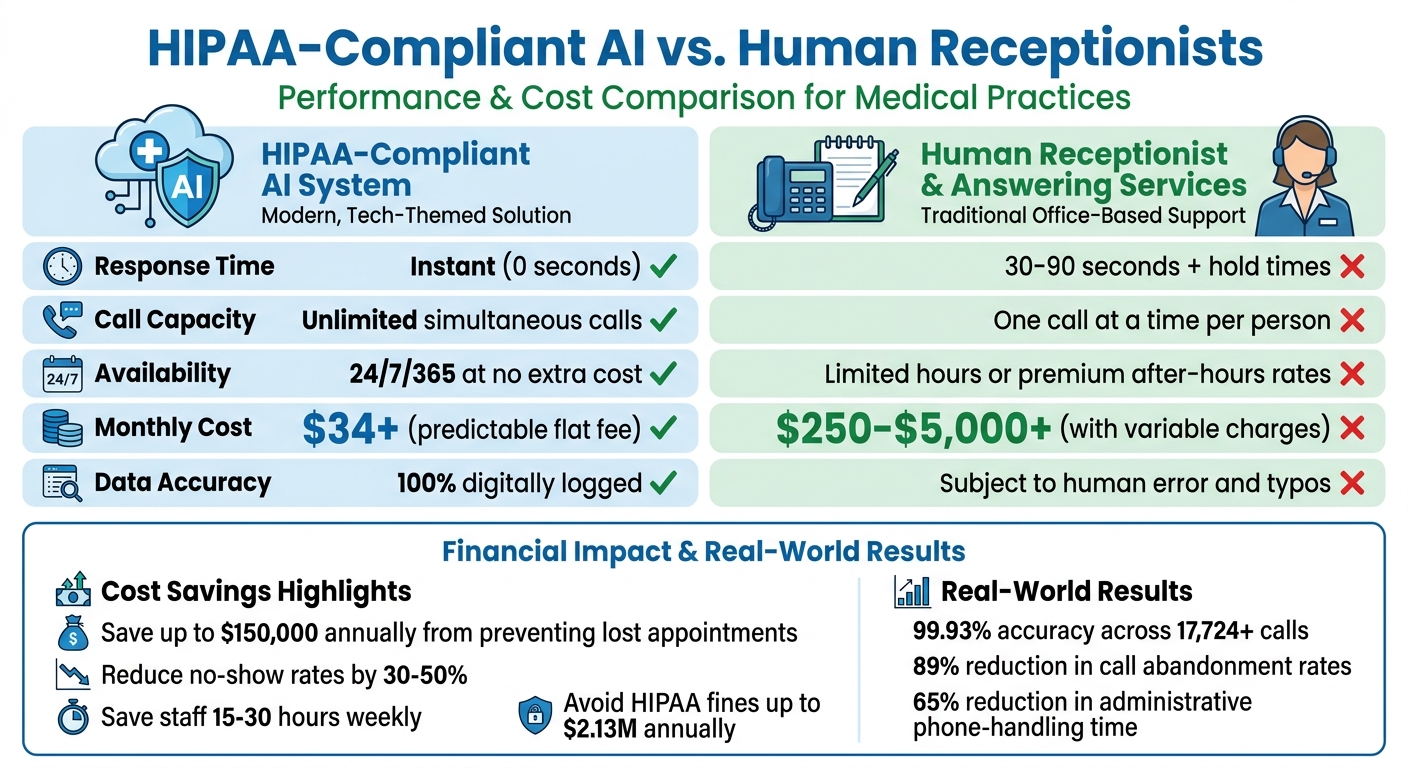
Practices miss 25–30% of inbound calls on average. That can add up to more than $150,000 a year in lost appointments.
Automating Routine Tasks
Scheduling, prescription refills, and insurance verification account for 60–70% of inbound calls. Automating them frees 15–30 hours of front-desk phone time each week.
Castle Hills Family Practice in San Antonio, TX, used CallMyDoc to handle 5,222 patient calls a month. It automated 51.9% of them, mostly after hours, and cut its phone workload in half. All documentation stayed inside its athenahealth EHR. Hudson Headwaters Health Network runs 89 offices in rural New York and automated 68.1% of 7,532 monthly calls. Encryption and audit trails stayed consistent across every location.
Lower Costs Than Human Receptionists
A full-time receptionist costs $38,000–$48,000 a year in salary and benefits. Human answering services run $250–$1,500 a month plus per-minute fees. Outsourced 24/7 coverage costs $2,500–$5,000 a month.
An AI system charges a flat fee with no per-minute or after-hours charges. It also applies the same security protocol to every call. That removes the handwritten messages and manual data entry where human services tend to leak PHI.
That consistency matters because the liability for a leak falls on your practice, not the vendor. Dr. Shahinaz Soliman, M.D., from CallMyDoc, puts it plainly:
The practice - not the answering service - bears primary regulatory liability for violations, which cost $100–$50,000 per incident.
| Feature | HIPAA-Compliant AI | Human Receptionist / Service |
|---|---|---|
| Response Time | Instant | 30–90 seconds, plus hold times |
| Capacity | Unlimited simultaneous calls | One call at a time per person |
| Availability | 24/7/365 at no extra cost | Limited hours or premium after-hours rates |
| Monthly Cost | Predictable flat fee | $250–$5,000+ with variable charges |
| Data Accuracy | Every call logged digitally | Subject to human error and typos |
How AI Systems Protect Patient Data and Meet HIPAA Requirements
HIPAA-compliant AI systems meet a common baseline. They use AES-256 encryption for data at rest and TLS 1.2+ for data in transit. They also keep tamper-proof audit logs for at least six years.
Access controls matter as much as encryption. Look for role-based access controls (RBAC), multi-factor authentication (MFA), unique user IDs, and automatic session timeouts. These replace the shared logins and paper messages common at traditional answering services.
Data Encryption and Security Measures
With zero-retention processing, the system purges patient data from active memory as soon as a task like scheduling is completed. Compliant vendors train their models on de-identified or synthetic data, so no PHI ends up in a shared model.
Input and output filtering blocks prompt injection, where a caller tries to trick the AI into revealing patient information. US-only data storage keeps PHI under domestic law.
These controls hold up at volume. CallMyDoc reports more than 26 million patient calls across 38 states with zero reported breaches.
Staying Audit-Ready and Reducing Compliance Risks
The Business Associate Agreement (BAA) makes the vendor legally accountable for protecting PHI. It also spells out what the vendor must do after a breach. The AIRA team explains:
A BAA makes the answering service legally responsible for protecting PHI. Without it, your practice carries all the legal exposure for the vendor's failure.
The stakes are real. In 2025, the Office for Civil Rights imposed more than $6 million in HIPAA penalties on small and mid-sized healthcare organizations. Uncorrected willful neglect carries a calendar-year cap of $2,134,831 for a single violation type. The average healthcare data breach in 2024 cost $4.88 million and took 204 days to detect.
HHS proposed Security Rule changes in January 2025 that would raise the bar further. The proposal would require annual technology asset inventories, network maps of PHI data flows, and the ability to restore systems within 72 hours. A vendor with SOC 2 Type II certification has had an independent auditor verify its controls over a 6–12 month period.
Before you sign, ask the vendor for:
- A signed BAA
- Its encryption standards at rest and in transit
- Audit log retention and export format
- Where PHI is stored, and whether it is used for model training
- A SOC 2 Type II report
Why Answering Agent Works Best for Medical Practices
Answering Agent covers the checklist above and has held 99.93% accuracy across 17,724 scored calls.
Answering Agent Features for Medical Practices
It answers unlimited simultaneous calls 24/7 and supports 31 languages. It integrates with EHR platforms including Epic, Cerner, athenahealth, eClinicalWorks, DrChrono, and Kareo, so appointments are booked without staff involvement. Confirm your specific system during setup.
It also handles prescription refill requests, insurance verification, and new patient intake. Every account includes a BAA, AES-256 encryption at rest, TLS 1.2+ in transit, and a 6-year audit log. Plans start at $34 per month.
FAQs
What makes an AI phone system truly HIPAA-compliant?
The vendor signs a BAA. The system encrypts PHI in transit and at rest, uses role-based access with MFA and unique user IDs, and keeps audit logs for at least six years. Storing data in the US and training only on de-identified data lowers the risk further.
Will it work with my EHR and scheduling system?
Answering Agent connects to EHR and scheduling systems through pre-built integrations, direct APIs, or middleware, depending on your platform. Confirm your specific system and version before rollout.
How do I measure ROI after turning it on?
Record your missed-call rate, no-show rate, and weekly front-desk phone hours before launch, then track the same numbers afterward. Put a dollar value on the recovered appointments ($150–$200 each) and the staff hours saved, then compare that total to the subscription cost.
Related Blog Posts
Book a walkthrough
See it handle your calls.
Book 20 minutes, or hear a sample call first.


