
Hold times fall to zero when every call gets answered the moment it rings, including the eighth caller at 8:05 on a Monday. An AI phone system can do this because it runs many conversations at once. It books appointments, takes refill requests, answers routine questions, and hands urgent calls to your staff.
For a practice, that means fewer abandoned calls, less phone tag, and a front desk that works with the patients standing in front of it. This guide covers where the phone line breaks down, what the AI takes over, and how to roll it out without disrupting the office. It also covers scheduling tools such as accessible healthcare scheduling.
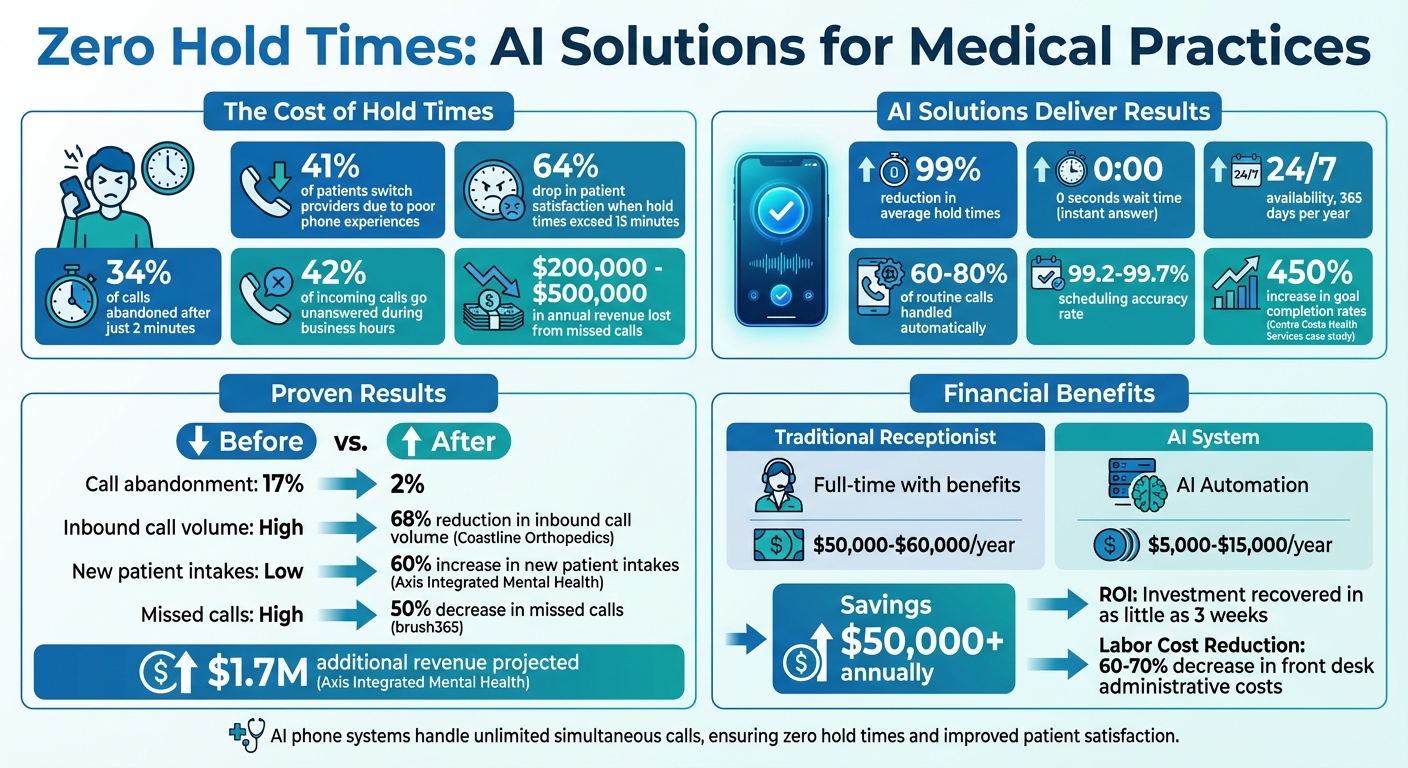
Problems with Traditional Phone Systems in Healthcare
How Long Hold Times Hurt Patient Satisfaction
Patients often judge the quality of your care by how quickly you answer the phone. Many calls involve symptoms, test results, or medication, so a few minutes on hold can feel much longer. Callers on mobile phones hang up quickly, and a patient who hangs up may simply book with another practice.
Why Manual Call Handling Creates Inefficiencies
One receptionist can take one call at a time. Call volume jumps on Monday mornings while staffing stays the same, so calls get missed. The callbacks then turn into phone tag, and a simple question can go unresolved for days. Virginia Burberry, Director of Clinical Education at Family Practice Associates of Lexington, described the effect of fixing this:
"Reaching those patients in a timely manner has been ultimately life-changing for our support staff. They're no longer overwhelmed with phone calls."
The phones also compete with check-in, insurance questions, and requests from nurses. When staff juggle all of that, calls get rushed, scheduling mistakes multiply, and turnover climbs. Turnover makes healthcare call center workforce management even harder.
How AI Phone Systems Remove Hold Times
24/7 Availability and Unlimited Call Capacity
An AI system runs in the cloud, so it can answer 50 callers as easily as one. Nobody hears a busy signal or hold music. The same answer is there at 11 PM on a Saturday, when a call would otherwise go to voicemail and wait until Monday.
Dr. Michael R., a family practice physician, put the result simply:
"Our front desk was drowning in calls. Now AI handles scheduling and refill requests... Hold times went from 4 minutes to zero."
Some systems can also move callers to text during a spike. That lets one staff member work several patient threads at once instead of holding one line open.
Natural Conversations and Custom Scripts
Modern systems understand plain speech, so patients don't have to navigate a phone menu. A patient can say "I need to see the doctor about my knee pain," and the system routes the request correctly.
You set the scripts. They cover scheduling, refills, insurance questions, and triaging patient concerns while maintaining HIPAA compliance. The system follows your protocols, not a generic one. Patients who get a real answer instead of voicemail are also far less likely to hang up.
Core Features of AI Answering Services for Medical Practices
Appointment Scheduling and Calendar Integration
When the system is connected to your EHR or practice management software, it sees live provider availability. It can then book the right appointment type, such as a 15-minute follow-up or a 45-minute new-patient visit. While booking, it can also flag symptoms that need a same-day visit or an immediate escalation to on-call staff or 911.
Before you buy, confirm that the vendor supports your specific EHR, whether that is Epic, athenahealth, Cerner, eClinicalWorks, NextGen, ModMed, or another system. Also ask whether it writes appointments back in real time. Automating appointment bookings only removes delays if the calendar stays in sync.
Patient Information Capture and Data Management
The system can collect intake details and insurance information during the call and write them to the chart. That leaves less paperwork at check-in and fewer retyping errors. Routine calls such as scheduling, refills, and FAQs can finish without a person. Everything else reaches staff with the details already captured.
Security is not optional. Require a signed Business Associate Agreement, encryption, and audit trails. Work through a HIPAA compliance checklist before any patient data moves.
Cost Savings and Return on Investment
Every missed call that would have become an appointment is lost revenue. An AI answering service usually costs far less than adding another front-desk hire with benefits. To estimate the return, count the calls you currently miss, then multiply by your booking rate and your average visit value.
Answering Agent: Top Choice for Medical Practices
Answering Agent answers every call immediately, including during the 8–10 AM rush, and runs on scripts you control. You can set it to flag chest pain, neurological symptoms, or anything else on your red-flag list and escalate those calls to staff. Everything else goes to scheduling, refills, and FAQs.
Rebecca Owens, a Nurse Supervisor, described what changed for her team:
"We thought patients would resist talking to AI, but honestly, it's not been an issue. AI answers routine questions, collects medical histories, and frees up my nurses for clinical work instead of phone duty."
Plans start at $49/month. Pro and Business tiers add outbound calling and advanced EHR integrations. Check the current pricing page for your call volume.
How to Implement AI Phone Answering in Your Practice
Most practices can go live in stages over a few weeks.
- Audit two weeks of calls. Log peak times, the most common requests, and which calls are routine and which are urgent. This tells you what to automate first.
- Write your triage rules. List the red-flag phrases, such as chest pain or trouble breathing, that must go straight to staff or trigger 911 instructions. Define what counts as a same-day visit.
- Connect your EHR. Test real bookings for each appointment type before any patient calls reach the system.
- Launch small. Start with after-hours calls or morning overflow. Review transcripts weekly and fix the scripts before you expand coverage.
- Change staff metrics. Once routine calls leave the queue, stop measuring the front desk on call volume. Measure how well they resolve complex issues and how patients rate their in-person experience.
Conclusion: AI Phone Systems for Medical Practices
Hold times come from a capacity problem, and an AI phone system removes it: every call gets answered, routine requests get finished, and urgent calls reach a person faster. The practices that do this well audit their calls first, write clear triage rules, and expand coverage in stages. Every call that no longer goes to voicemail cuts missed revenue opportunities and frees your staff for the patients in the building.
FAQs
Will an AI phone system work with my EHR?
Usually, yes. Most systems integrate with major EHRs so they can check live availability and write appointments and intake notes to the chart. Before you sign, confirm that the vendor supports your specific EHR and syncs in real time.
How does AI handle urgent or emergency symptoms?
It follows the triage rules you set. When a caller mentions a red-flag symptom such as chest pain or trouble breathing, the system escalates the call to staff or gives 911 instructions, and it hands over the details it has already collected. Routine calls continue to scheduling or refills.
How quickly can my practice go live with AI answering?
Basic answering can be running within days. A full rollout with EHR integration and tested triage rules typically takes a few weeks. Starting with after-hours calls gets you results while you finish the rest.
Related Blog Posts
Book a walkthrough
See it handle your calls.
Book 20 minutes, or hear a sample call first.


