
Most school front-office calls are routine: absences, lunch balances, bell times, event dates. AI handles those well, answers every call at once, and works after hours. A person is still the right answer for a worried parent, a bullying report, or a visitor at the door.
The practical goal is to answer every call, get the routine ones resolved without staff time, and send the sensitive ones to a human with context. The comparison below shows where each option fits. For a broader look at the tradeoff, see AI vs. human staff on customer experience.
Quick Comparison:
| Feature | Human Receptionists | AI Receptionists |
|---|---|---|
| Cost | $55,000–$75,000/year | $1,200–$7,000/year |
| Availability | ~2,000 hours/year | 24/7 (8,760 hours/year) |
| Call Handling | 1 call at a time | Unlimited simultaneous calls |
| Response Time | 45–90 seconds | Under 5 seconds |
| Languages | 1–2 | 25+ |
| Complex Scenarios | Handled with empathy | Escalates to humans |
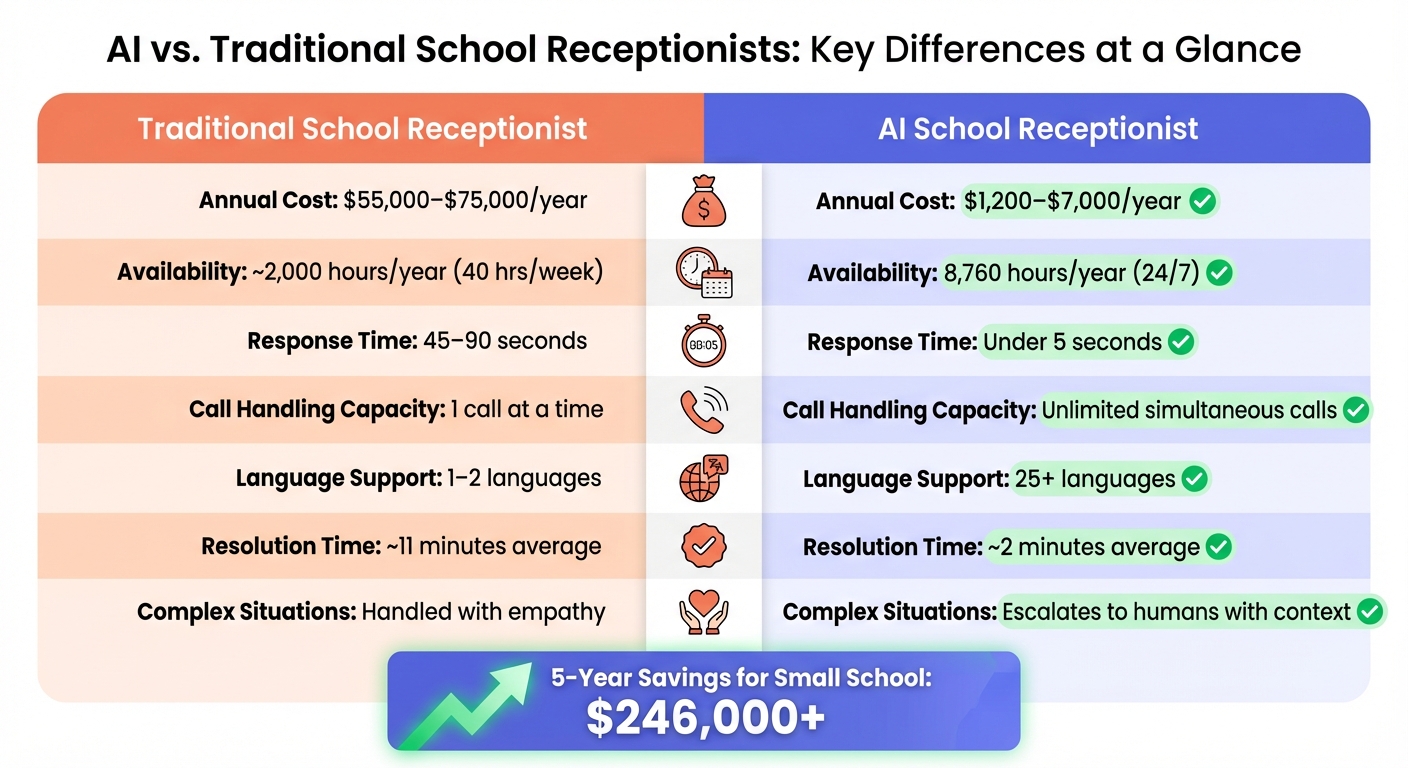
AI vs Traditional School Receptionists: Cost, Availability, and Performance Comparison
Understanding Traditional and AI Receptionists
What Traditional School Receptionists Do
A school receptionist answers and routes calls, greets visitors, records attendance, fields questions, and handles emergency communications. They also do administrative work like scheduling and calendar management, filing, and basic bookkeeping.
The part that is hardest to replace is the relationship. A receptionist who knows families by name can calm a parent down in a way a script can't.
The limit is coverage. One person works set hours, takes breaks, and gets sick. Calls that come in outside those hours usually go to voicemail, and most callers who reach voicemail hang up without leaving a message.
What AI Receptionists Are
An AI phone agent uses speech recognition and natural language processing to hold a normal conversation. It can take an absence report, check a lunch balance, or confirm an event date without making the parent press through a phone tree.
The stronger systems connect to your Student Information System (SIS), Google Workspace, or Microsoft Teams. That lets them update records and calendars directly. Before you sign, confirm the vendor meets FERPA and COPPA requirements and ask where the data is stored.
Cost Comparison: Traditional vs. AI Receptionists
Salaries vs. Subscription Costs
A receptionist on a $35,000 base salary costs roughly $43,750–$49,000 a year once you add benefits and payroll taxes. The total rises to $52,500–$81,500 when you include training, turnover, equipment, and office space.
AI plans are subscriptions. Professional tiers with unlimited calls run about $199–$699 a month, so even the top end stays under about $8,400 a year.
| School Size | Staffing Level | Human Staff Total Cost (5 Years) | AI Solution Total Cost (5 Years) | Estimated Savings |
|---|---|---|---|---|
| Small School | 1 Receptionist | ~$265,000 | ~$8,000–$19,000 | $246,000+ |
| Medium School | 2 Receptionists | ~$530,000 | ~$15,000–$30,000 | $500,000+ |
| Large District | 5 Receptionists | ~$1,325,000 | ~$40,000–$75,000 | $1,250,000+ |
Few schools will replace front-office staff outright. For most, the numbers matter in a narrower way: AI can absorb call volume without adding headcount or temp workers.
How AI Receptionists Reduce Costs
Most of the savings come from costs that recur with human staff. Benefits add 29.4%–35% on top of salary. Replacing a departing receptionist costs $3,000–$7,500 every 2.5 to 3 years. Covering absences and overtime adds more. An AI system needs one to three hours of setup, and it has no sick days.
If you're comparing vendors, start with this roundup of AI answering services and pricing.
Performance: Efficiency and Availability
Response Times and Handling Multiple Calls
A receptionist can take one call at a time, so the next parent gets a busy signal or hold music. AI answers every call at once, typically in under 5 seconds. That is why 8:15 AM, when absence calls pile up, is the first place schools notice the difference.
| Metric | Traditional Receptionist | AI Receptionist |
|---|---|---|
| Response Time | 45–90 seconds to 3–5 minutes | Under 5 seconds |
| Simultaneous Calls | 1 at a time | Unlimited |
| Resolution Time | ~11 minutes | ~2 minutes |
| Call Abandonment (Peak Hours) | 15–25% | Near 0% |
| Lead Capture Rate | 40–70% (voicemail losses) | 85%+ |
Registration rushes and emergency days work the same way. Here's more on handling peak-hour calls with AI.
24/7 Availability vs. Business Hours Only
About 30% of school-related calls come in after hours, often from working parents. A full-time employee covers about 2,000 hours a year. AI covers all 8,760.
After-hours coverage also matters for urgent calls. AI can flag words like "emergency" or "ASAP," which show up in about 15.9% of calls, and route those calls straight to on-call staff.
Service Quality: Consistency, Personalization, and Complex Situations
Consistency and Language Support
AI pulls every answer from one knowledge base. When a schedule or policy changes, you update it once and every call reflects the change. It also transcribes each request, so absence notes and messages arrive as written.
For multilingual communities, language support may matter more than speed. Many systems handle 25+ languages and can switch mid-call when a parent does.
| Metric | AI Receptionist | Traditional School Receptionist |
|---|---|---|
| Consistency | 100% (knowledge-base driven) | Variable (affected by fatigue and mood) |
| Language Support | Supports 25+ languages, with mid-call switching available | Typically supports 1–2 languages |
| Data Accuracy | 99% | ~85% |
| Complex Situations | Routes to a human with context | Handled directly with empathy |
Managing Complex and Sensitive Situations
A bullying report or a medical concern needs a person. A human receptionist hears the fear in a parent's voice and adjusts. AI uses sentiment and keyword detection to spot distress, then hands the call to an administrator with the details attached. That handoff works, but it will feel less personal to some families.
The fix is to make reaching a person easy. 77% of people say they are more comfortable with AI when they know they can get to a human quickly. Put that option in the greeting.
Scalability: Adapting to Changing School Needs
Managing Peak Season Call Volumes
Enrollment season and flu outbreaks are where a one-line front desk breaks down. One urban district with 45 schools and 32,000 students sent 28% of its calls to voicemail during flu season. In July 2025 the district deployed the SuperU AI Receptionist. Within 60 days its live answer rate reached 92%, and each school got back 12 clerical hours a week for enrollment processing and student-facing work.
Adding human staff for a busy season means weeks of hiring and training. AI capacity scales the same day at no extra cost.
Setup Time and Training Requirements
Hiring a receptionist takes 6–10 weeks from posting to a trained employee, and 2–4 of those weeks are training on policies and systems. An AI system can go live in a day, with 30 minutes to 3 hours of configuration. Montgomery Bell Academy in Nashville launched its AI receptionist, "Sam," in 2024, and it began handling calls and messages right away.
The Hybrid Approach: Combining AI and Human Receptionists
Most schools land on a split. AI resolves 60–70% of calls on its own and flags 25–30% for a staff callback. It escalates the remaining 5–10% to a person immediately.
"The hybrid model operates as an intelligent filter... ensuring complex or sensitive calls are seamlessly escalated to a human expert." – Michael Relf, Norango
Give AI the transactional calls: school hours, lunch menus, attendance, and basic appointment scheduling. Keep bullying reports, emergencies, and anything a parent asks a person for with staff.
Carnegie Mellon ran an early version of this setup in 2018. An AI receptionist named "Emily" answered admissions and directions questions, and front-desk staff took the harder ones.
Conclusion: Choosing the Right Solution for Your School
Start by sorting your call log. If 80% or more of your calls are attendance updates, lunch balances, or school hours, AI will answer them faster and more consistently than one person can. If you have heavy walk-in traffic and need someone on-site for security, keep a human at the desk and let AI take the phone overflow.
The lowest-risk first step is after-hours coverage. Turn on AI for evenings and weekends, check the transcripts, and expand to daytime overflow once the routing works the way you want.
Answering Agent offers school phone flows for attendance and common questions, supports FERPA and COPPA compliance, and handles unlimited simultaneous calls at a flat rate.
FAQs
Will parents know they’re talking to AI?
Many won't, because modern systems sound natural. You should tell them anyway. Say so in the greeting and give parents a clear way to reach a staff member.
How does an AI receptionist handle emergencies or sensitive calls?
It routes them. The system listens for urgent keywords and signs of distress, then transfers the call to on-call or office staff with the details attached. Routine calls stay with the AI.
What does it take to set up an AI receptionist with our SIS and calendars?
- Pick a compatible platform: Confirm it works with your SIS and with Google Calendar or Outlook.
- Sync your calendar: Connect it for real-time scheduling.
- Integrate with your SIS: Use an API connection or a data upload.
- Configure responses: Set answers, routing rules, and escalation contacts.
- Run a test: Place test calls and book a few test appointments before going live.
Related Blog Posts
Book a walkthrough
See it handle your calls.
Book 20 minutes, or hear a sample call first.


