
Dispatch has two jobs: put the right technician on the right job with the least driving, and change the plan fast when the day falls apart. Manual scheduling does both with spreadsheets, whiteboards, and phone calls. AI dispatch does both with live data.
If your dispatchers spend the morning rebuilding the board, your techs drive past each other, or after-hours calls sit in voicemail until 8 a.m., this post covers what AI changes and where AI call routing and AI phone scheduling fit in.
Where does manual scheduling break?
Manual scheduling fails because the tools don't talk to each other. A booking taken by phone, another from the web form, and a reschedule on a sticky note never meet in one place, so double-bookings happen whenever two channels are busy at once.
Each change also takes real time. Booking a single visit by hand averages about 17 minutes, rescheduling 15, and canceling 12. On a heavy day, one dispatcher can spend the whole shift on the calendar.
Surges make it worse. During a lunch rush or seasonal spike, a person can't weigh traffic, certifications, parts, and job length for every assignment. So they guess, and the guesses show up as late arrivals, wrong-skill dispatches, and unnecessary truck rolls.
Routing is where the cost lands. Field techs spend roughly 15% of their hours driving and another 30% on admin, which leaves about half the day billable. Long gaps between jobs also wear people down, and a shortage of qualified technicians makes it expensive to lose one to a bad schedule.
What does AI dispatch change?
AI dispatch weighs every variable for every assignment at once. That includes GPS location, technician certifications, traffic, parts availability, job complexity, and how long similar jobs actually took.
It re-plans in real time. When a tech calls out sick or an emergency comes in, the system redistributes the day instead of leaving a dispatcher on the phone for an hour. Over time it learns recurring patterns, like the bridge that jams at 4 p.m. or the week furnaces start failing.
It clusters jobs by geography and matches skill to job. Less driving between stops means more stops. Sending the certified tech the first time means fewer callbacks. As a working rule, cutting one hour of daily drive time per technician opens room for one or two more jobs. The route optimization post walks through that math.
It also removes admin work. The booking, reschedule, and cancellation steps that eat those 12 to 17 minutes each happen automatically, and work orders fill themselves in from the intake.
How do AI and manual scheduling compare?
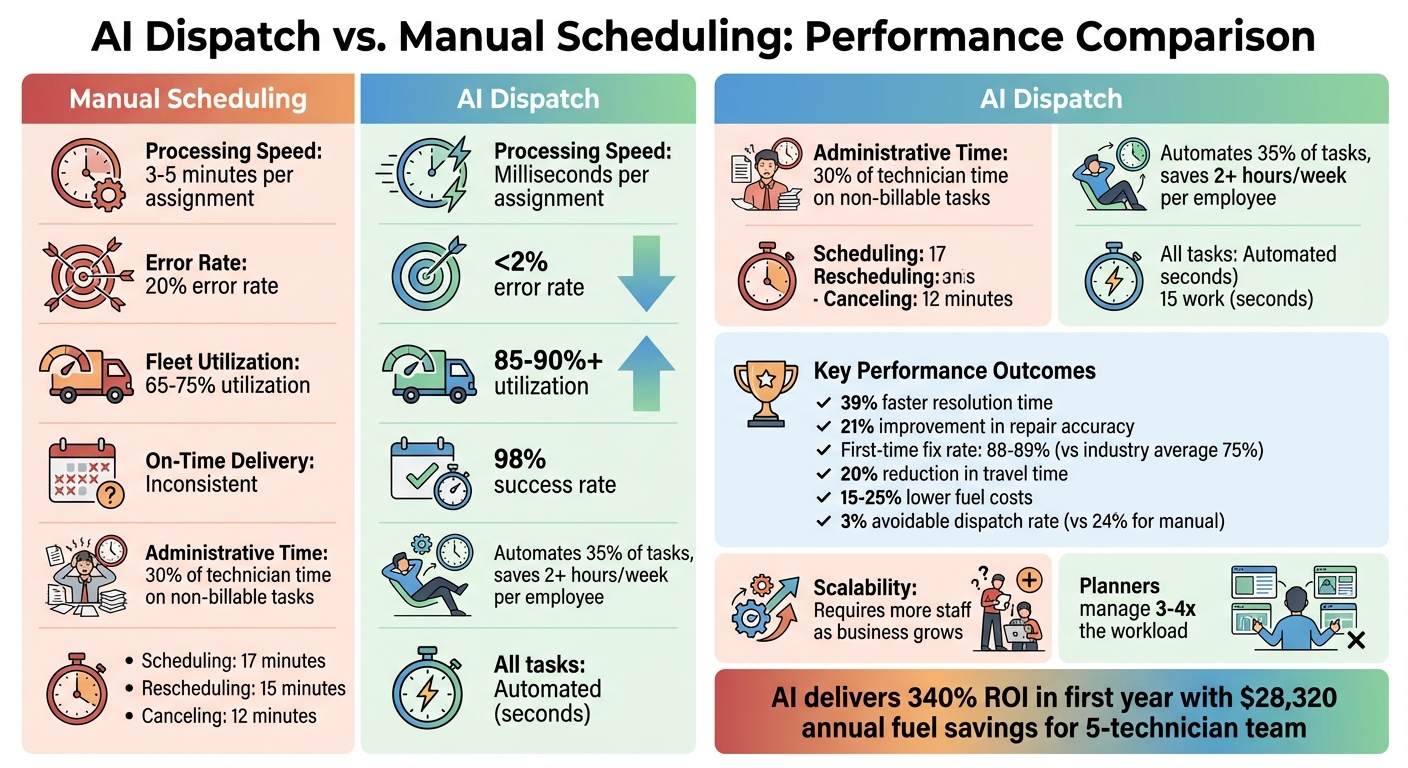
AI Dispatch vs Manual Scheduling: Performance Metrics and Cost Comparison
| Metric | Manual scheduling | AI dispatch |
|---|---|---|
| Time per assignment | 3–5 minutes | Milliseconds |
| Scheduling error rate | 10–20% | Under 2% |
| Fleet utilization | 65–75% | 85–90% |
| First-time fix rate | ~75% industry average | 88–89% for top performers |
| Avoidable dispatch rate | 14% average, up to 24% | As low as 3% |
| Planner capacity | Add staff to grow | 3–4x workload per planner |
Two rows matter most for margin. Avoidable dispatches are the costliest mistake in field service because every unneeded truck roll burns fuel, labor, and a slot another customer wanted. Planner capacity decides whether growth means hiring another dispatcher or not. For the day-to-day version of these failures, see common scheduling problems and AI solutions.
Where does Answering Agent fit?
Dispatch can only optimize the jobs that make it onto the board. Phone answering is the intake side. It answers every call, books the job into the technician calendar, and fills in the work order without anyone retyping it.
That matters most after hours, when a large share of service calls arrive and many of those callers need help now. An agent that answers immediately and books into the same optimized schedule keeps those jobs from going to whoever picks up first.
Set up urgency rules before go-live. Tell the agent which phrases mean life-safety, such as "burning smell" or "sparking," and which on-call tech gets those calls right away. Standard requests book into the next open slot. The 24/7 AI phone answering checklist covers the rest of the setup. If you run several locations, multi-location call routing explains how to send calls to the right site.
Answering Agent has processed more than 17,724 scored calls at 99.93% accuracy. To size the payback for your own call volume, use the guide to calculating phone-answering ROI.
FAQs
How hard is it to switch from manual scheduling to AI dispatch?
The work is mostly upfront. You set up the system, connect your job and technician data, and train dispatchers to supervise the board instead of building it. Clean data on skills and typical job durations makes the rollout faster.
What data does AI dispatch need to optimize routes and schedules?
It needs technician skills and certifications, estimated job durations, customer availability windows, live traffic, and technician location. The more accurate your historical job times are, the better the schedules get.
Can Answering Agent book jobs after hours and update schedules automatically?
Yes. It books, reschedules, and checks for conflicts 24/7, so after-hours calls land on the schedule without anyone touching them the next morning.
Related Blog Posts
Book a walkthrough
See it handle your calls.
Book 20 minutes, or hear a sample call first.
Ready to see it handle your calls?
Book a walkthrough, or hear a short sample call first.
Related Articles

Car Wash Membership Retention Phone Calls: A Desk Guide
Desk guide for car wash membership retention calls: fork failed payment, pause, plan change, reactivation, transfer, and cancel intent before you process.

How to Handle Car Wash Membership Reactivation Calls
Handle car wash membership reactivation calls. Fork five paths before promising the old rate, then follow wash rejoin rules.

How to Handle Car Wash Membership Transfer Calls
Handle car wash membership transfer calls. Fork five paths before promising yes, then follow wash transfer rules.